- 対象年齢4+
- カテゴリ仕事効率化
- 開発元Fokusbloks Oy
- サイズ8.6 MB
App Storeの公式ページにリンクしています
Download.orgはapptokenのファイルを一切ホストしていません。ボタンを押すと、Fokusbloks Oyが公開しているApp Storeのアプリページが開きます。ページの最終確認:2026/11/12。
スクリーンショット

概要
開発元はこのテキストをお使いの言語で提供していません。
Apptoken helps you create real friction before opening distracting apps.
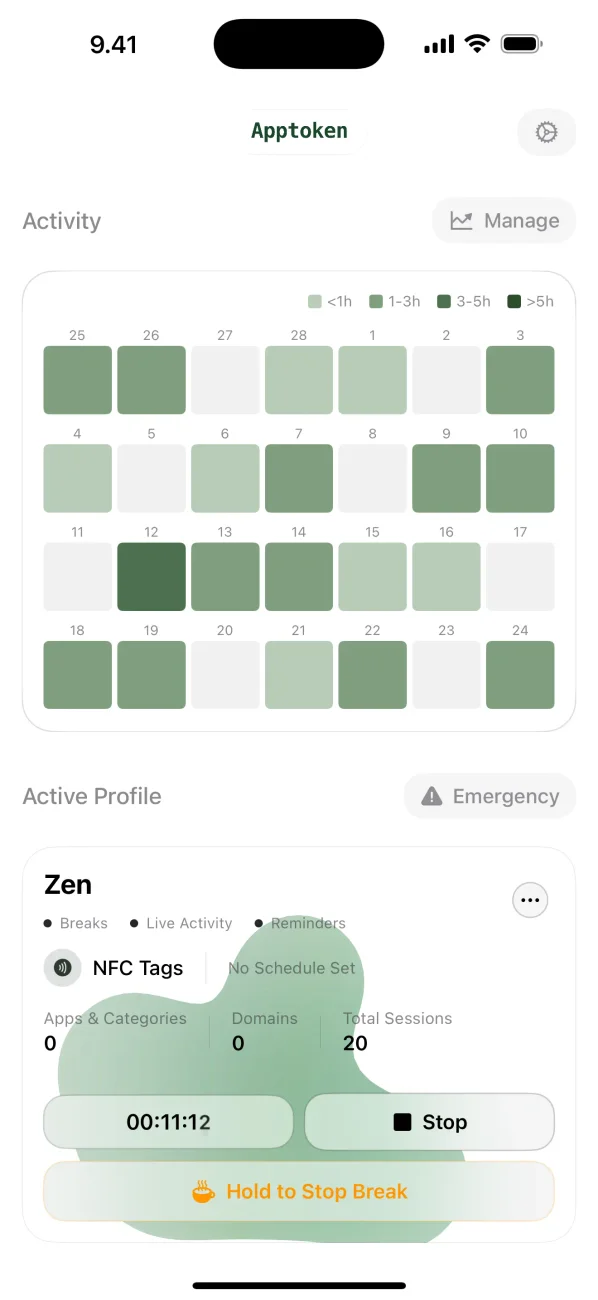
Instead of relying on willpower, Apptoken lets you create blocking profiles, choose the apps and websites you want to restrict, and start focused sessions using Apple's Screen Time controls. When you need access again, unlock using the method that fits your setup: NFC token, QR code, timer, schedule, widget, or manual control.
Apptoken is free. There are no subscriptions, no in-app purchases, no paywall, and no account required.
HOW IT WORKS
1. Create a blocking profile
2. Select distracting apps and websites
3. Grant Screen Time permission
4. Start a blocking session
5. Unlock only when you choose to
BUILT FOR PRACTICAL FOCUS
Apptoken is designed for people who want a stronger boundary than a reminder, but still need controlled access when life happens.
Use it to:
- Reduce mindless scrolling
- Protect work and study blocks
- Build better phone habits
- Keep social apps out of easy reach
- Add physical friction with an NFC token
- Use a QR code as a simple unlock method
- Schedule recurring focus time
- Control active sessions from widgets
UNLOCK OPTIONS
NFC unlock
Pair blocking with a physical NFC tag or token so access requires a deliberate tap.
QR unlock
Use a QR code as a lightweight unlock method when you want separation without extra setup.
Timers
Start timed sessions and return to your selected restrictions when the session ends.
Schedules
Create recurring blocks for work, school, mornings, evenings, or any routine you want to protect.
Widgets and Live Activities
Control active sessions and keep track of focus time from the places you already use on iPhone.
PRIVACY-FIRST BY DEFAULT
Apptoken does not require an account. Your profiles, selected restrictions, NFC and QR identifiers, schedules, timers, and session history are stored locally on your device or in the app group container used by the app and its extensions.
The app does not use third-party app analytics, advertising SDKs, behavioral tracking, subscriptions, or in-app purchases.
REQUIREMENTS
Apptoken uses Apple's Screen Time, Family Controls, Managed Settings, Device Activity, NFC, Camera, WidgetKit, Live Activities, and Background Tasks frameworks to provide blocking and unlock features.
You can revoke app permissions at any time in iOS Settings.
Apptoken is developed by Fokusbloks Oy.
Support: benjam@fokusbloks.com
Website: apptoken.co
新機能
バージョン 3.1 · 2026/5/12
Apptoken is now free.
This update removes subscriptions, in-app purchases, paywalls, and account sign-in. Every blocking strategy is available to every user.
What changed:
- No subscription required
- No in-app purchase required
- No account or Sign in with Apple step
- Simpler onboarding with Welcome and Screen Time permission
- Cleaner first onboarding screen with the Apptoken logo centered correctly
- NFC, QR, timer, schedule, widget, and manual controls are all included
- Updated privacy handling for local, on-device app data
アプリのプライバシー
このアプリのデータの取り扱いについて、Fokusbloks OyがApp Storeで申告している内容です。
-
データの収集なし
開発元はこのアプリからデータを収集しません。
プライバシーの取り扱いは、ご利用の機能やお客様の年齢などに応じて異なる場合があります。
情報
- 販売元
- Fokusbloks Oy
- カテゴリ
- 仕事効率化
- バージョン
- 3.1
- 更新日
- 2026/5/12
- リリース
- 2025/6/7
- サイズ
- 8.6 MB
- 必要条件
- iOS 17.6以降
- 対象年齢
- 4+
- 価格
- 無料
- アプリ内課金
- あり
- 著作権
- © Fokusbloks Oy
こちらもおすすめ
-
 TapLock - Block AppsLock Apps. Tap to Unlock.
-
 Noff仕事効率化
-
 Normal: Screen Time Control仕事効率化
-
 VantaFocus: NFC App Blocker仕事効率化
-
 SmartDocs Library仕事効率化
-
 Clank: Screen Time Blocker仕事効率化
-
 TezBlock: Screen Time Control仕事効率化
-
 Scrollless - Screen Time Block仕事効率化
-
 AppTimeLock:アプリブロックアプリ制限・スマホ依存対策・スクリーンタイム管理・集中
-
 FocusRabbit: Screen Time Detox仕事効率化