- Altersfreigabe4+
- KategorieFoto und Video
- EntwicklerNaoki Okubo
- SprachenJapanisch
- Größe3,3 MB
Verlinkt auf die offizielle App Store-Seite
Download.org hostet keine Datei von AWCap 30. Die Schaltfläche öffnet die App-Seite bei App Store, wo Naoki Okubo die App veröffentlicht. Eintrag zuletzt geprüft am 22.11.2026.
Screenshots
Info
Der Entwickler hat diesen Text nicht in Ihrer Sprache bereitgestellt.
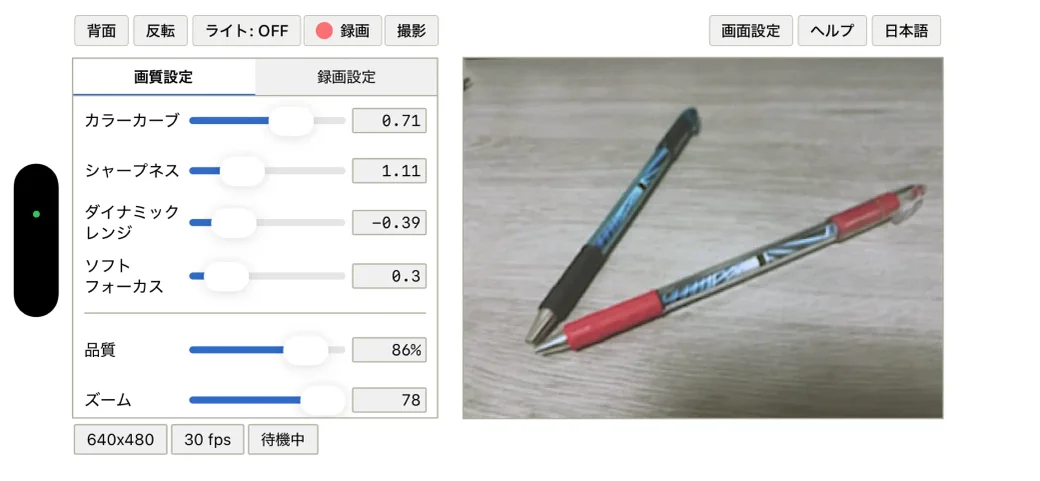
Faithfully recreates the image quality unique to the 0.3-megapixel CMOS sensors of that era.
【Key Features】
• Switch between 640×480 / 320×240 resolution
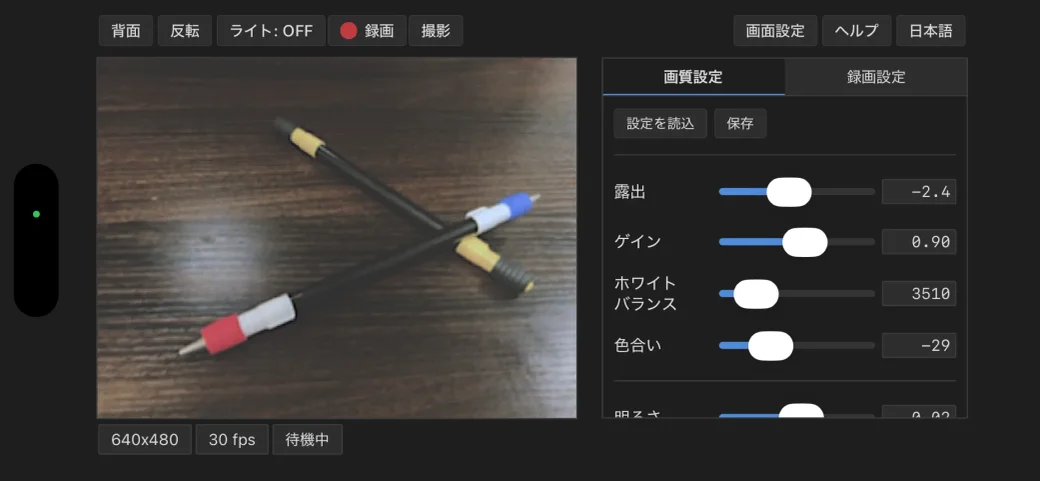
• Image quality adjustment: ISO, gain, white balance, tint, brightness, contrast, saturation, and more
• Color curve, sharpness, dynamic range, blur, and shutter speed adjustment
• Zoom (field of view) and focus adjustment
• Recording bitrate adjustment (1000–8000 kbps)
• Photo capture (saved as high-quality PNG) and video recording (saved to camera roll)
• Save, load, rename, delete, and reset image quality settings
• Share settings via clipboard
• Front / Rear camera switch
• Screen flip (180° rotation)
• LED light control
• Customizable settings panel and record button positions
• Dark / Light mode toggle
• Japanese / English language toggle
Recorded videos are saved to the camera roll in MP4 format.
Recommended for anyone who wants to capture videos with a retro webcam vibe, or who enjoys 2000s internet culture.
Neue Funktionen
Version 1.5 · 24.10.2026
• New base quality: ver.4
Softens highlights and adds the hazy glow of an early-2000s webcam. Select it from the base quality switch.
• Built-in recommended presets
Three ready-made presets now appear at the top of the Load list. Tap one to try the ver.4 look right away.
• Wider zoom range
The minimum field of view is now 50° instead of 60° (50°–78°), so you can frame tighter shots.
• Recording time display
While recording, a REC badge with the elapsed time appears at the top left of the preview and in the status bar. Turn it off with "Show recording time" in Screen settings.
• Simplified settings
The Dynamic Range setting has been removed and is now fixed for all base qualities. Saved presets and clipboard codes still load as before.
• Help updated to reflect the current features.
App-Datenschutz
Was Naoki Okubo im App Store zum Umgang dieser App mit Daten angibt.
-
Keine Daten erfasst
Der Entwickler erfasst keine Daten von dieser App.
Die Datenschutzpraktiken können variieren, zum Beispiel je nach den von Ihnen verwendeten Funktionen oder Ihrem Alter.
Informationen
- Anbieter
- Naoki Okubo
- Kategorie
- Foto und Video
- Version
- 1.5
- Aktualisiert
- 24.10.2026
- Veröffentlicht
- 01.05.2026
- Größe
- 3,3 MB
- Erfordert
- iOS 17.0 oder neuer
- Altersfreigabe
- 4+
- Preis
- 2,99 €
- In-App-Käufe
- Ja
- Sprachen
- Japanisch
- Copyright
- © 2026 AWCap
Das könnte Ihnen auch gefallen
-
 Image StackBilder konvertieren & mehr
-
 outfoFoto und Video
-
 Chromarize - Mono Color PhotoFoto und Video
-
 RNI ColibriFoto und Video
-
 Zeus Focus StackingMakro-Focus-Stacking
-
 Mirror Trick CameraFoto und Video
-
 Low Camera - Retro-KameraSparen Sie Ihren Speicherplatz
-
 M=CameraFoto und Video
-
 Eagle ViewerFoto und Video
-
 VR VlogFoto und Video