AWCap 30
30万画素Webカメラ風のカメラ
iPhone için tasarlandı
₺149,99 · Uygulama içi satın alma
- Yaş sınırı4+
- KategoriFotoğraf ve Video
- GeliştiriciNaoki Okubo
- DillerJaponca
- Boyut3,3 MB
Resmi App Store sayfasına bağlanır
Download.org, AWCap 30 için hiçbir dosya barındırmaz. Düğme, uygulamanın App Store üzerindeki sayfasını açar; uygulamayı orada Naoki Okubo yayınlar. Sayfanın son kontrolü: 22.11.2026.
Ekran görüntüleri
Hakkında
Geliştirici bu metni dilinizde sunmamış.
Faithfully recreates the image quality unique to the 0.3-megapixel CMOS sensors of that era.
【Key Features】
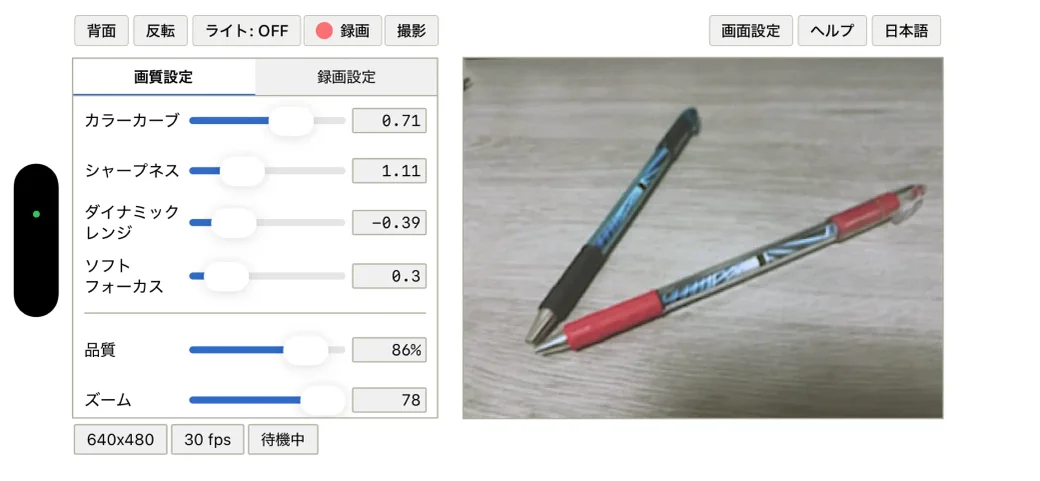
• Switch between 640×480 / 320×240 resolution
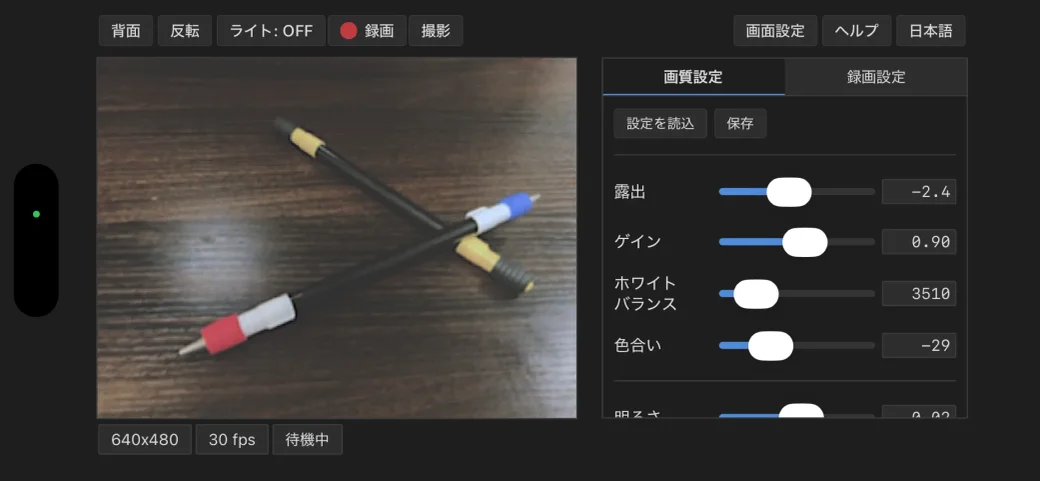
• Image quality adjustment: ISO, gain, white balance, tint, brightness, contrast, saturation, and more
• Color curve, sharpness, dynamic range, blur, and shutter speed adjustment
• Zoom (field of view) and focus adjustment
• Recording bitrate adjustment (1000–8000 kbps)
• Photo capture (saved as high-quality PNG) and video recording (saved to camera roll)
• Save, load, rename, delete, and reset image quality settings
• Share settings via clipboard
• Front / Rear camera switch
• Screen flip (180° rotation)
• LED light control
• Customizable settings panel and record button positions
• Dark / Light mode toggle
• Japanese / English language toggle
Recorded videos are saved to the camera roll in MP4 format.
Recommended for anyone who wants to capture videos with a retro webcam vibe, or who enjoys 2000s internet culture.
Yenilikler
Sürüm 1.5 · 24.10.2026
• New base quality: ver.4
Softens highlights and adds the hazy glow of an early-2000s webcam. Select it from the base quality switch.
• Built-in recommended presets
Three ready-made presets now appear at the top of the Load list. Tap one to try the ver.4 look right away.
• Wider zoom range
The minimum field of view is now 50° instead of 60° (50°–78°), so you can frame tighter shots.
• Recording time display
While recording, a REC badge with the elapsed time appears at the top left of the preview and in the status bar. Turn it off with "Show recording time" in Screen settings.
• Simplified settings
The Dynamic Range setting has been removed and is now fixed for all base qualities. Saved presets and clipboard codes still load as before.
• Help updated to reflect the current features.
Uygulama gizliliği
Bu uygulamanın verileri nasıl işlediği hakkında Naoki Okubo tarafından App Store üzerinde yapılan beyan.
-
Veri toplanmıyor
Geliştirici bu uygulamadan hiçbir veri toplamıyor.
Gizlilik uygulamaları, örneğin kullandığınız özelliklere veya yaşınıza göre değişiklik gösterebilir.
Bilgiler
- Satıcı
- Naoki Okubo
- Kategori
- Fotoğraf ve Video
- Sürüm
- 1.5
- Güncellendi
- 24.10.2026
- Yayın tarihi
- 01.05.2026
- Boyut
- 3,3 MB
- Gereksinim
- iOS 17.0 veya sonrası
- Yaş sınırı
- 4+
- Fiyat
- ₺149,99
- Uygulama içi satın alma
- Evet
- Diller
- Japonca
- Telif hakkı
- © 2026 AWCap
Bunları da beğenebilirsiniz
-
 Image StackFotoğraf ve Video
-
 outfoFotoğraf ve Video
-
 Chromarize - Mono Color PhotoFotoğraf ve Video
-
 RNI ColibriFotoğraf ve Video
-
 Zeus Focus StackingFotoğraf ve Video
-
 Mirror Trick CameraFotoğraf ve Video
-
 Low Camera - Low Quality CamFotoğraf ve Video
-
 M=CameraFotoğraf ve Video
-
 Eagle ViewerFotoğraf ve Video
-
 VR VlogFotoğraf ve Video