
BFIDGET
Brewfather readings in widget
Entwickelt für iPhone, iPad
Kostenlos · In-App-Käufe
- Altersfreigabe4+
- KategorieEssen und Trinken
- EntwicklerAppsipaja Oy
- SprachenEnglisch
- Größe9,5 MB
Verlinkt auf die offizielle App Store-Seite
Download.org hostet keine Datei von BFIDGET. Die Schaltfläche öffnet die App-Seite bei App Store, wo Appsipaja Oy die App veröffentlicht. Eintrag zuletzt geprüft am 15.11.2026.
Screenshots
Info
Der Entwickler hat diesen Text nicht in Ihrer Sprache bereitgestellt.
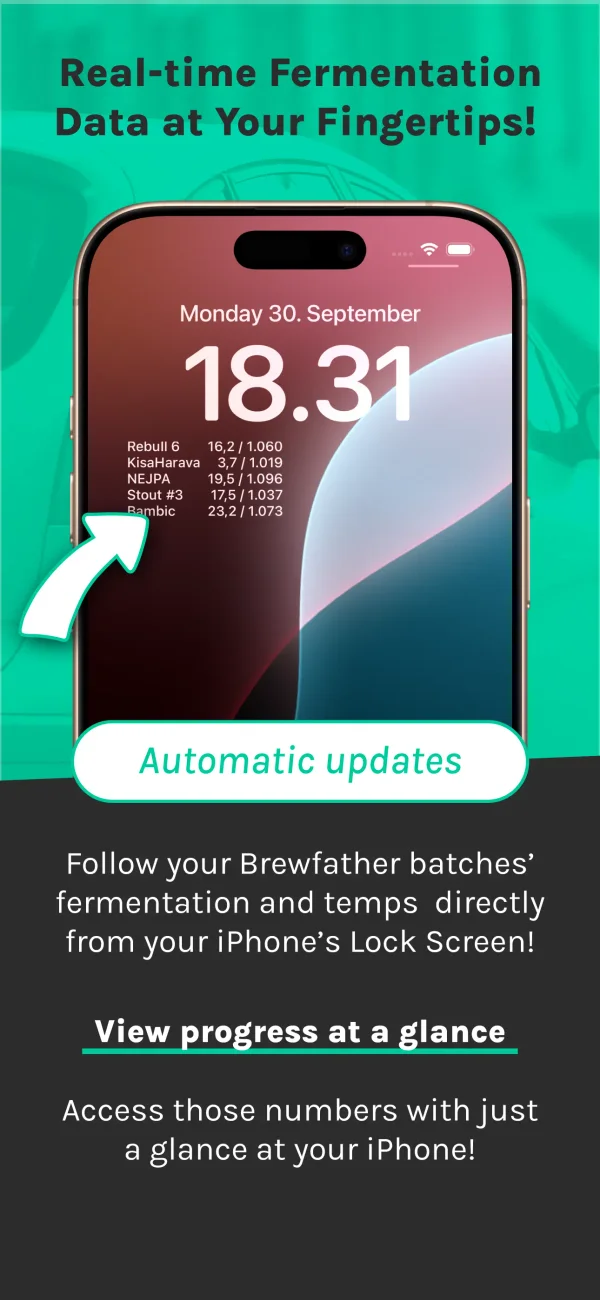
Tired of constantly opening the Brewfather app to check on your fermentation? Meet Bfidget, your solution!
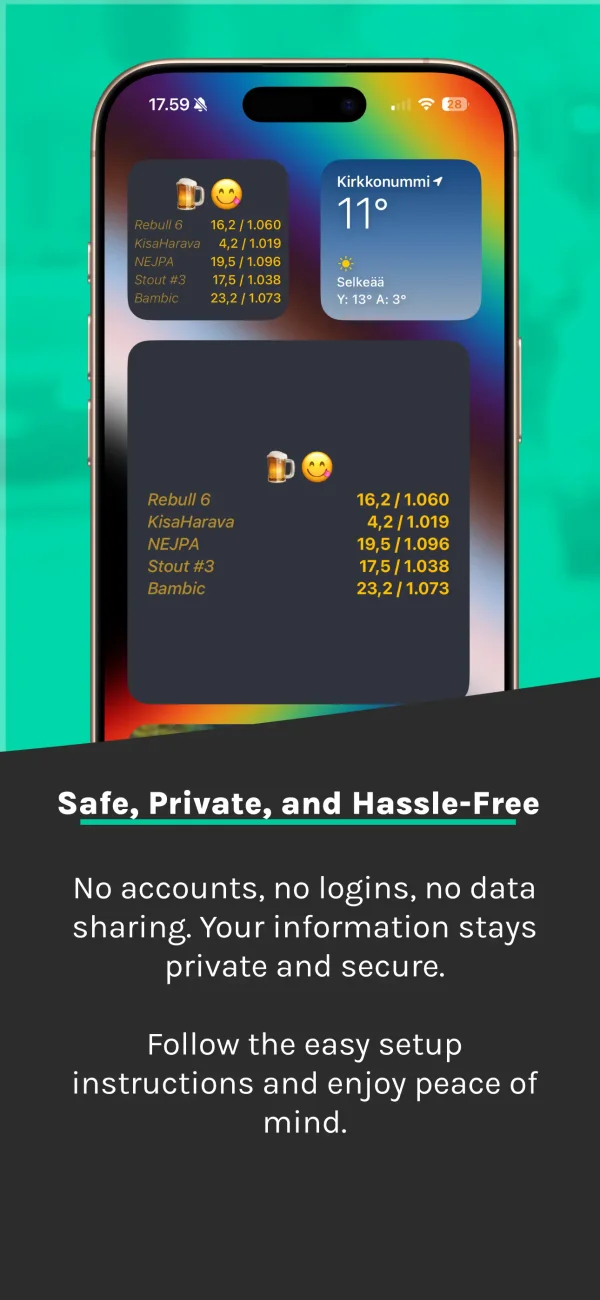
Bfidget is an iOS app that displays your Brewfather batches' fermentation status directly in a widget on your device. It automatically updates through iOS’s widget system, allowing you to monitor your batches right from your Home or Lock Screen—no need to manually check the Brewfather app. It’s compatible with automatic gravity measuring devices like Rapt Pill, Tilt, iSpindel, or even manual batch readings entered via the Brewfather app.
KEY FEATURES
- Automatic updates through iOS’s widget update system.
- Home Screen widgets in various sizes, and Lock Screen widgets.
- Privacy-focused: No account required, and your data never leaves your device.
STEP-BY-STEP SETUP INSTRUCTIONS:
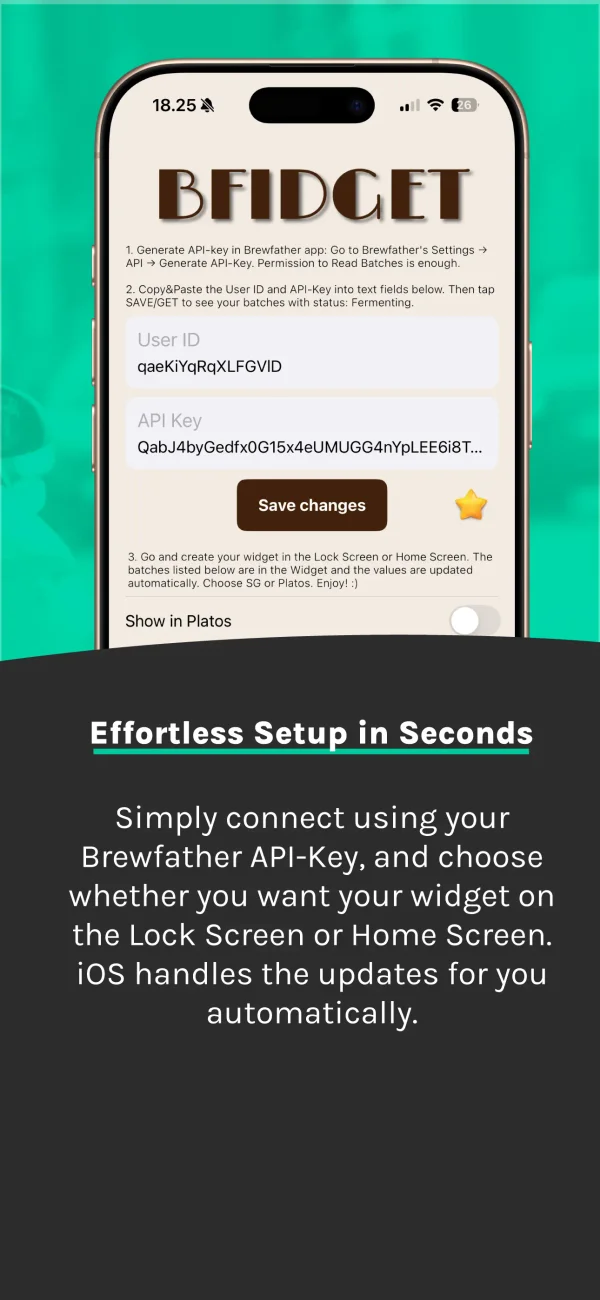
1. Open the Brewfather app, go to Settings, scroll down to the API section, and tap “Generate API-Key.”
2. When asked for Key Access Scope, select Read Batches.
3. Copy and paste your User ID and API Key into the BFIDGET app.
4. Tap GET/SAVE.
5. Create a widget of your choice for the Lock Screen or Home Screen (refer to generic iOS instructions on how to set up widgets).
6. Your widget will automatically update, so you won’t need to open the Brewfather app to check your batch gravities.
7. If your batch name is "Batch," go to Brewfather, open the batch, open the Planning tab, and give the batch a name.
8. Note: If you can't find the BFIDGET app in the widget list, try using the search field or restarting your phone. This issue is related to iOS, not the BFIDGET app.
TIPS:
* Do not enter your Brewfather username and password anywhere—they’re not required. The API is a secure way to exchange specific data between apps. You’ll only need to create an API key to allow read-only access to your batch data. Simple and safe.
* Once set up correctly, you won’t need to use the BFIDGET app again—everything is automatic. New batches are added to the widget automatically.
* BFIDGET only fetches the latest readings for batches that are in Fermenting status.
* The latest reading can come from devices like Tilt, iSpindel, Pill, or from a manually entered reading.
* Be sure to give your batches proper names in the Planning view in Brewfather.
* Widgets are best displayed on the Lock Screen for quick access.
* Automatic updates are fully managed by iOS. Keep in mind, there is an update “budget,” so it doesn’t refresh every second. If the widget sometimes shows "Data fetch failed," just wait—it will soon update again.
FREE VS. PAID:
The free version of Bfidget displays only one batch per widget. To display multiple batches, upgrade to the Heavy Brewer subscription for expanded functionality at a low cost. No hidden fees—just more features!
Terms of use, standard Apple Terms of Use (EULA): https://www.apple.com/legal/internet-services/itunes/dev/stdeula/
Neue Funktionen
Version 1.26 · 11.11.2025
iOS 26 support
App-Datenschutz
Was Appsipaja Oy im App Store zum Umgang dieser App mit Daten angibt.
-
Nicht mit Ihnen verknüpfte Daten
Können erfasst werden, sind aber nicht mit Ihrer Identität verknüpft.
- Nutzungsdaten
- Diagnose
Die Datenschutzpraktiken können variieren, zum Beispiel je nach den von Ihnen verwendeten Funktionen oder Ihrem Alter.
Informationen
- Anbieter
- Appsipaja Oy
- Kategorie
- Essen und Trinken
- Version
- 1.26
- Aktualisiert
- 11.11.2025
- Veröffentlicht
- 07.12.2023
- Größe
- 9,5 MB
- Erfordert
- iOS 16.1 oder neuer
- Altersfreigabe
- 4+
- Preis
- Kostenlos
- In-App-Käufe
- Ja
- Sprachen
- Englisch
- Copyright
- © Appsipaja Oy
Das könnte Ihnen auch gefallen
-
 FERMNTRHausbrau-Rezepte & Tracking
-
 BrewtistEssen und Trinken
-
 Bar HelperEssen und Trinken
-
 Taplist.ioEssen und Trinken
-
 Brew Cloud: Homebrew RecipesEssen und Trinken
-
 Brew Pilot: Brew Better BeerEssen und Trinken
-
 Grist: Brew CompanionEssen und Trinken
-
 LalBrew appEssen und Trinken
-
 Fermolog: Homebrew & Mead LogEssen und Trinken
-
 Build a BeerEssen und Trinken