CreatorCut
Portrait + landscape, one take
Entwickelt für iPhone, iPad, Mac
Kostenlos · In-App-Käufe
- Altersfreigabe4+
- KategorieFoto und Video
- EntwicklerRohit Kumar
- SprachenEnglisch
- Größe1,2 MB
Verlinkt auf die offizielle App Store-Seite
Download.org hostet keine Datei von CreatorCut. Die Schaltfläche öffnet die App-Seite bei App Store, wo Rohit Kumar die App veröffentlicht. Eintrag zuletzt geprüft am 12.11.2026.
Screenshots




Info
Der Entwickler hat diesen Text nicht in Ihrer Sprache bereitgestellt.
Record once. Publish everywhere.
CreatorCut films a single wide take and hands you two finished videos: a vertical 9:16 cut that follows your face in real time, and the full 16:9 landscape version — untouched. Stop choosing between a vertical post and a widescreen upload. Shoot it once, post both.
ONE TAKE, TWO CUTS
• Records a wide 16:9 master, then renders a face-tracked portrait crop that stays locked on you as you move.
• Choose your output: portrait only, landscape only, or both. Unwanted renders are skipped.
• Renders happen after you stop — typically faster than realtime on Apple silicon.
LOOKS, BAKED IN — NEW
• Nine color grades: Vivid and Dramatic, each with warm and cool variants, plus Mono, Silvertone, and Noir. Tap a swatch and the grade appears in the viewfinder.
• Beautify masks to skin tone, so your face softens and your background stays sharp. A slider from 0 to 100%, not a preset.
• Both render into the finished files. What you saw when you pressed record is what lands in your library.
• Free on iPhone and Mac.
A TELEPROMPTER THAT READS YOU (CREATORCUT PRO)
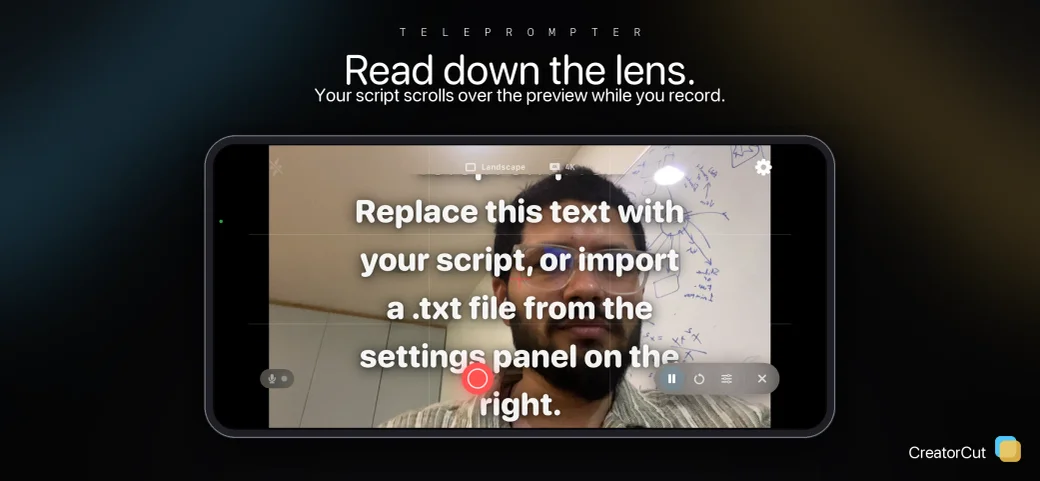
• On-device speech recognition scrolls the script at your speaking pace. Slow down to think and it waits; find your rhythm and it keeps up.
• Adjustable words-per-minute, font size, column width, and opacity.
• Overlay the script on the preview, or on Mac pop it out to a second display so you look down the lens — not down at a keyboard.
YOUR PHONE AND YOUR MAC
• Full feature parity across iPhone and Mac.
• iPhone: pinch-to-zoom, tap-to-focus, a tappable output-format chip, live composition guides, and a 3/5/10-second countdown.
• Mac: side-by-side split preview and a floating teleprompter window.
• Live audio metering and face tracking on both.
PRIVATE BY DESIGN
• No accounts. No cloud. No analytics. Nothing to opt out of, because nothing is collected.
• Speech recognition, face tracking, and every filter run on-device.
• Video is encoded locally. Your footage never leaves the device.
• iPhone saves straight to Photos; Mac saves to a folder you choose.
WHAT IT DOESN'T DO — on purpose
• No face reshaping. No slimming, no eye enlarging, no AR masks. Beautify softens skin texture and leaves your features exactly where they are — you still look like you.
• No timeline editor. Cut in your editor of choice.
• No AI captions, summaries, or rewriting. Just your words.
CREATORCUT PRO
The free tier includes dual-output capture, face tracking, all nine color looks, beautify, 1080p recording, and takes up to 60 seconds. Upgrade to Pro for:
• Unlimited recording length
• Up to 4K (where your camera supports it)
• The teleprompter — overlay, pop-out, and voice-pace
• Watermark control — move it, restyle it, or remove it
Pro is available monthly or yearly (each with a 7-day free trial), or as a one-time, family-shareable Lifetime purchase.
SUBSCRIPTION TERMS
CreatorCut Pro Monthly ($4.99) and Yearly ($29.99) are auto-renewable subscriptions, each with a 7-day free trial. Lifetime ($79.99) is a one-time purchase. Payment is charged to your Apple Account at confirmation. Subscriptions renew automatically unless auto-renew is turned off at least 24 hours before the current period ends; your account is charged for renewal within 24 hours before the period ends. Manage or cancel in your App Store account settings. Any unused portion of a free trial is forfeited when you buy a subscription. Prices may vary by region.
Terms of Use: https://rohitsainier.github.io/pages/creatorcut/terms/
Privacy Policy: https://rohitsainier.github.io/pages/creatorcut/privacy/
Requires iOS 17 or macOS 14 Sonoma or later.
Neue Funktionen
Version 1.1 · 17.08.2026
Filters, finally — and they work the way the rest of the app does. You
set them before you record, and they're already in the file when you're
done. No round trip through an editor.
Nine color looks
Vivid and Dramatic, each with a warm and a cool variant, plus Mono,
Silvertone, and Noir. Tap a swatch and the grade appears in the
viewfinder. What you see is what gets saved.
Beautify that only touches skin
Most smoothing filters blur the whole frame — your background and your
shirt go soft along with your face. This one masks to skin tone, so the
softening lands where you want it and everything else stays sharp. It's
a slider, not a preset: anywhere from 0 to 100%.
Both are free. No subscription required.
Also in this release
• Microphone selection now holds on both iPhone and Mac. External mics
and AirPods stay routed for the whole take.
• The save dialog no longer refuses to reopen after you cancel it once.
• Layout corrections on the CreatorCut Pro screen.
App-Datenschutz
Was Rohit Kumar im App Store zum Umgang dieser App mit Daten angibt.
-
Keine Daten erfasst
Der Entwickler erfasst keine Daten von dieser App.
Die Datenschutzpraktiken können variieren, zum Beispiel je nach den von Ihnen verwendeten Funktionen oder Ihrem Alter.
Informationen
- Anbieter
- Rohit Kumar
- Kategorie
- Foto und Video
- Version
- 1.1
- Aktualisiert
- 17.08.2026
- Veröffentlicht
- 30.05.2026
- Größe
- 1,2 MB
- Erfordert
- iOS 17.0 oder neuer
- Altersfreigabe
- 4+
- Preis
- Kostenlos
- In-App-Käufe
- Ja
- Sprachen
- Englisch
- Copyright
- © 2026 Rohit Saini
Das könnte Ihnen auch gefallen
-
 iPrompter Studio by StatsKeyFoto und Video
-
 Wandershot: Timestamp CameraFoto und Video
-
 PairCam - Browser Remote CamFoto und Video
-
 1Take: TeleprompterTeleprompter TikTok & Reels
-
 Lucent: Profi Kamera & VideoTeleprompter, Filmlook & 4K
-
 MirrorLive – KameramonitorDrahtloses Video-Assist
-
 Whisprompt: Stimm-TeleprompterScrollt, während du sprichst
-
 SimpleIPCameraFoto und Video
-
 2Cam: Dual Kamera RekorderFront- & Rückkamera zugleich
-
 Teleprompter for Vlog CreatorsFoto und Video