
- Altersfreigabe4+
- KategorieFoto und Video
- EntwicklerMarcus Kjellberg
- SprachenEnglisch+ 8 weitere
- Größe2,8 MB
Verlinkt auf die offizielle App Store-Seite
Download.org hostet keine Datei von Cut Away Pro. Die Schaltfläche öffnet die App-Seite bei App Store, wo Marcus Kjellberg die App veröffentlicht. Eintrag zuletzt geprüft am 18.11.2026.
Screenshots

Info
Der Entwickler hat diesen Text nicht in Ihrer Sprache bereitgestellt.
CutAway is the video trimmer that should have been built into iOS.
Trim your clips, merge them together, and export — without re-encoding. Free. No ads. No subscriptions. No watermarks. No bloat.
HEAR WHERE TO CUT
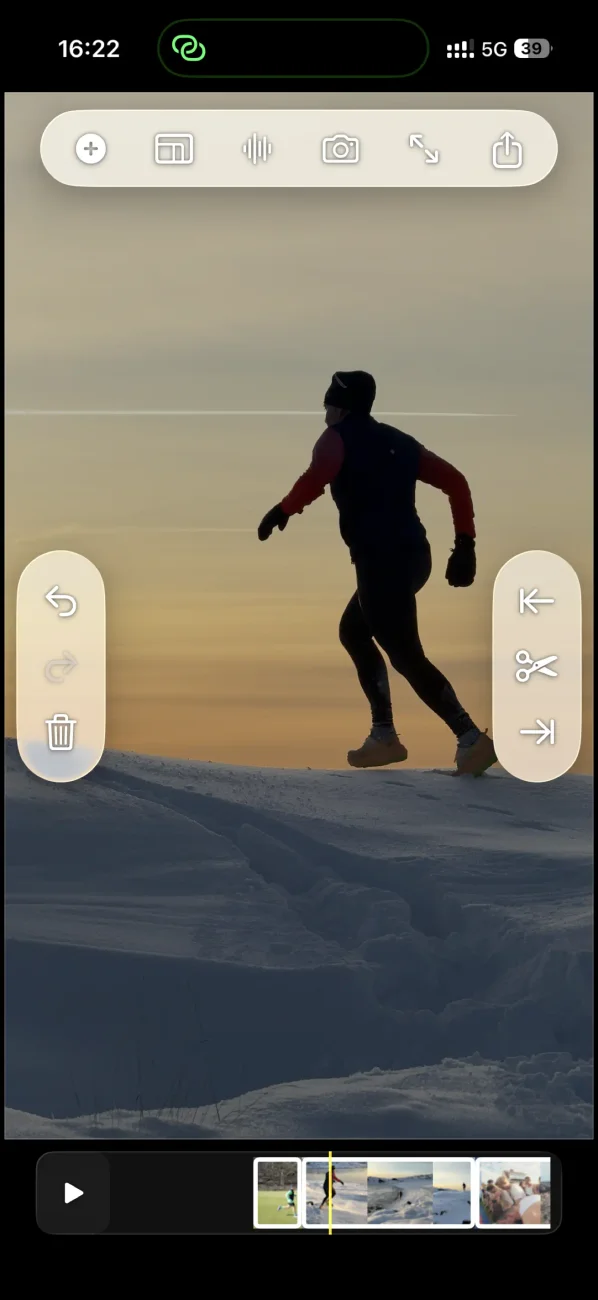
CutAway is the only lightweight video trimmer with audio scrubbing. Hear exactly where people start and stop talking, so you never cut mid-sentence. Combined with a visual waveform and silence detection, finding the perfect cut point takes seconds — not minutes.
SCRUB, TAP, DONE
Scrub to where you want to cut, then tap Cut Left or Cut Right. Everything on that side disappears. No start and end points. No tiny handles. Just scrub, tap, done. It's 2–3x faster than any other trimmer.
INSTANT EXPORT, ORIGINAL QUALITY
Other trimmers re-encode your video — slow, lossy, and battery-draining. CutAway uses passthrough export: same resolution, same codec, same frame rate. For single clips, export is nearly instant.
MERGE WITHOUT COMPLEXITY
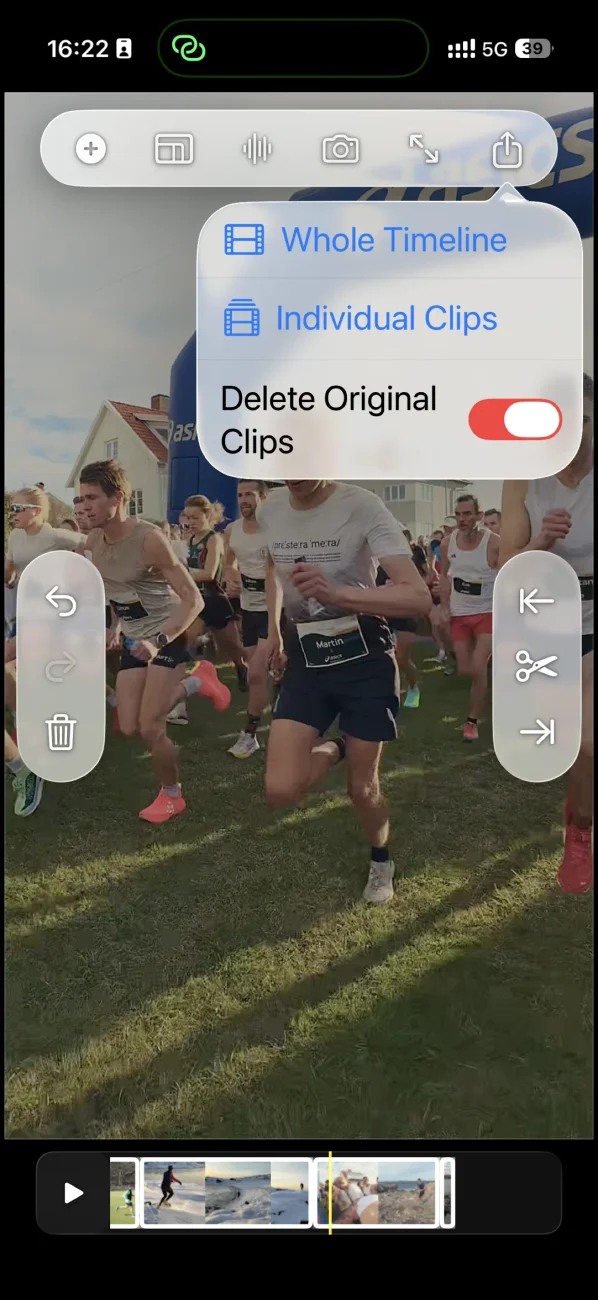
Shot 40 clips at the Eiffel Tower? Trim each one to the highlights, arrange them in order, and export one combined video. No multi-track timelines. No learning curve. Trim, merge, done.
CAPTURE THE PERFECT FRAME
Found the perfect moment? Export the current frame as a high-quality photo. Perfect for thumbnails, social media, or saving a memory.
PERFECT FOR
• Reclaiming storage — trim hours of footage to the good parts
• Trip & event highlights — combine a day's clips into one reel
• Drone footage — distill long flights to the best moments
• Quick shares — cut to the good part before sending
• Thumbnails — capture the perfect still frame
KEY FEATURES
• Audio scrubbing with waveform visualization
• One-tap Cut Left / Cut Right
• Split, delete, trim & reorder clips
• Precision scrubbing — pause your finger to zoom in
• Passthrough export (no re-encoding)
• Export full timeline, individual clips, or still frames
• 50-level undo/redo
• Pinch to zoom the timeline
• Works directly with your Photos library
• Non-destructive — originals never modified
• No ads. No watermarks. No third-party SDKs.
• Your data never leaves your device.
Neue Funktionen
Version 1.01 · 21.08.2026
Faster exports for large videos.
Exporting a long timeline used to write your video to disk three times over. Now it writes once — large exports are much faster and need far less free space.
Also fixed:
• The filmstrip showed the wrong frames after trimming or splitting a clip
• Deleting a clip could jump the playhead back to the start of the timeline
• The timeline could get stuck zoomed in after touching and holding
• Stutter when turning on the waveform for long clips
• Videos shared into CutAway could be lost if the import failed
• CutAway now asks for Photos access up front, instead of after your first pick
App-Datenschutz
Was Marcus Kjellberg im App Store zum Umgang dieser App mit Daten angibt.
-
Keine Daten erfasst
Der Entwickler erfasst keine Daten von dieser App.
Die Datenschutzpraktiken können variieren, zum Beispiel je nach den von Ihnen verwendeten Funktionen oder Ihrem Alter.
Informationen
- Anbieter
- Marcus Kjellberg
- Kategorie
- Foto und Video
- Version
- 1.01
- Aktualisiert
- 21.08.2026
- Veröffentlicht
- 29.07.2026
- Größe
- 2,8 MB
- Erfordert
- iOS 18.6 oder neuer
- Altersfreigabe
- 4+
- Preis
- Kostenlos
- Sprachen
- Englisch, Französisch, Deutsch, Japanisch, Koreanisch, Portugiesisch, Vereinf. Chinesisch, Spanisch, Schwedisch
- Copyright
- © 2026 Marcus Kjellberg
Das könnte Ihnen auch gefallen
-
 Crank — Video ScratchFoto und Video
-
 Lossless Video TrimmerFoto und Video
-
 Cutaway: Video Editor with AIFoto und Video
-
 SnipFuse: Cut & Join VideosFoto und Video
-
 OneTake - Social Media VideosAufnehmen, schneiden, posten
-
 SchüttelFoto - Lustige EffekteFotoeffekte per Handy & Watch
-
 Vidsmith: Video Compressor GIFFoto und Video
-
 Split Video: Lossless CutFoto und Video
-
 Clip Stitch - Videos verbindenClips schnell zusammenfügen
-
 FFhub: Video komprimierenKonverter, GIF, Ton & Bilder