
- 対象年齢4+
- カテゴリ写真/ビデオ
- 開発元Marcus Kjellberg
- 言語英語ほか8言語
- サイズ2.8 MB
App Storeの公式ページにリンクしています
Download.orgはCut Away Proのファイルを一切ホストしていません。ボタンを押すと、Marcus Kjellbergが公開しているApp Storeのアプリページが開きます。ページの最終確認:2026/11/18。
スクリーンショット

概要
開発元はこのテキストをお使いの言語で提供していません。
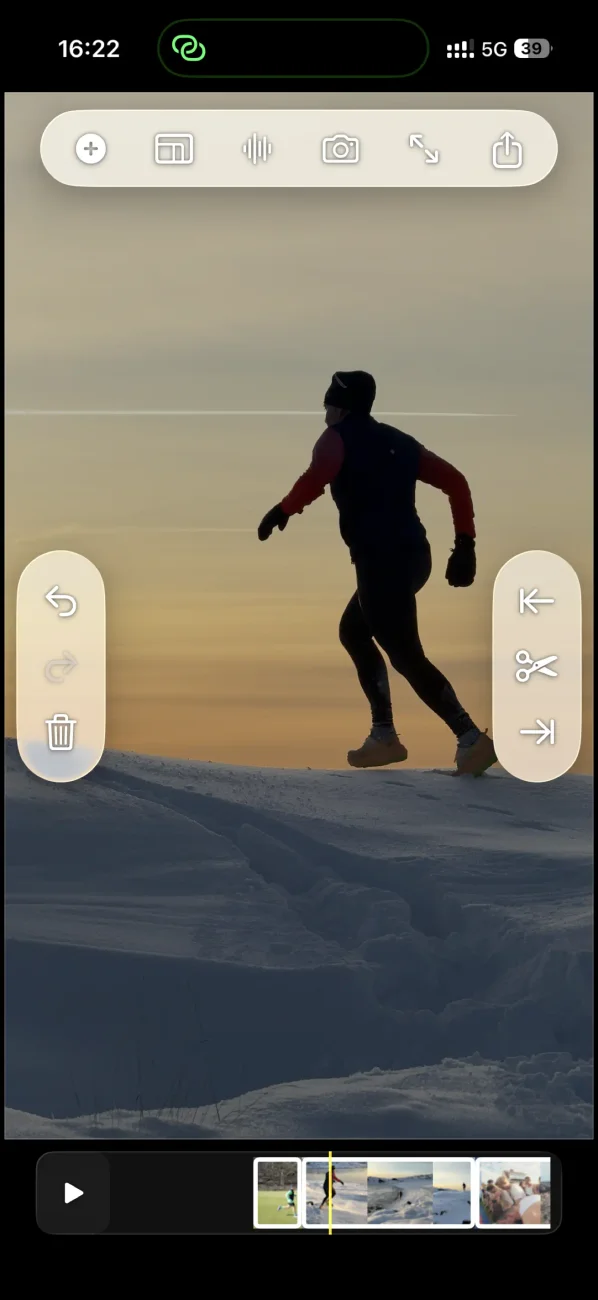
CutAway is the video trimmer that should have been built into iOS.
Trim your clips, merge them together, and export — without re-encoding. Free. No ads. No subscriptions. No watermarks. No bloat.
HEAR WHERE TO CUT
CutAway is the only lightweight video trimmer with audio scrubbing. Hear exactly where people start and stop talking, so you never cut mid-sentence. Combined with a visual waveform and silence detection, finding the perfect cut point takes seconds — not minutes.
SCRUB, TAP, DONE
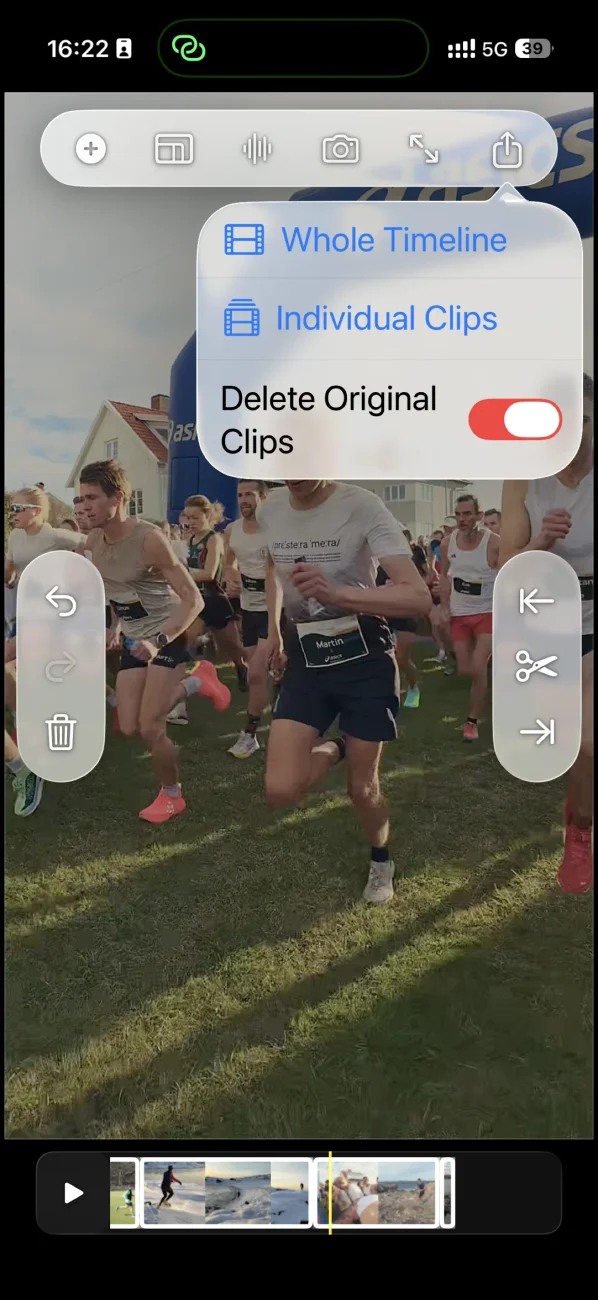
Scrub to where you want to cut, then tap Cut Left or Cut Right. Everything on that side disappears. No start and end points. No tiny handles. Just scrub, tap, done. It's 2–3x faster than any other trimmer.
INSTANT EXPORT, ORIGINAL QUALITY
Other trimmers re-encode your video — slow, lossy, and battery-draining. CutAway uses passthrough export: same resolution, same codec, same frame rate. For single clips, export is nearly instant.
MERGE WITHOUT COMPLEXITY
Shot 40 clips at the Eiffel Tower? Trim each one to the highlights, arrange them in order, and export one combined video. No multi-track timelines. No learning curve. Trim, merge, done.
CAPTURE THE PERFECT FRAME
Found the perfect moment? Export the current frame as a high-quality photo. Perfect for thumbnails, social media, or saving a memory.
PERFECT FOR
• Reclaiming storage — trim hours of footage to the good parts
• Trip & event highlights — combine a day's clips into one reel
• Drone footage — distill long flights to the best moments
• Quick shares — cut to the good part before sending
• Thumbnails — capture the perfect still frame
KEY FEATURES
• Audio scrubbing with waveform visualization
• One-tap Cut Left / Cut Right
• Split, delete, trim & reorder clips
• Precision scrubbing — pause your finger to zoom in
• Passthrough export (no re-encoding)
• Export full timeline, individual clips, or still frames
• 50-level undo/redo
• Pinch to zoom the timeline
• Works directly with your Photos library
• Non-destructive — originals never modified
• No ads. No watermarks. No third-party SDKs.
• Your data never leaves your device.
新機能
バージョン 1.01 · 2026/8/21
Faster exports for large videos.
Exporting a long timeline used to write your video to disk three times over. Now it writes once — large exports are much faster and need far less free space.
Also fixed:
• The filmstrip showed the wrong frames after trimming or splitting a clip
• Deleting a clip could jump the playhead back to the start of the timeline
• The timeline could get stuck zoomed in after touching and holding
• Stutter when turning on the waveform for long clips
• Videos shared into CutAway could be lost if the import failed
• CutAway now asks for Photos access up front, instead of after your first pick
アプリのプライバシー
このアプリのデータの取り扱いについて、Marcus KjellbergがApp Storeで申告している内容です。
-
データの収集なし
開発元はこのアプリからデータを収集しません。
プライバシーの取り扱いは、ご利用の機能やお客様の年齢などに応じて異なる場合があります。
情報
- 販売元
- Marcus Kjellberg
- カテゴリ
- 写真/ビデオ
- バージョン
- 1.01
- 更新日
- 2026/8/21
- リリース
- 2026/7/29
- サイズ
- 2.8 MB
- 必要条件
- iOS 18.6以降
- 対象年齢
- 4+
- 価格
- 無料
- 言語
- 英語, フランス語, ドイツ語, 日本語, 韓国語, ポルトガル語, 簡体字中国語, スペイン語, スウェーデン語
- 著作権
- © 2026 Marcus Kjellberg
こちらもおすすめ
-
 Crank - 映像スクラッチダイヤルを回して、映像をプレイ。
-
 Lossless Video Trimmer写真/ビデオ
-
 Cutaway: Video Editor with AI写真/ビデオ
-
 SnipFuse:動画カット・結合途中を消して、動画をつなぐ
-
 OneTake - Social Media Videos写真/ビデオ
-
 シェイク!-おもしろ写真写真の部分アニメ・スマホと腕時計で体感操作
-
 Vidsmith: 動画圧縮・変換・GIF作成容量指定・Live Photos・音声抽出・透かしなし
-
 Split Video: Lossless Cut写真/ビデオ
-
 Clip Stitch - 動画を超高速で結合動画を超高速で結合して、思い出を見やすく保存!
-
 FFhub:動画圧縮・容量削減・MP4変換サイズ指定で小さく、着信音・GIF作成