EveryConvert
File Conversion & PDF Tools
Entwickelt für iPhone, iPad, Mac
Kostenlos
- Altersfreigabe4+
- KategorieProduktivität
- EntwicklerKang taeyang
- SprachenEnglisch+ 1 weitere
- Größe1.003,0 KB
Verlinkt auf die offizielle App Store-Seite
Download.org hostet keine Datei von EveryConvert. Die Schaltfläche öffnet die App-Seite bei App Store, wo Kang taeyang die App veröffentlicht. Eintrag zuletzt geprüft am 23.11.2026.
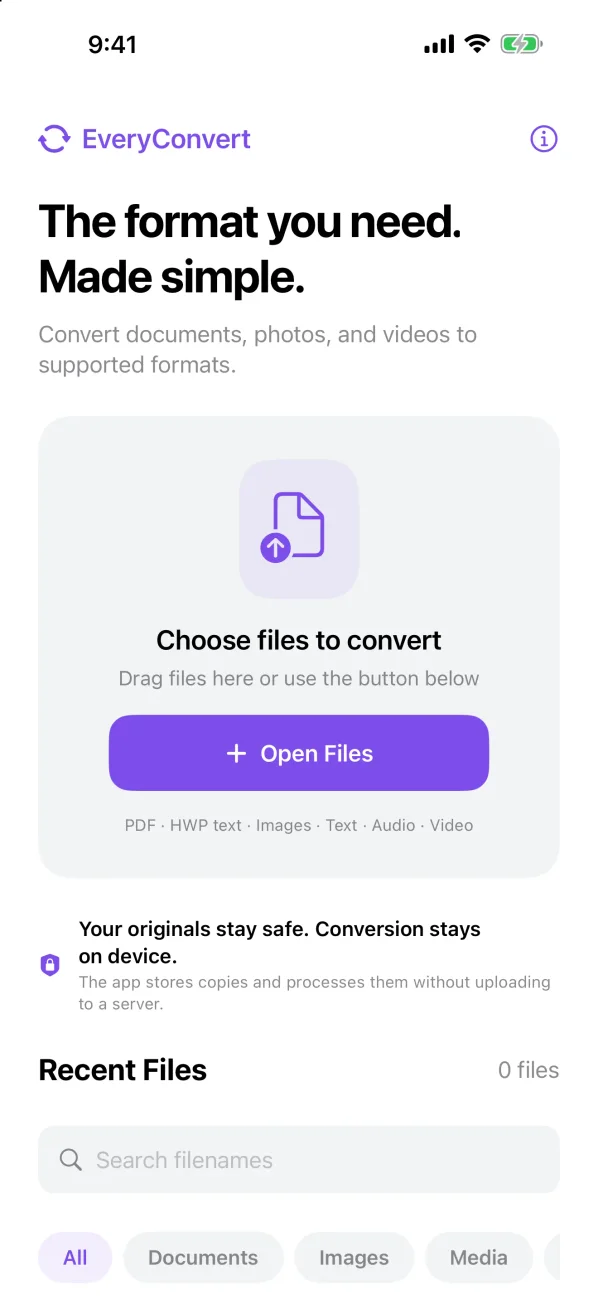
Screenshots
Info
Der Entwickler hat diesen Text nicht in Ihrer Sprache bereitgestellt.
EveryConvert helps you change files into supported formats and use practical PDF tools on iPhone, iPad, and Mac. All conversion features are free, with no ads, subscriptions, or additional purchases.
OPEN, CHOOSE, CONVERT
Open files or drag them into the app, choose an available action, and start conversion. Import multiple files and convert them one at a time. Save the result elsewhere or share it using your device’s sharing options.
IMAGES AND DOCUMENT TEXT
• Convert single-frame images to PNG, JPG, HEIC, TIFF, or PDF when supported by your device.
• Turn UTF-8 TXT, MD, CSV, and TSV text into a newly laid out PDF. Save MD, CSV, and TSV body text as TXT.
• Extract HWP 5, HWPX, and DOCX body text to TXT or a new text PDF. Original fonts, pictures, tables, and page layout are not preserved.
• Extract text from text-based PDFs.
PDF TOOLS AND TEXT RECOGNITION
• Merge PDFs, extract selected pages in your chosen order, rotate pages 90°, or reverse page order.
• Export PDF pages as JPG or PNG images in a ZIP, with a 2,000 px longest edge.
• Recognize Korean and English text in images and scanned PDFs on device. Recognition can contain errors; PDF recognition and page image export support up to 100 pages.
MEDIA, SUBTITLES, AND ZIP
• Export supported audio or video audio to M4A, video to MP4 or MOV, and supported audio to 16-bit WAV. Available actions depend on your file and device.
• Convert UTF-8 SRT and VTT subtitle timing and text. Positioning, styling, and notes are omitted.
• Package one original file as a ZIP without size-reducing compression. Save a ZIP’s filename listing as TXT.
YOUR FILES STAY UNDER YOUR CONTROL
Conversion uses copies stored in the app and does not change your originals. Files are processed on device without a conversion-server upload. The app keeps recent file copies and the latest result; delete a stored copy from the recent files menu. Files exported elsewhere remain unchanged. Sharing and downloads from cloud file providers use the destinations you choose.
Choose Follow System, Korean, or English in the app’s Settings & Info screen. Changes apply immediately and persist after relaunch.
Limits include 512 MB per imported file, 100 MB for ZIP packaging, 5 MB for text, and 40 megapixels for images. Unencrypted PDF tools support up to 1,000 pages; PDF merging supports 2–100 files and up to 1,000 combined pages. File structures and device codecs may limit conversion.
Every format-to-format combination is not supported. Original-layout Office, Pages, Numbers, Keynote, and HWP conversion, PDF-to-DOCX, PDF compression, video-to-GIF, MP3/FLAC/OGG output, font conversion, and RAR/7Z extraction or recompression are unavailable.
Privacy Policy: https://taeyang-code.com/everyconvert/privacy.html
Terms: https://www.apple.com/legal/internet-services/itunes/dev/stdeula/
Neue Funktionen
Version 1.2.1 · 11.11.2026
Improved PDF page selection and result handling. Extract pages in your chosen order, including repeated pages, with clearer validation of invalid ranges. Conversion guidance and language consistency have also been refined.
Updated privacy policy and support links to the new TaeyangCoding domain.
App-Datenschutz
Was Kang taeyang im App Store zum Umgang dieser App mit Daten angibt.
-
Keine Daten erfasst
Der Entwickler erfasst keine Daten von dieser App.
Die Datenschutzpraktiken können variieren, zum Beispiel je nach den von Ihnen verwendeten Funktionen oder Ihrem Alter.
Informationen
- Anbieter
- Kang taeyang
- Kategorie
- Produktivität
- Version
- 1.2.1
- Aktualisiert
- 11.11.2026
- Veröffentlicht
- 14.10.2026
- Größe
- 1.003,0 KB
- Erfordert
- iOS 17.0 oder neuer
- Altersfreigabe
- 4+
- Preis
- Kostenlos
- Sprachen
- Englisch, Koreanisch
- Copyright
- © 2026 Kang taeyang
Das könnte Ihnen auch gefallen
-
 Rewrite Text - KI SchreibtoolTexte lokal umschreiben
-
 FocusRabbit: Handy-DetoxBildschirmzeit & App Blocker
-
 Quick Memo+ToDo - PinDeckProduktivität
-
 서초 스마트시티Produktivität
-
 쿠파파 - 쿠팡 파트너스의 파트너스Produktivität
-
 LiveNote: Notizen im SperrbildMemo- & Aufgaben-App
-
 Locka: SperrbildschirmkalenderSperrbildschirm Kalender
-
 Pickle: Your personal AI agentProduktivität
-
 Turn Off the Lights for SafariVerdunkelt den Rest der Seite
-
 Hancom DocsProduktivität