
- 対象年齢4+
- カテゴリ仕事効率化
- 開発元Kang taeyang
- 言語英語ほか1言語
- サイズ1,003.0 KB
App Storeの公式ページにリンクしています
Download.orgはEveryConvertのファイルを一切ホストしていません。ボタンを押すと、Kang taeyangが公開しているApp Storeのアプリページが開きます。ページの最終確認:2026/11/23。
スクリーンショット
概要
開発元はこのテキストをお使いの言語で提供していません。
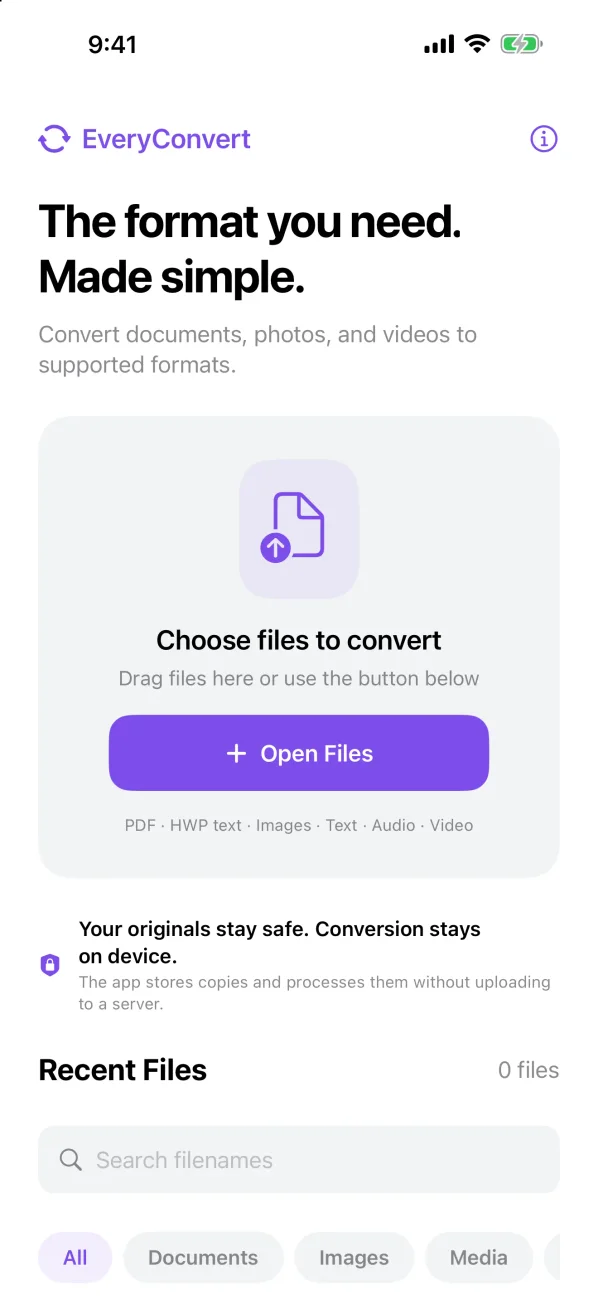
EveryConvert helps you change files into supported formats and use practical PDF tools on iPhone, iPad, and Mac. All conversion features are free, with no ads, subscriptions, or additional purchases.
OPEN, CHOOSE, CONVERT
Open files or drag them into the app, choose an available action, and start conversion. Import multiple files and convert them one at a time. Save the result elsewhere or share it using your device’s sharing options.
IMAGES AND DOCUMENT TEXT
• Convert single-frame images to PNG, JPG, HEIC, TIFF, or PDF when supported by your device.
• Turn UTF-8 TXT, MD, CSV, and TSV text into a newly laid out PDF. Save MD, CSV, and TSV body text as TXT.
• Extract HWP 5, HWPX, and DOCX body text to TXT or a new text PDF. Original fonts, pictures, tables, and page layout are not preserved.
• Extract text from text-based PDFs.
PDF TOOLS AND TEXT RECOGNITION
• Merge PDFs, extract selected pages in your chosen order, rotate pages 90°, or reverse page order.
• Export PDF pages as JPG or PNG images in a ZIP, with a 2,000 px longest edge.
• Recognize Korean and English text in images and scanned PDFs on device. Recognition can contain errors; PDF recognition and page image export support up to 100 pages.
MEDIA, SUBTITLES, AND ZIP
• Export supported audio or video audio to M4A, video to MP4 or MOV, and supported audio to 16-bit WAV. Available actions depend on your file and device.
• Convert UTF-8 SRT and VTT subtitle timing and text. Positioning, styling, and notes are omitted.
• Package one original file as a ZIP without size-reducing compression. Save a ZIP’s filename listing as TXT.
YOUR FILES STAY UNDER YOUR CONTROL
Conversion uses copies stored in the app and does not change your originals. Files are processed on device without a conversion-server upload. The app keeps recent file copies and the latest result; delete a stored copy from the recent files menu. Files exported elsewhere remain unchanged. Sharing and downloads from cloud file providers use the destinations you choose.
Choose Follow System, Korean, or English in the app’s Settings & Info screen. Changes apply immediately and persist after relaunch.
Limits include 512 MB per imported file, 100 MB for ZIP packaging, 5 MB for text, and 40 megapixels for images. Unencrypted PDF tools support up to 1,000 pages; PDF merging supports 2–100 files and up to 1,000 combined pages. File structures and device codecs may limit conversion.
Every format-to-format combination is not supported. Original-layout Office, Pages, Numbers, Keynote, and HWP conversion, PDF-to-DOCX, PDF compression, video-to-GIF, MP3/FLAC/OGG output, font conversion, and RAR/7Z extraction or recompression are unavailable.
Privacy Policy: https://taeyang-code.com/everyconvert/privacy.html
Terms: https://www.apple.com/legal/internet-services/itunes/dev/stdeula/
新機能
バージョン 1.2.1 · 2026/11/11
Improved PDF page selection and result handling. Extract pages in your chosen order, including repeated pages, with clearer validation of invalid ranges. Conversion guidance and language consistency have also been refined.
Updated privacy policy and support links to the new TaeyangCoding domain.
アプリのプライバシー
このアプリのデータの取り扱いについて、Kang taeyangがApp Storeで申告している内容です。
-
データの収集なし
開発元はこのアプリからデータを収集しません。
プライバシーの取り扱いは、ご利用の機能やお客様の年齢などに応じて異なる場合があります。
情報
- 販売元
- Kang taeyang
- カテゴリ
- 仕事効率化
- バージョン
- 1.2.1
- 更新日
- 2026/11/11
- リリース
- 2026/10/14
- サイズ
- 1,003.0 KB
- 必要条件
- iOS 17.0以降
- 対象年齢
- 4+
- 価格
- 無料
- 言語
- 英語, 韓国語
- 著作権
- © 2026 Kang taeyang
こちらもおすすめ
-
 Rewrite Text - AI文章作成端末上で安全に文章を書き換え
-
 FocusRabbit: Screen Time Detox仕事効率化
-
 クイックメモ+ToDoウィジェット - PinDeckメモウィジェット・ToDo・ジェスチャー・ロック画面
-
 서초 스마트시티仕事効率化
-
 쿠파파 - 쿠팡 파트너스의 파트너스仕事効率化
-
 LiveNote: ロック画面に記し、忘れないロック画面メモ・タスク・リマインダーアプリ
-
 LockScreen Calendar: Locka予定が見えるカレンダー壁紙
-
 Pickle(ピクル)自分だけのAIエージェント電話・予約・注文を代わりに
-
 Turn Off the Lights for Safariウェブ中のあらゆるものを暗く
-
 Hancom Docs仕事効率化