- Altersfreigabe4+
- KategorieDienstprogramme
- EntwicklerGregory Mckeithan
- SprachenEnglisch+ 7 weitere
- Größe7,8 MB
Verlinkt auf die offizielle App Store-Seite
Download.org hostet keine Datei von Fold by Fold. Die Schaltfläche öffnet die App-Seite bei App Store, wo Gregory Mckeithan die App veröffentlicht. Eintrag zuletzt geprüft am 28.11.2026.
Screenshots
Info
Der Entwickler hat diesen Text nicht in Ihrer Sprache bereitgestellt.
Requires iPhone Duo for automatic fold counting and open-session timing. One-time setup in Apple Shortcuts is required. Live hinge play requires iPhone Duo with iOS 27.1 or later.
Track your daily rhythm, personalize your widgets, and meet Hingelet—your playful folding companion.
COUNT YOUR WAY
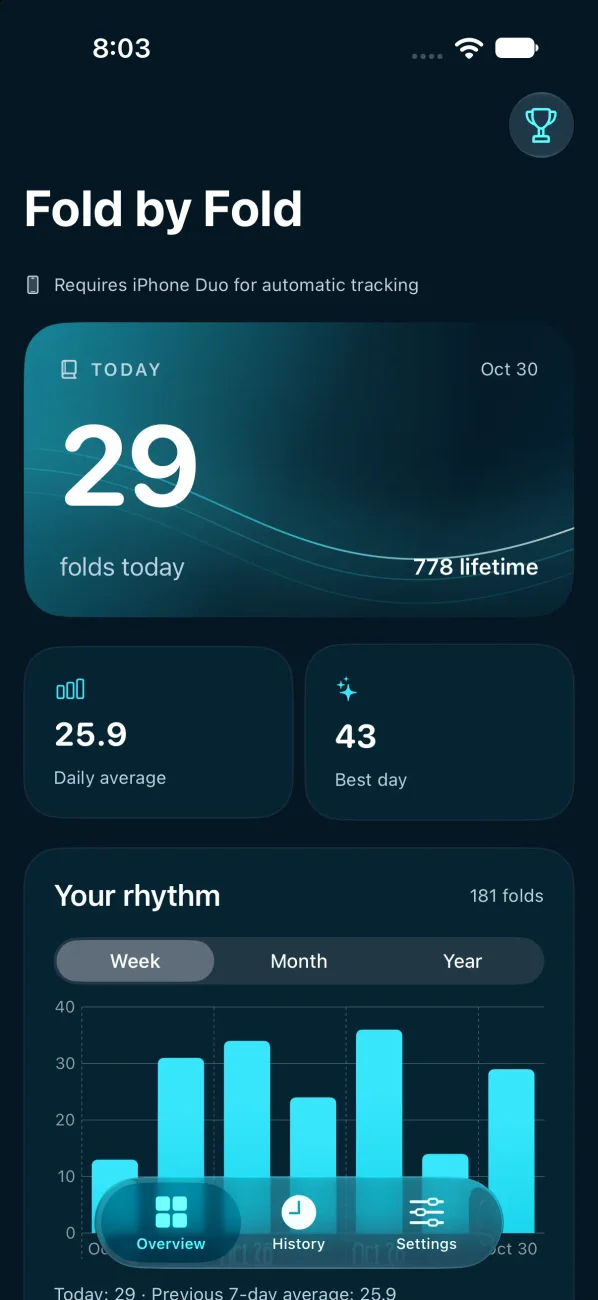
• Track today’s folds, lifetime totals, daily averages, milestones, and your busiest day.
• Choose Openings only, Closings only, or Openings + closes. Changes apply to future activity without rewriting history.
• Bring a previous app’s fold count into your lifetime total. Review it before saving, edit it later, or remove it without changing recorded daily activity.
• Optional daily goals and local achievement alerts.
SEE YOUR DAY CLEARLY
• Open the dedicated Activity Calendar, browse months, and tap a date.
• Explore visual day summaries with fold counts, an unfolded-time ring, session-stat cards, hourly activity charts, and recorded opening/closing moments.
• Review completed sessions, average and longest times, and overnight time split across local day boundaries.
• Compare the last seven completed days with the previous week in Weekly insights. Share daily and weekly recap pictures in Classic, Hingelet, 16-Bit Retro, Blueprint, or Scoreboard styles.
• Filter History, correct daily counts, and undo the latest eligible opening. Customize the stats cards shown on Overview.
WIDGETS YOUR WAY
• Choose Nixie Tubes, Split Flap, Comic Book, Neon Lights, Odometer, 16-Bit Retro, Blueprint, Scoreboard, Train Station Board, Retro Handheld, Activity Ring, Simple, Classic, Dashboard, Focus, or Weekly.
• Pick each clock widget’s design and statistic separately: today, lifetime, last 7 days, matched closes, or completed time.
• Compare Small, Medium, and Large previews. Neon Lights has four color choices. Choose Dark Metal, Brushed Metal, Warm Wood, Original, or Glass backgrounds.
• Use 16 preset themes or create named custom colors.
• Schedule Hourly, Daily, Weekly, Time of day, or Daylight widget colors without location permission.
• Adjust number size, contrast, and decoration. Weekly activity and Daily goal widgets are also included.
PLAY WITH HINGELET
Watch Hingelet’s ears and expressions follow your Duo’s hinge angle while the Hinge screen is active. Tap him for smiles, giggles, and laughs, or try the clearly labeled demo slider. Reduce Motion is supported.
Hinge Hoops is a little basketball game: aim with your hinge, then tap Shoot to launch from Hingelet’s back ear. Try bank shots against a solid backboard and hoops that move after a basket. Save your best streak and run locally. A demo slider and optional basket haptics are available. Playing never adds folds or changes session timers.
SETUP AND YOUR DATA
Connect Record a Fold to an Opened-only Shortcuts automation and Record a Close to a separate Closed-only automation. Closings only needs both: a close counts after a recorded opening. Enable automatic and locked execution. Duplicate close signals do not add folds. Guided setup checks received actions, not Shortcuts settings or physical posture.
Export daily history as CSV, save a full backup, or restore with a recovery copy. Supports English, Simplified Chinese, Traditional Chinese, Japanese, Korean, Spanish, French, and German.
No account, ads, subscription, analytics, or tracking. Activity stays on your device unless you export or share it. One-time paid app; no in-app purchases. Support: spudappssupport@gmail.com.
History starts when actions run; missing closes and earlier durations cannot be reconstructed. Completed time excludes unfinished sessions. iOS controls automation execution, widget refresh timing, and Clear/Tinted appearance. Glass is frosted, not an independent wallpaper transparency setting. Hinge play is not a precision instrument. Goals are personal activity markers, not durability estimates.
DISTANCE STATS
Convert folds into a playful unfolded-width equivalent. Choose units and watch Hingelet drive.
Neue Funktionen
Version 2.3 · 27.11.2026
App Store presentation update: widget theme previews and the Lock Screen widget now appear first in the screenshots. Fold counting, saved history, and features are unchanged.
App-Datenschutz
Was Gregory Mckeithan im App Store zum Umgang dieser App mit Daten angibt.
-
Keine Daten erfasst
Der Entwickler erfasst keine Daten von dieser App.
Die Datenschutzpraktiken können variieren, zum Beispiel je nach den von Ihnen verwendeten Funktionen oder Ihrem Alter.
Informationen
- Anbieter
- Gregory Mckeithan
- Kategorie
- Dienstprogramme
- Version
- 2.3
- Aktualisiert
- 27.11.2026
- Veröffentlicht
- 01.11.2026
- Größe
- 7,8 MB
- Erfordert
- iOS 17.0 oder neuer
- Altersfreigabe
- 4+
- Preis
- 0,99 €
- Sprachen
- Englisch, Französisch, Deutsch, Japanisch, Koreanisch, Vereinf. Chinesisch, Spanisch, Tradit. Chinesisch
- Copyright
- © 2026 Gregory Mckeithan
Das könnte Ihnen auch gefallen
-
 Fold StatsDienstprogramme
-
 Fold Counter: Hinge TrackerJedes Auf- & Zuklappen zählen
-
 Foldometer: Fold Angle GaugeDienstprogramme
-
 Hingeworthy : Fold CounterDienstprogramme
-
 DealFlow appDienstprogramme
-
 FoldOdometerDienstprogramme
-
 Shield Shift TrackerDienstprogramme
-
 DuoCorder+Dienstprogramme
-
 Wide Web: Full Screen SafariDienstprogramme
-
 USB Mobile DiskPortabler Musik-Player