
InstantCut - Video Editor
AI Auto-Edit Sports Highlights
Entwickelt für iPhone, iPad
Kostenlos · In-App-Käufe
- Altersfreigabe4+
- KategorieFoto und Video
- Entwickleryating yang
- SprachenEnglisch+ 9 weitere
- Größe61,7 MB
Verlinkt auf die offizielle App Store-Seite
Download.org hostet keine Datei von InstantCut - Video Editor. Die Schaltfläche öffnet die App-Seite bei App Store, wo yating yang die App veröffentlicht. Eintrag zuletzt geprüft am 27.11.2026.
Screenshots
Info
Der Entwickler hat diesen Text nicht in Ihrer Sprache bereitgestellt.
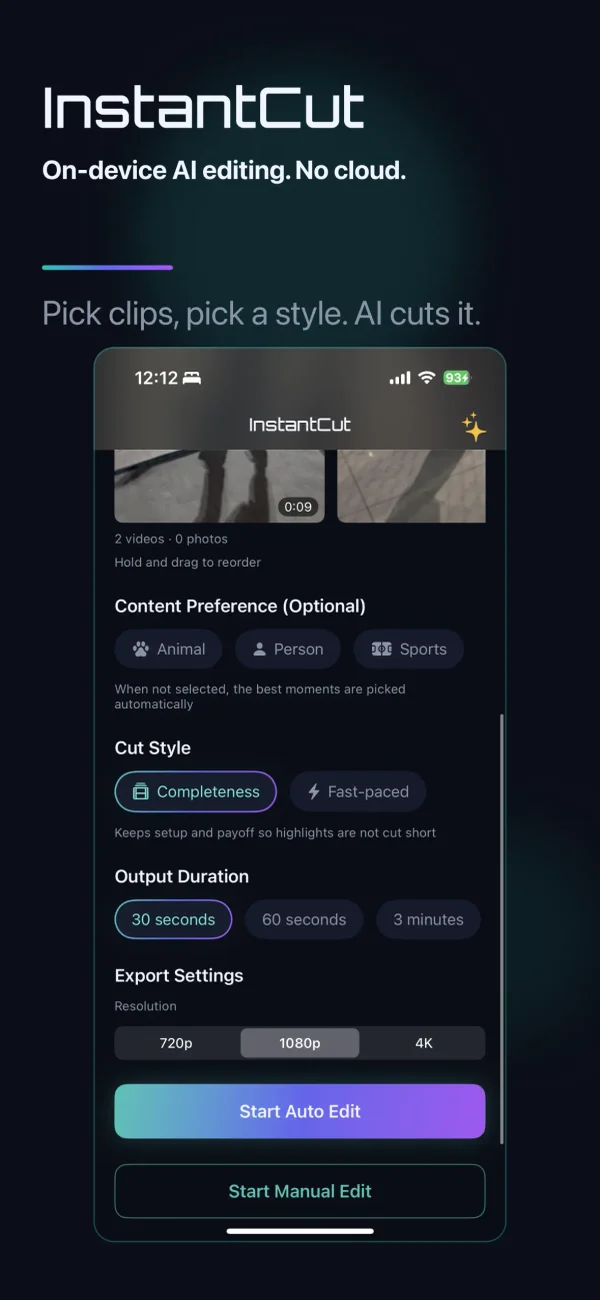
InstantCut is an AI-powered video editing app designed for social media shorts, vlogs, sports highlights, pet videos, and daily life snippets. Simply select your footage, and InstantCut will analyze the visuals, action, audio, and key moments right on your device. It helps you quickly generate a well-paced, high-impact short video, saving you from the hassle of endlessly dragging timelines.
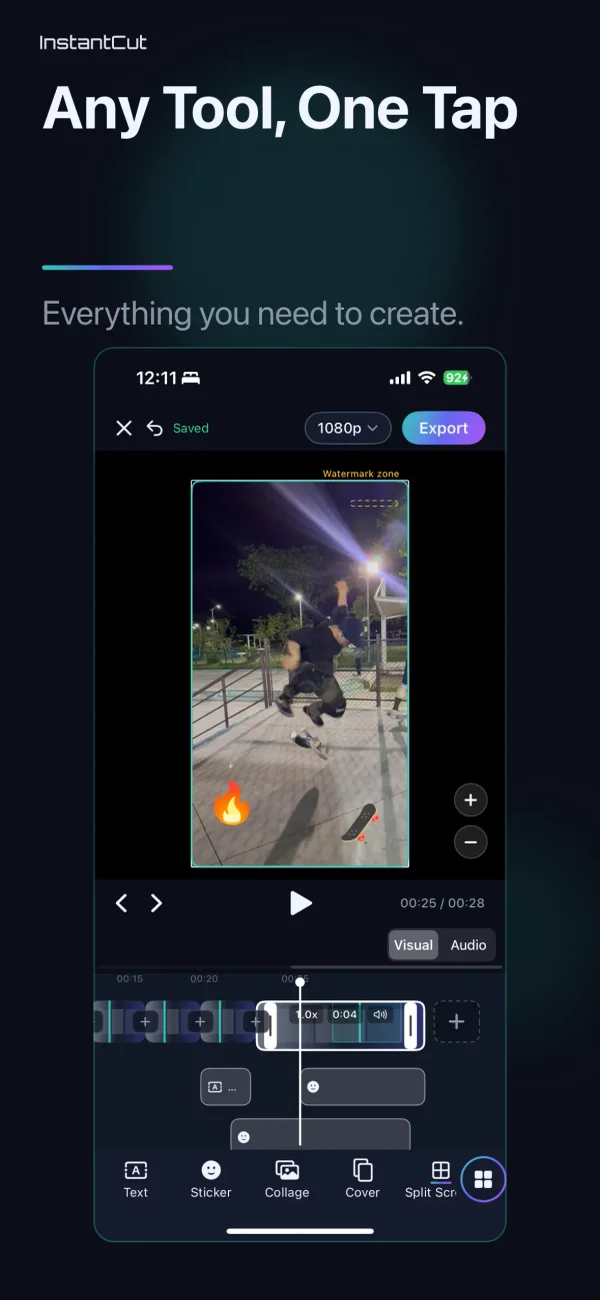
Want more control than just auto-editing? Switch to Manual Editing Mode to fine-tune clip lengths, split videos, reorder footage, and save your progress as a draft to finish later. InstantCut is perfect for anyone looking to quickly compile travel memories, sports highlights, pet moments, and event recaps, or prepare fresh content for social media.
【100% On-Device Processing: Your Privacy Comes First】
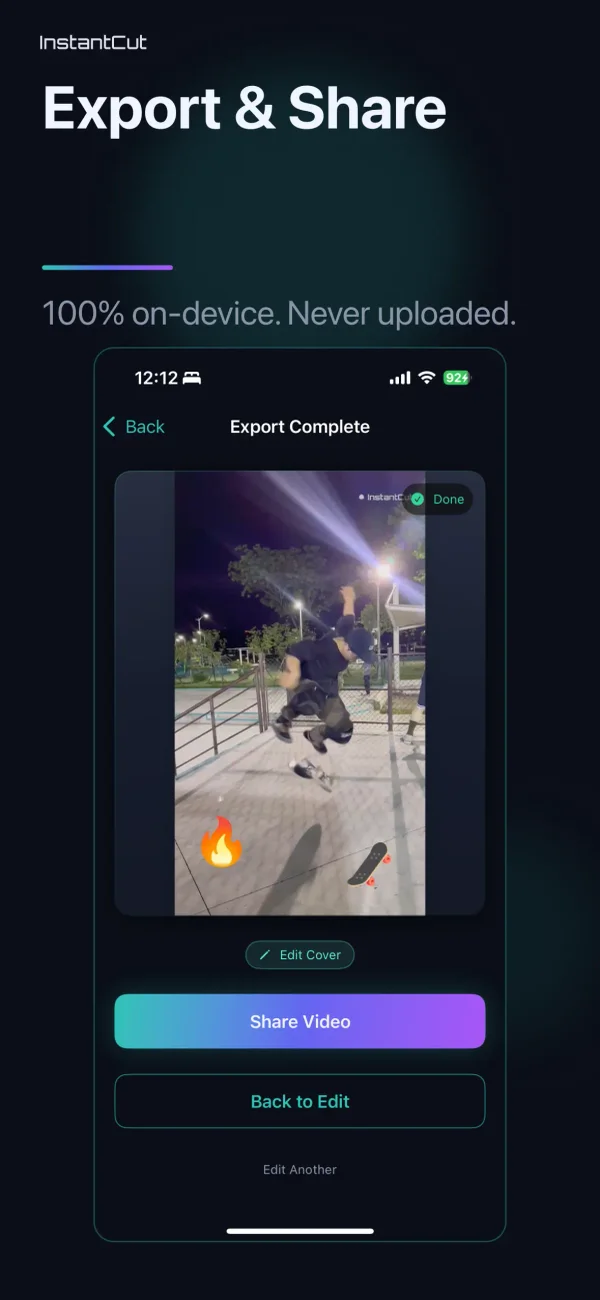
InstantCut’s AI analysis and video processing are done entirely on your device. Your private footage is never uploaded to cloud servers. Enjoy a smoother editing workflow, faster rendering, and absolute peace of mind with zero risk of data leaks.
【True content analysis — no cookie-cutter templates】
InstantCut uses on-device AI to analyze video and audio, detect highlight moments, and build your timeline. Every cut is shaped by your footage — not a one-size-fits-all template.
Key Features:
【Effortless & Time-Saving】 AI automatically selects the best highlights to generate short videos in a flash.
【Tailored Themes】 Optimize your edits based on your content focus, including Animals, People, or Sports.
【Rock-Solid Data Security】 Local analysis and rendering mean your videos never leave your device.
【Manual Editing】 Fine-tune trim ranges, split, reorder, and add subtitles or stickers with ease.
【Worry-Free Drafts】 Project-based management automatically saves your progress, keeping your unfinished edits safe.
【Flexible Sharing】 Supports video previews, custom sharing options, and instant saving.
Subscribe to 【Premium】 now to unlock longer video exports, higher resolutions, watermark removal, unlimited drafting and sharing, and more advanced editing features!
Whether you want to condense an entire day of footage into a single highlight reel or just quickly organize a few daily life snippets, InstantCut makes video editing effortless.
Terms of Use: https://www.apple.com/legal/internet-services/itunes/dev/stdeula/
Privacy Policy: https://sites.google.com/view/instantcutprivacyinfo/privacypolicy
Contact Us: https://sites.google.com/view/instantcutprivacyinfo/contacts
Social Media: instagram @instantcut.official
This application includes open-source licensed Google Emojis and open-source fonts. For details, please see "Open Source Licenses" within the application.
Neue Funktionen
Version 1.13.1 · 27.11.2026
NEW: Skin Retouch (Premium)
The new Retouch tool automatically touches up the skin of every face detected in a clip, all on your device.
• Three sliders: Smoothing, Skin tone and Brighten, with no need to pick faces one by one
• Apply to your other clips in one go
• Tap "Add a face" to pick up any face that was missed
NEW: More Fonts
• Over 90 new fonts covering Chinese, Japanese, Latin, Vietnamese and Thai
• Browse a sample of each font on the More Fonts page and tap to download and apply; works for both Text and AI Subtitles
• Tap the heart to save up to 12 favorite fonts, shown right in the font row
Other improvements:
Bug fixes and stability improvements.
App-Datenschutz
Was yating yang im App Store zum Umgang dieser App mit Daten angibt.
-
Nicht mit Ihnen verknüpfte Daten
Können erfasst werden, sind aber nicht mit Ihrer Identität verknüpft.
- Käufe
Die Datenschutzpraktiken können variieren, zum Beispiel je nach den von Ihnen verwendeten Funktionen oder Ihrem Alter.
Informationen
- Anbieter
- yating yang
- Kategorie
- Foto und Video
- Version
- 1.13.1
- Aktualisiert
- 27.11.2026
- Veröffentlicht
- 15.07.2026
- Größe
- 61,7 MB
- Erfordert
- iOS 18.0 oder neuer
- Altersfreigabe
- 4+
- Preis
- Kostenlos
- In-App-Käufe
- Ja
- Sprachen
- Englisch, Französisch, Deutsch, Indonesisch, Japanisch, Portugiesisch, Spanisch, Thai, Tradit. Chinesisch, Vietnamesisch
- Copyright
- Copyright © 2026 YaTing Yang
Das könnte Ihnen auch gefallen
-
 CutFrame - AI Video EditorFoto und Video
-
 PeekCutFoto und Video
-
 Pulse: Auto Highlight ReelFoto und Video
-
 Pink Span: JahresfilmEine Sekunde Video pro Tag
-
 Form Camera: Ski / SnowboardFoto und Video
-
 cutzio: AI Auto Video EditorFoto und Video
-
 Dailies – Vlog & VideotagebuchStylische Vlogs, ganz einfach
-
 Gleam: Swipe to Delete PhotosDoppelte Fotos löschen
-
 Framr: Video Highlights AIFoto und Video
-
 VideoX: Videoschnitt & CutoutSpeed Ramp, Tracking, Effekte