
InstantCut - Video Editor
AI Auto-Edit Sports Highlights
Designed for iPhone, iPad
Free · In-app purchases
- Age rating4+
- CategoryPhoto & Video
- Developeryating yang
- LanguagesEnglish+ 9 more
- Size59.5 MB
Links to the official App Store page
Download.org hosts no file of InstantCut - Video Editor. The button opens its official App Store page, published by yating yang. Listing last checked on Nov 23, 2026.
Screenshots
About
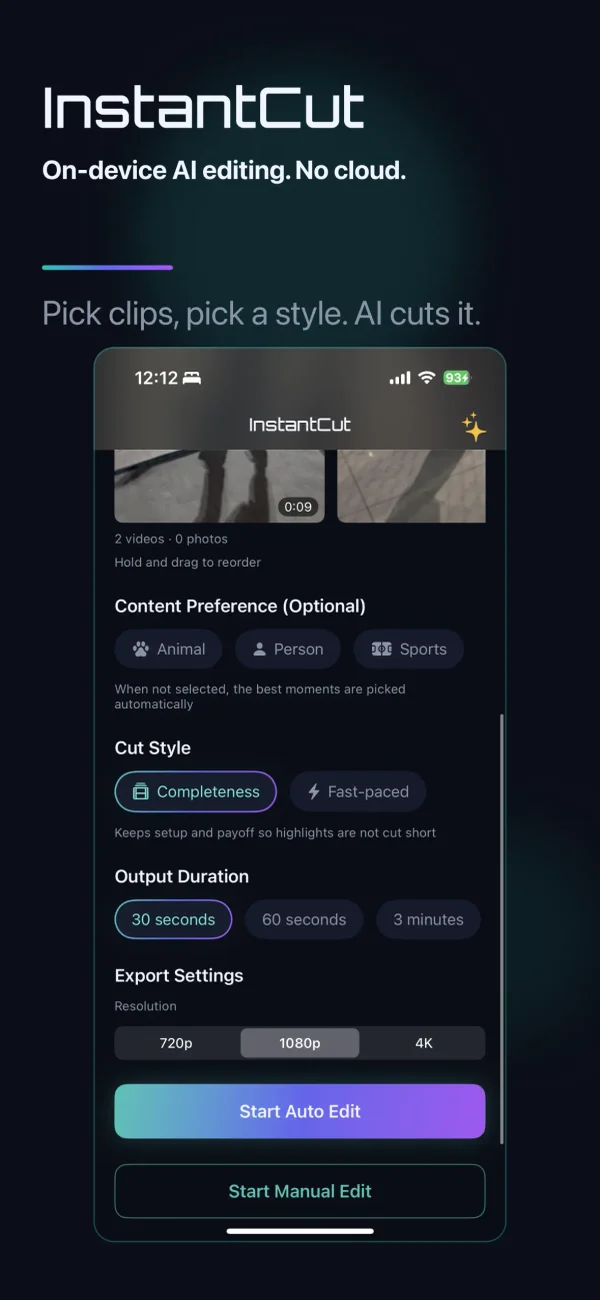
InstantCut is an AI-powered video editing app designed for social media shorts, vlogs, sports highlights, pet videos, and daily life snippets. Simply select your footage, and InstantCut will analyze the visuals, action, audio, and key moments right on your device. It helps you quickly generate a well-paced, high-impact short video, saving you from the hassle of endlessly dragging timelines.
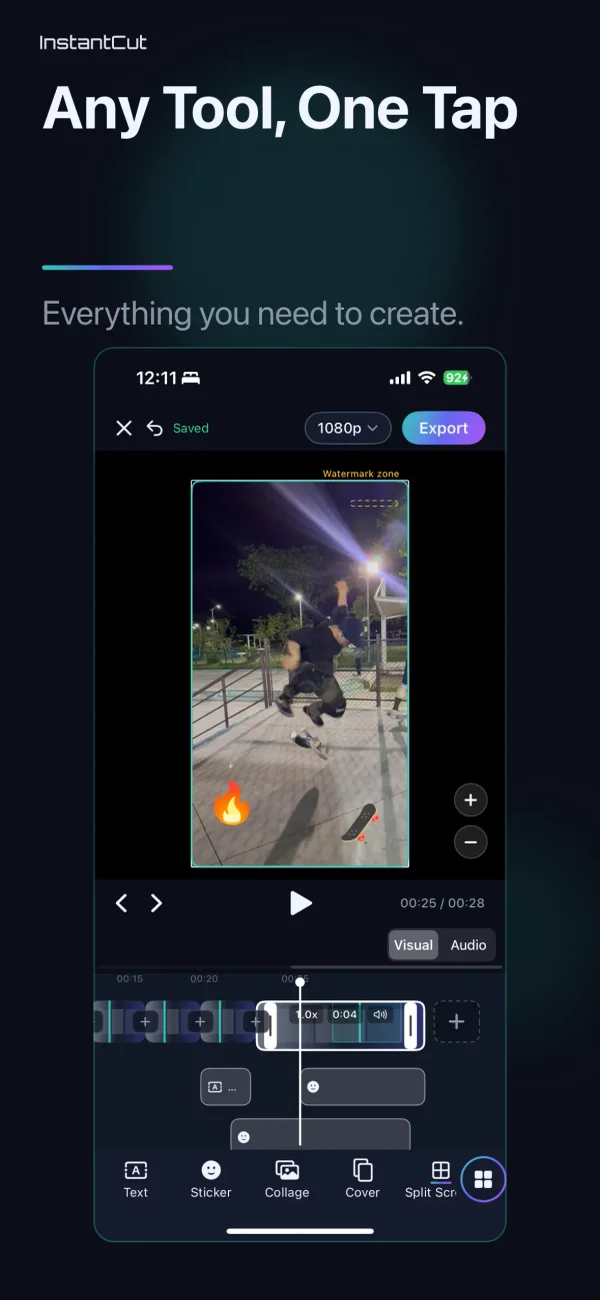
Want more control than just auto-editing? Switch to Manual Editing Mode to fine-tune clip lengths, split videos, reorder footage, and save your progress as a draft to finish later. InstantCut is perfect for anyone looking to quickly compile travel memories, sports highlights, pet moments, and event recaps, or prepare fresh content for social media.
【100% On-Device Processing: Your Privacy Comes First】
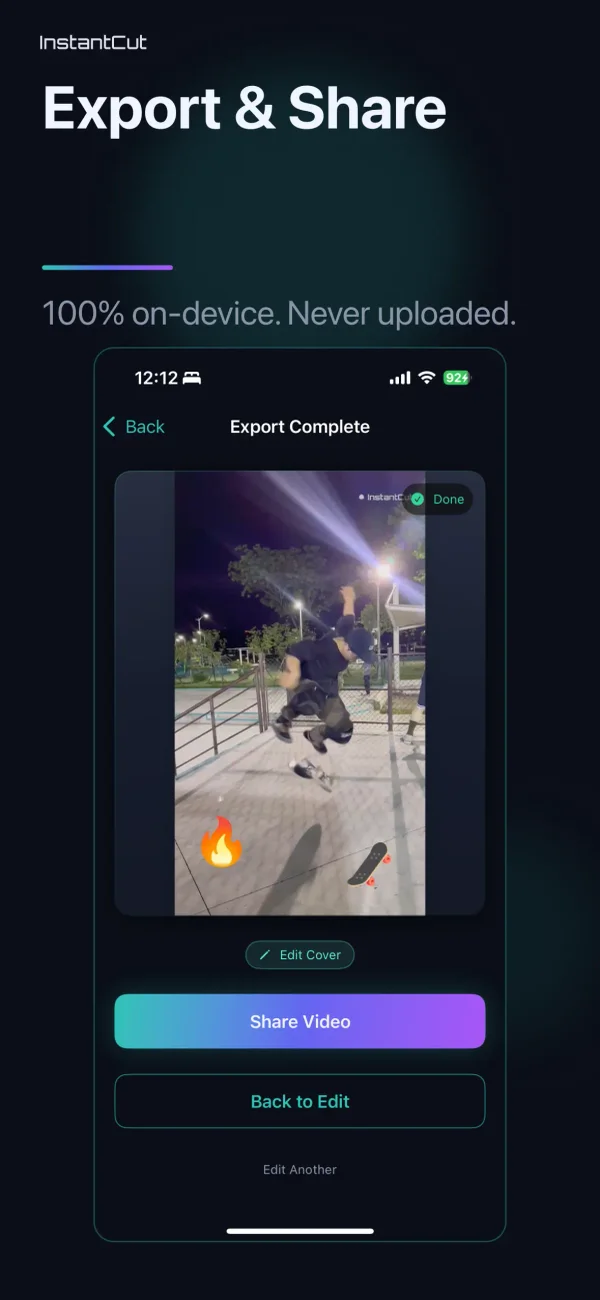
InstantCut’s AI analysis and video processing are done entirely on your device. Your private footage is never uploaded to cloud servers. Enjoy a smoother editing workflow, faster rendering, and absolute peace of mind with zero risk of data leaks.
【True content analysis — no cookie-cutter templates】
InstantCut uses on-device AI to analyze video and audio, detect highlight moments, and build your timeline. Every cut is shaped by your footage — not a one-size-fits-all template.
Key Features:
【Effortless & Time-Saving】 AI automatically selects the best highlights to generate short videos in a flash.
【Tailored Themes】 Optimize your edits based on your content focus, including Animals, People, or Sports.
【Rock-Solid Data Security】 Local analysis and rendering mean your videos never leave your device.
【Manual Editing】 Fine-tune trim ranges, split, reorder, and add subtitles or stickers with ease.
【Worry-Free Drafts】 Project-based management automatically saves your progress, keeping your unfinished edits safe.
【Flexible Sharing】 Supports video previews, custom sharing options, and instant saving.
Subscribe to 【Premium】 now to unlock longer video exports, higher resolutions, watermark removal, unlimited drafting and sharing, and more advanced editing features!
Whether you want to condense an entire day of footage into a single highlight reel or just quickly organize a few daily life snippets, InstantCut makes video editing effortless.
Terms of Use: https://www.apple.com/legal/internet-services/itunes/dev/stdeula/
Privacy Policy: https://sites.google.com/view/instantcutprivacyinfo/privacypolicy
Contact Us: https://sites.google.com/view/instantcutprivacyinfo/contacts
Social Media: instagram @instantcut.official
This application includes open-source licensed Google Emojis and open-source fonts. For details, please see "Open Source Licenses" within the application.
What’s new
Version 1.12.0 · Nov 16, 2026
NEW: Mosaic (Premium)
Automatically cover faces in your videos and photos. The app detects faces across the whole clip and keeps tracking them, all on your device.
• Three target modes: All, Selected only and All except selected, so you can keep your subject and hide bystanders
• Mosaic or Blur style, with adjustable intensity and coverage
• Use "Manual patch" to cover any frames that were missed; "Adjust position" fine-tunes the position and size of a mask
Other improvements:
Bug fixes and stability improvements.
App privacy
What yating yang declares on the App Store about how this app handles data.
-
Data not linked to you
May be collected but is not linked to your identity.
- Purchases
Privacy practices may vary, for example with the features you use or your age.
Information
- Seller
- yating yang
- Category
- Photo & Video
- Version
- 1.12.0
- Updated
- Nov 16, 2026
- Released
- Jul 15, 2026
- Size
- 59.5 MB
- Requires
- iOS 18.0 or later
- Age rating
- 4+
- Price
- Free
- In-app purchases
- Yes
- Languages
- English, French, German, Indonesian, Japanese, Portuguese, Spanish, Thai, Traditional Chinese, Vietnamese
- Copyright
- Copyright © 2026 YaTing Yang
You might also like
-
 CutFrame - AI Video EditorReels Maker, Captions & Music
-
 PeekCutPrivate AI Video Highlights
-
 Pulse: Auto Highlight ReelAuto highlights, on your phone
-
 Pink Span: Video DiaryOne second a day, year film
-
 Form Camera: Ski / SnowboardRecord & compare side by side
-
 cutzio: AI Auto Video EditorShorts, Reels & Vlog Cut Maker
-
 Dailies: Cinematic Vlog MakerMini video diary & journal
-
 Gleam: Swipe to Delete PhotosStorage Cleaner, Free Up Space
-
 Framr: Video Highlights AIMemory Grab & Frame Extractor
-
 VideoX: Video Editor & CutoutSpeed Ramp, Tracking & Effects