
- Altersfreigabe17+
- KategorieDienstprogramme
- EntwicklerDenys Pashchenko
- SprachenEnglisch
- Größe13,6 MB
Verlinkt auf die offizielle App Store-Seite
Download.org hostet keine Datei von JoyArk: Cloud Gaming. Die Schaltfläche öffnet die App-Seite bei App Store, wo Denys Pashchenko die App veröffentlicht. Eintrag zuletzt geprüft am 17.11.2026.
Screenshots




Info
Der Entwickler hat diesen Text nicht in Ihrer Sprache bereitgestellt.
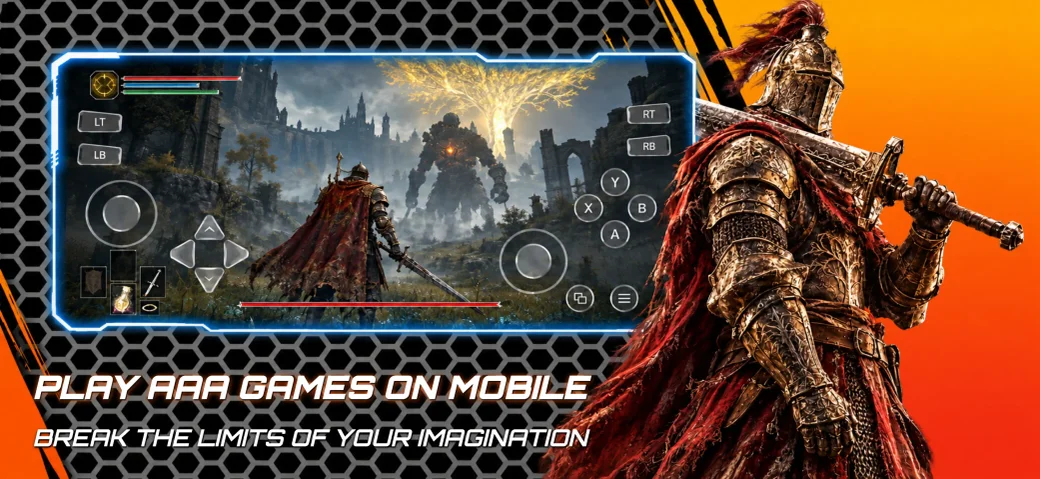
Stream games running on your own Mac to your iPhone over the same local network.
JoyArk connects directly to the free JoyArk Host companion on your Mac. Your game runs on the Mac, while your iPhone shows the screen and sends your controls back over an encrypted local connection.
PLAY FROM YOUR MAC
• Find nearby Macs automatically and compare a six-digit code to approve pairing.
• Reconnect to a saved Mac without entering its address or key again.
• Use touch controls or a Bluetooth controller connected to your iPhone.
• Stream system audio and choose 720p or 1080p, 30 or 60 FPS, and a suitable bitrate.
• Rotate your iPhone to landscape for a wider view.
• Get connection help and a keyboard/mouse mapping guide inside the app.
WHAT YOU NEED
• A Mac running macOS 13 or later and an iPhone running iOS 17 or later.
• Xcode with Swift 5.9 or later to build the Mac host from the public source download.
• Both devices on the same home network. The Mac can use Wi-Fi or Ethernet and must remain awake with the host running.
• Games you own that run on your Mac and support keyboard and mouse input.
MAC HOST SETUP
Download the source and follow the build instructions:
https://github.com/egnatkinadev/JoyArkHost
Build the host once, allow Screen Recording and Accessibility on your Mac, and open it whenever you want to stream. Select your Mac in JoyArk, approve the matching code, open your game on the Mac and tap Start streaming.
JoyArk shares the whole selected Mac display. Close private windows before streaming. Controls target the focused Mac app. The host maps input to keyboard and mouse commands; it does not emulate a native Mac gamepad.
Games, cloud computers and a game subscription are not included. This version supports Mac hosts on the same local network; Windows hosts and streaming over the internet are not supported. Streaming quality depends on your devices, game and network.
Usage analytics is optional and disabled by default. Advertising permission can be declined without limiting streaming.
Setup and support: https://egnatkinadev.github.io/JoyArkHost/
Privacy: https://egnatkinadev.github.io/JoyArkHost/privacy.html
Neue Funktionen
Version 1.0.1 · 30.10.2026
Bug fixes.
App-Datenschutz
Was Denys Pashchenko im App Store zum Umgang dieser App mit Daten angibt.
-
Daten, die zum Tracking Ihrer Person verwendet werden
Können verwendet werden, um Sie über Apps und Websites anderer Unternehmen hinweg zu verfolgen.
- Standort
- Browserverlauf
- Kennungen
- Nutzungsdaten
- Sonstige Daten
-
Mit Ihnen verknüpfte Daten
Können erfasst und mit Ihrer Identität verknüpft werden.
- Standort
- Browserverlauf
- Kennungen
- Nutzungsdaten
- Diagnose
- Sonstige Daten
-
Nicht mit Ihnen verknüpfte Daten
Können erfasst werden, sind aber nicht mit Ihrer Identität verknüpft.
- Diagnose
Die Datenschutzpraktiken können variieren, zum Beispiel je nach den von Ihnen verwendeten Funktionen oder Ihrem Alter.
Informationen
- Anbieter
- Denys Pashchenko
- Kategorie
- Dienstprogramme
- Version
- 1.0.1
- Aktualisiert
- 30.10.2026
- Veröffentlicht
- 27.10.2026
- Größe
- 13,6 MB
- Erfordert
- iOS 17.0 oder neuer
- Altersfreigabe
- 17+
- Preis
- Kostenlos
- Sprachen
- Englisch
- Copyright
- © 2026 Denys Pashchenko
Das könnte Ihnen auch gefallen
-
 PlayPc - Pocket ComputerDienstprogramme
-
 Koyozo ClubDienstprogramme
-
 CloudPlayPlusDienstprogramme
-
 GameArchive+Dienstprogramme
-
 Lose Control: PC ControllerDienstprogramme
-
 Gamepad Pro – Remote for PCDienstprogramme
-
 Dark Aura Panel - Rabbit GreenDienstprogramme
-
 IPA Installer: Dev UtilityDienstprogramme
-
 GameHubDienstprogramme
-
 MuMuPlayerMuMuPlayer – PC-Fernsteuerung