Level: Sound Level Meter
Set & Match Speaker Levels
Entwickelt für iPhone
Kostenlos
- Altersfreigabe4+
- KategorieDienstprogramme
- EntwicklerCarl Sieber
- SprachenEnglisch
- Größe1,0 MB
Verlinkt auf die offizielle App Store-Seite
Download.org hostet keine Datei von Level: Sound Level Meter. Die Schaltfläche öffnet die App-Seite bei App Store, wo Carl Sieber die App veröffentlicht. Eintrag zuletzt geprüft am 17.11.2026.
Screenshots

Info
Der Entwickler hat diesen Text nicht in Ihrer Sprache bereitgestellt.
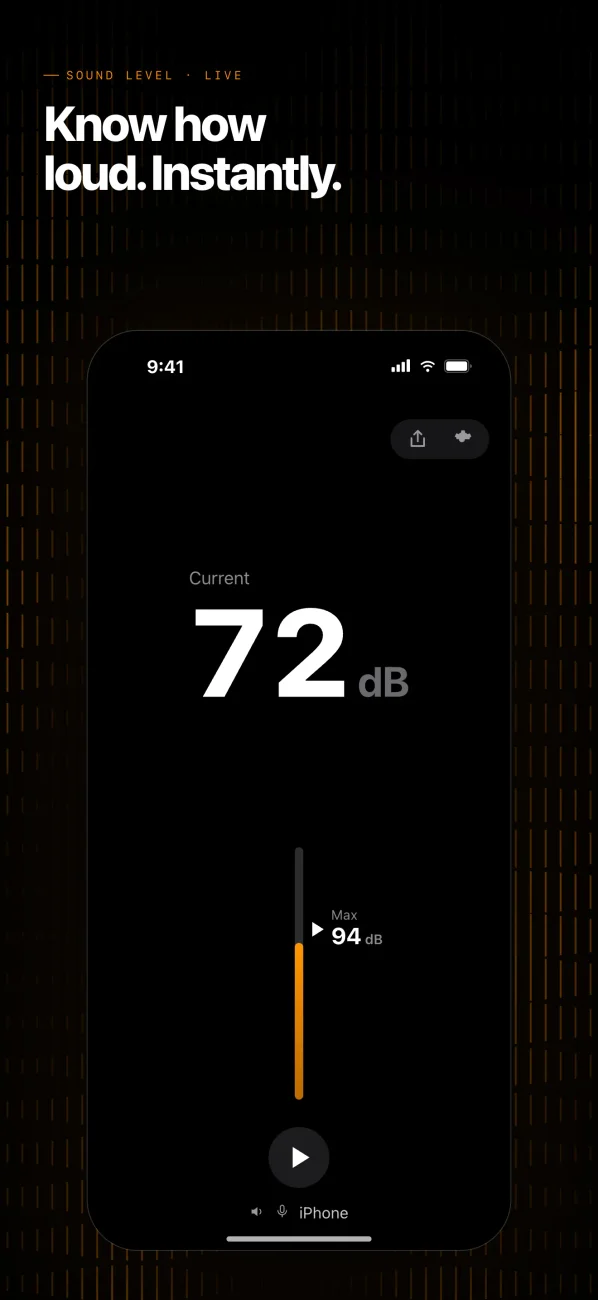
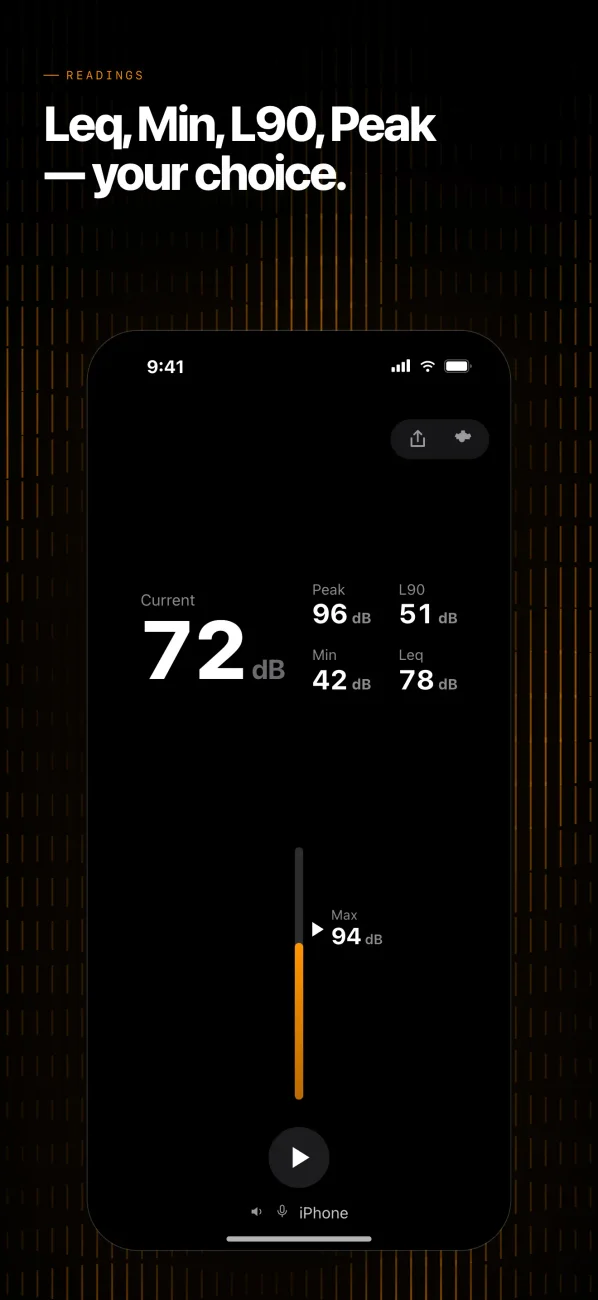
Level is a fast, honest sound-level meter for iPhone. A big live decibel reading, with Leq, Min, L90, L10, Peak, and elapsed time alongside it — show up to four, arranged the way you want. It tells you when the sound is louder than the mic can measure. A reference generator and calibrated-mic support are there for speaker work or true SPL. One clean instrument, not a busy suite.
FEATURES
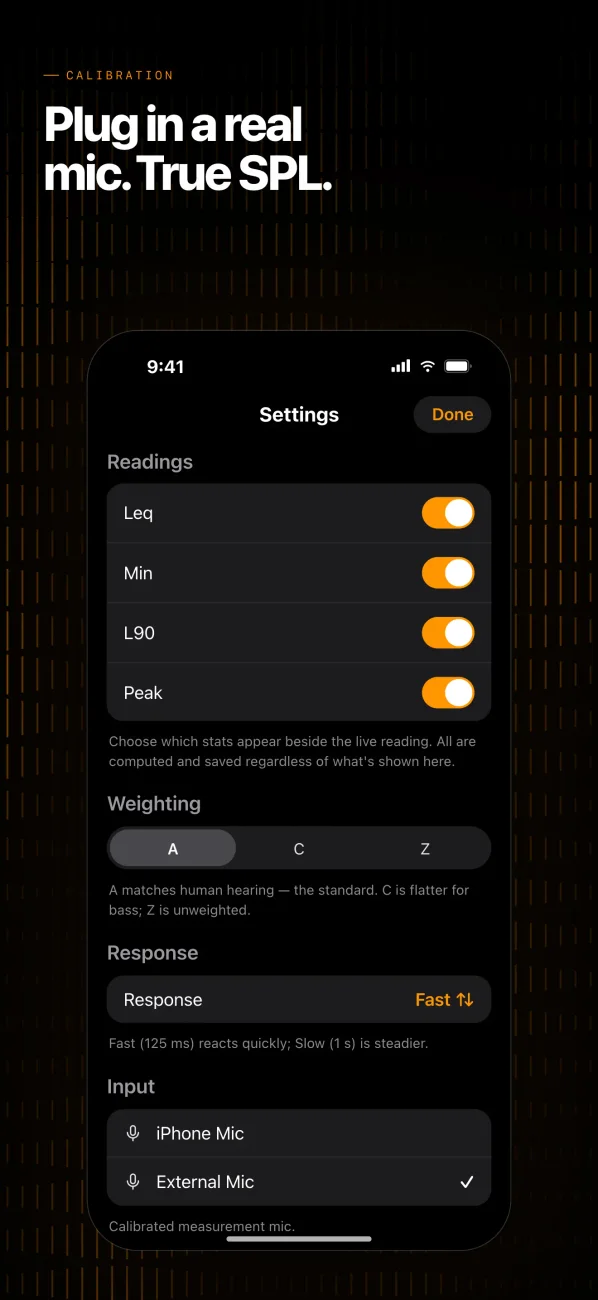
- Big decibel reading — A/C/Z weighting, Fast (125 ms) or Slow (1 s) response
- Six readings, up to four on screen: Leq (energy-average), Min, L90 (background level — exceeded 90% of the time), L10 (exceeded 10% of the time), Peak (true instantaneous peak), and Time (how long you've been measuring). Always computed; show only what you need
- Arrange the readings yourself — hold one on the meter and drag it, or reorder in Settings. On iPhone Duo's open display, all six show
- Overload flag — "Current · OVER" and a tick on the meter while the sound is louder than the mic can measure; Peak stays marked for the rest of the measurement. Tap either to see what it means
- Peak-hold "Max" — a marker holds the loudest moment; tap the meter to start a new measurement
- Control bar — play, the mic and output in use, and the signal, together at the bottom of the screen
- Reference signals: pink noise, white noise, ten octave tones (31.5 Hz–16 kHz), level-matched. 1 kHz tone pairs with a 94 dB calibrator
- Play any output — iPhone speaker, AirPlay, Bluetooth, or USB — while the meter keeps reading
- Calibrated-mic support: Dayton iMM-6C, miniDSP UMIK-1/UMIK-2/EARS, Behringer ECM8000, REW. Frequency correction plus a true-SPL anchor from the file's 1 kHz sensitivity
- Set to 94 dB — fit a calibrator over the mic, tap once, and Level trims itself to the tone. Each mic keeps its own offset
- Share card — current reading, your readings as arranged, and the level bar
- Fits iPhone Duo — closed, open, and open held wide
- Full VoiceOver support
- No account, no analytics, no third-party SDKs, no in-app purchases, no network connections
HOW IT WORKS
Open Level, allow the microphone, and read the room. Turn on up to four readings in Settings → Readings to see them beside the live number; hold one on the meter to move it. Tap the meter to reset Max and every reading and start a new measurement — Time starts over too.
If the sound is louder than the mic can measure, Level says so: OVER appears beside the live number, and Peak stays marked until you reset. Tap the mark to see what it means.
For speaker work, the control bar has it all: play sends the reference signal — pink noise for level-setting, white noise for tweeters, an octave tone for room modes, or the 1 kHz tone against a 94 dB calibrator — and the mic, output, and signal buttons switch each in a tap.
With the built-in mic, readings are approximate but honest and well-behaved. A calibrated USB mic and its cal file give true SPL. Either way, Level is a measurement tool, not a certified Type 1/2 instrument.
GREAT FOR
- Checking if a room, party, nursery, or workspace is too loud
- Home theater/hi-fi — matching channels, setting levels, dialing in a subwoofer
- Car audio — matching and balancing components
- Live-sound hobbyists and DIY speaker builders
- Anyone who wants an honest number without a pro suite
PRIVACY
Audio is measured live only — never recorded, written to disk, or transmitted. No account, no analytics, no in-app purchases, no network connection at all.
QUICK START
1. Open Level, allow the microphone
2. Read the big number (A-weighted by default)
3. Settings → Readings: turn on up to four of Leq/Min/L90/L10/Peak/Time; hold one on the meter to move it
4. Tap the meter to reset Max and every reading
5. For speaker work: tap play in the control bar; the buttons beside it switch mic, output, and signal
IMPORTANT
Level is a general-purpose meter, not a certified Type 1/Type 2 instrument. Built-in mic readings are approximate; a calibrated USB mic with a cal file gives true SPL.
Neue Funktionen
Version 1.5 · 04.11.2026
Level 1.5 makes the meter more of a meter.
• OVER. When the sound is louder than the microphone can measure, "Current · OVER" appears beside the live number and a tick shows at the top of the meter. Peak stays marked for the rest of the measurement. Tap either to see what it means.
• Two new readings. L10 (the level exceeded 10% of the time) and Time (how long you've been measuring). Six readings now, up to four on screen.
• Arrange them yourself. Hold a reading on the meter and drag it onto another to swap them, or reorder in Settings. On iPhone Duo's open display, all six show.
• Set to 94 dB. Fit a calibrator over the mic and tap once; Level trims itself to the tone. Each mic keeps its own offset.
• Control bar. Play, which mic and output are in use, and the signal — together at the bottom of the screen. Tap the mic, speaker, or waveform to switch each.
• At the mic's floor, the reading dims instead of pretending.
Also: a one-time hint that tapping the meter resets everything, and tapping empty space no longer resets Max.
App-Datenschutz
Was Carl Sieber im App Store zum Umgang dieser App mit Daten angibt.
-
Keine Daten erfasst
Der Entwickler erfasst keine Daten von dieser App.
Die Datenschutzpraktiken können variieren, zum Beispiel je nach den von Ihnen verwendeten Funktionen oder Ihrem Alter.
Informationen
- Anbieter
- Carl Sieber
- Kategorie
- Dienstprogramme
- Version
- 1.5
- Aktualisiert
- 04.11.2026
- Veröffentlicht
- 23.06.2026
- Größe
- 1,0 MB
- Erfordert
- iOS 17.0 oder neuer
- Altersfreigabe
- 4+
- Preis
- Kostenlos
- Sprachen
- Englisch
- Copyright
- © 2026, Carl Sieber
Das könnte Ihnen auch gefallen
-
 SoundLevel Pro: dB MeterDienstprogramme
-
 ng-audioDienstprogramme
-
 Ojo PRDienstprogramme
-
 iSPL PRO+Dienstprogramme
-
 QiblaOneDienstprogramme
-
 Calculator SuiteDienstprogramme
-
 Sound Meter: Noise & dB LevelDienstprogramme
-
 Level - Aluminium Level SimDienstprogramme
-
 Smart Cleaner: Photo CleanupDienstprogramme
-
 Timer tickDienstprogramme