
- Altersfreigabe4+
- KategorieProduktivität
- Entwicklergggatelier
- SprachenEnglisch+ 1 weitere
- Größe88,2 MB
MonCalite ist bei App Store derzeit möglicherweise nicht verfügbar
Bei unserer letzten Prüfung war der Store-Eintrag nicht erreichbar. Der Link führt weiterhin zur offiziellen App Store-Seite.
Screenshots


Info
Der Entwickler hat diesen Text nicht in Ihrer Sprache bereitgestellt.
Thanks for visiting MonCalite.
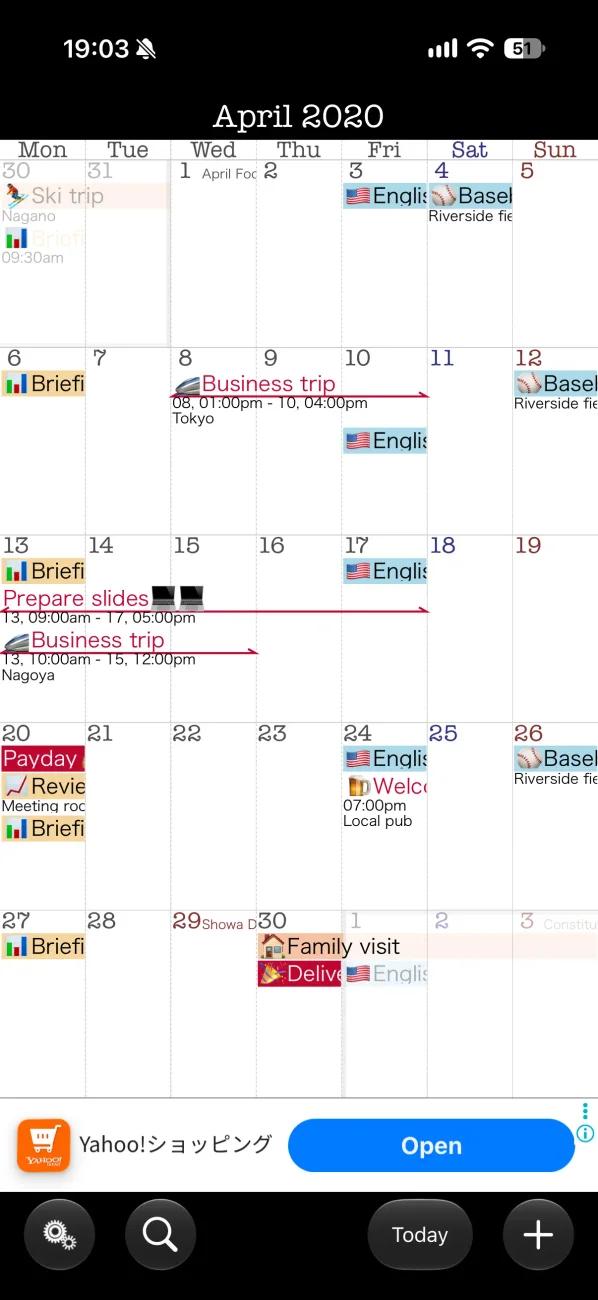
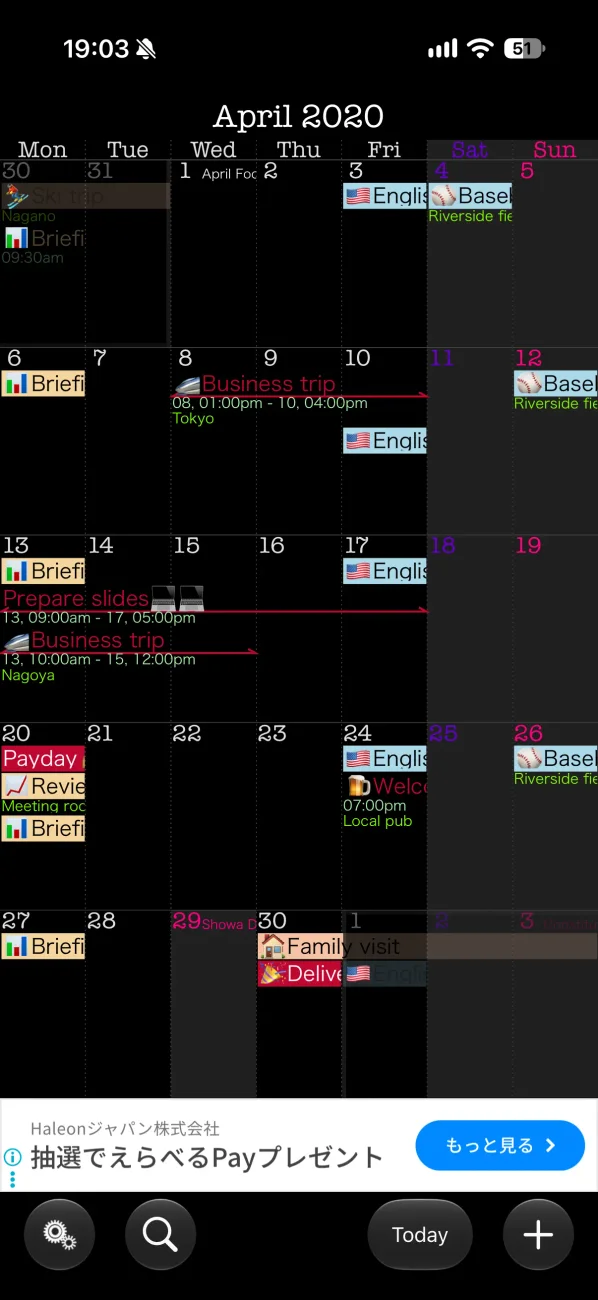
MonCalite is a software dedicated to monitor your schedule on and only on a monthly basis.
It was developed to mimic the actual usage of schedule paper notes, with a view of your monthly schedule at a glance.
This software is suitable for those:
Who writes the plan to manage desk calendar or diary of the month view.
Who tried many scheduler but ended up using monthly view only.
Registered schedules will be synchronized with your iPhone via standard calendar app. If other calendar apps such as iCloud Calendar and MS Exchange are set to sync with the standard calendar app., they will be reflected as well.
The fonts used are relatively small but with the Retina display, you will be able to view both the time and place without a stress. In addition, you can choose the fonts from 7 different size variations for a better view.
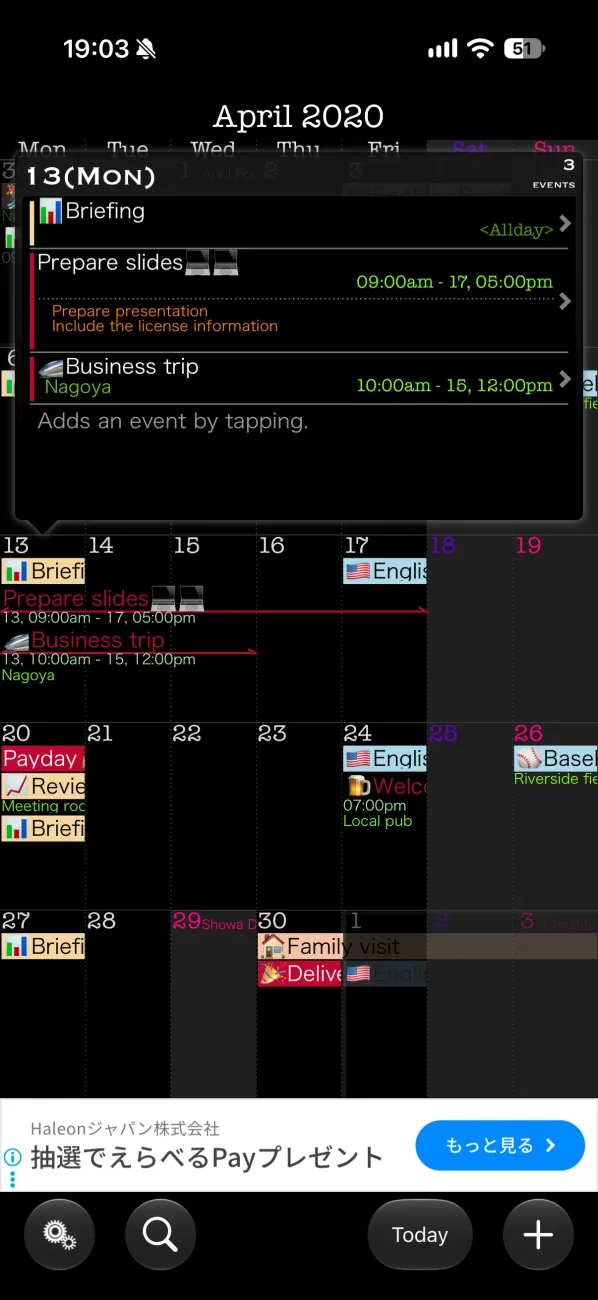
Your daily schedule will be displayed in a popup by tapping the date.
Please try! !
Functions:
+ Monthly calendar view
+ Detailed Event view
+ Launching the maps from a location text
+ Launching the browser from a URL in notes
+ Sync with the standard calendar app.
+ Create a event from input histories.
+ Color selection per calendar (Text color also available in black and white)
+ Adding or deleting calendar in iCloud or Local
+ Event repeat
(Yearly, Monthly, Weekly, Bi-Weekly, Daily and Custom setting)
+ Alarm
+ Beginning of the week
+ Fonts ( 4 types, 7 size variations) And bold
+ Layout of an event display ( 3 types )
+ Icon badge
+ Event copy
+ Landscape mode
+ And other Customizing...
+ Supports for URL Scheme ('com.gggatelier.moncalite://')
+ Supports iOS 15 / 16 / 17 / 18 / 26 / 27
+ Supports multitasking(Slide Over & Split View)
--------------------------
Feedback, requests are
X(Twitter): @gggatelier
mail: gggatelier.apps@gmail.com
Neue Funktionen
Version 3.1.1 · 16.11.2026
- Fixed an issue where the date in the top-left corner would not change color when selected during Multiple Copy
- Fixed an issue with notifications
- Fixed issues that were causing crashes
App-Datenschutz
Was gggatelier im App Store zum Umgang dieser App mit Daten angibt.
-
Daten, die zum Tracking Ihrer Person verwendet werden
Können verwendet werden, um Sie über Apps und Websites anderer Unternehmen hinweg zu verfolgen.
- Standort
- Kennungen
- Nutzungsdaten
- Diagnose
-
Mit Ihnen verknüpfte Daten
Können erfasst und mit Ihrer Identität verknüpft werden.
- Standort
- Kennungen
- Nutzungsdaten
- Diagnose
-
Nicht mit Ihnen verknüpfte Daten
Können erfasst werden, sind aber nicht mit Ihrer Identität verknüpft.
- Diagnose
Die Datenschutzpraktiken können variieren, zum Beispiel je nach den von Ihnen verwendeten Funktionen oder Ihrem Alter.
Informationen
- Anbieter
- Masaki Mori
- Kategorie
- Produktivität
- Version
- 3.1.1
- Aktualisiert
- 16.11.2026
- Veröffentlicht
- 20.01.2013
- Größe
- 88,2 MB
- Erfordert
- iOS 15.5 oder neuer
- Altersfreigabe
- 4+
- Sprachen
- Englisch, Japanisch
- Copyright
- © 2013 - 2026 gggatelier
Das könnte Ihnen auch gefallen
-
 Otona Calendar: Simple PlannerProduktivität
-
 Vertical Planner:Calendar,TodoProduktivität
-
 ColumnCalendar and MemoProduktivität
-
 SnapCal - for Google CalendarProduktivität
-
 CalCal|Einfacher KalenderScrolle und sieh alle Termine
-
 Einfach KalenderSimple and stylish Calendar
-
 Supercal KalendarKlar und Einfach zu navigieren
-
 Vertikaler MonatskalenderEinfacher Mehrfachkalender
-
 Simple Calendar: Widget CalProduktivität
-
 Page CalendarDer Kalender zum Blättern