NoteScrap: Note, Memo, OCR
Handwriting scan & organize
Entwickelt für iPhone, iPad, Mac
Kostenlos
- Altersfreigabe4+
- KategorieProduktivität
- EntwicklerKiwon Chang
- SprachenKoreanisch+ 1 weitere
- Größe3,9 MB
Verlinkt auf die offizielle App Store-Seite
Download.org hostet keine Datei von NoteScrap: Note, Memo, OCR. Die Schaltfläche öffnet die App-Seite bei App Store, wo Kiwon Chang die App veröffentlicht. Eintrag zuletzt geprüft am 12.11.2026.
Screenshots


Info
Der Entwickler hat diesen Text nicht in Ihrer Sprache bereitgestellt.
Easily convert handwriting, photos, and files into text, then organize everything with a clean Markdown editor.
NoteScribe is a note-taking app that lets you quickly capture moments as notes and manage them with folders and search.
Simply attach a photo or file, or use the Share button to send content to NoteScribe — it'll be converted to text instantly.
Key Features
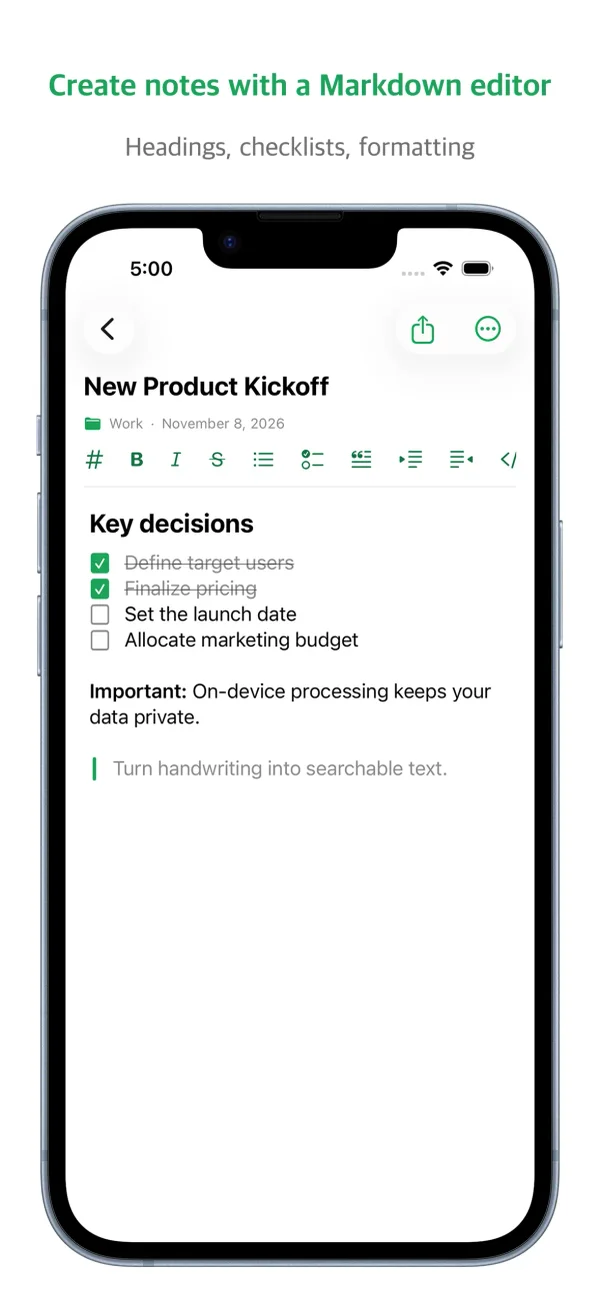
Markdown Editor — Supports headings, bold, italic, strikethrough, bullets, checkboxes, code blocks, quotes, and more
Handwriting, Photo & File Conversion - Convert handwritten notes, images, and attachments into text
Easy Sharing - Share directly from GoodNotes, Photos, or any app using the Share button
On-Device OCR - Recognizes text without an internet connection; your handwriting is never sent to a server
Korean + English Recognition - Automatically recognizes mixed Korean and English handwriting
Folder Organization - Create folders to organize notes by topic
Search - Search note titles and content to find what you need instantly
Export - Export notes as TXT or Markdown (.md) files
iCloud Sync - Sync and continue writing across iPhone and iPad
Who It's For
Professionals who want to quickly capture meeting and work notes
Students who want to take class notes and study materials digitally
Writers who want to convert handwritten drafts into text
GoodNotes users who want to organize accumulated handwriting as text
Anyone who wants to save content from photos or documents as notes
Pricing
Free to use.
Neue Funktionen
Version 1.8 · 08.11.2026
Fixed bugs and improved stability.
App-Datenschutz
Was Kiwon Chang im App Store zum Umgang dieser App mit Daten angibt.
-
Nicht mit Ihnen verknüpfte Daten
Können erfasst werden, sind aber nicht mit Ihrer Identität verknüpft.
- Kennungen
- Nutzungsdaten
- Diagnose
Die Datenschutzpraktiken können variieren, zum Beispiel je nach den von Ihnen verwendeten Funktionen oder Ihrem Alter.
Informationen
- Anbieter
- Kiwon Chang
- Kategorie
- Produktivität
- Version
- 1.8
- Aktualisiert
- 08.11.2026
- Veröffentlicht
- 26.08.2026
- Größe
- 3,9 MB
- Erfordert
- iOS 17.6 oder neuer
- Altersfreigabe
- 4+
- Preis
- Kostenlos
- Sprachen
- Koreanisch, Englisch
- Copyright
- © 2026 장기원