NoteScrap: Note, Memo, OCR
Handwriting scan & organize
Designed for iPhone, iPad, Mac
- Age rating4+
- CategoryProductivity
- DeveloperKiwon Chang
- LanguagesKorean+ 1 more
- Size3.9 MB
Links to the official App Store page
Download.org hosts no file of NoteScrap: Note, Memo, OCR. The button opens its official App Store page, published by Kiwon Chang. Listing last checked on Nov 12, 2026.
Screenshots


About
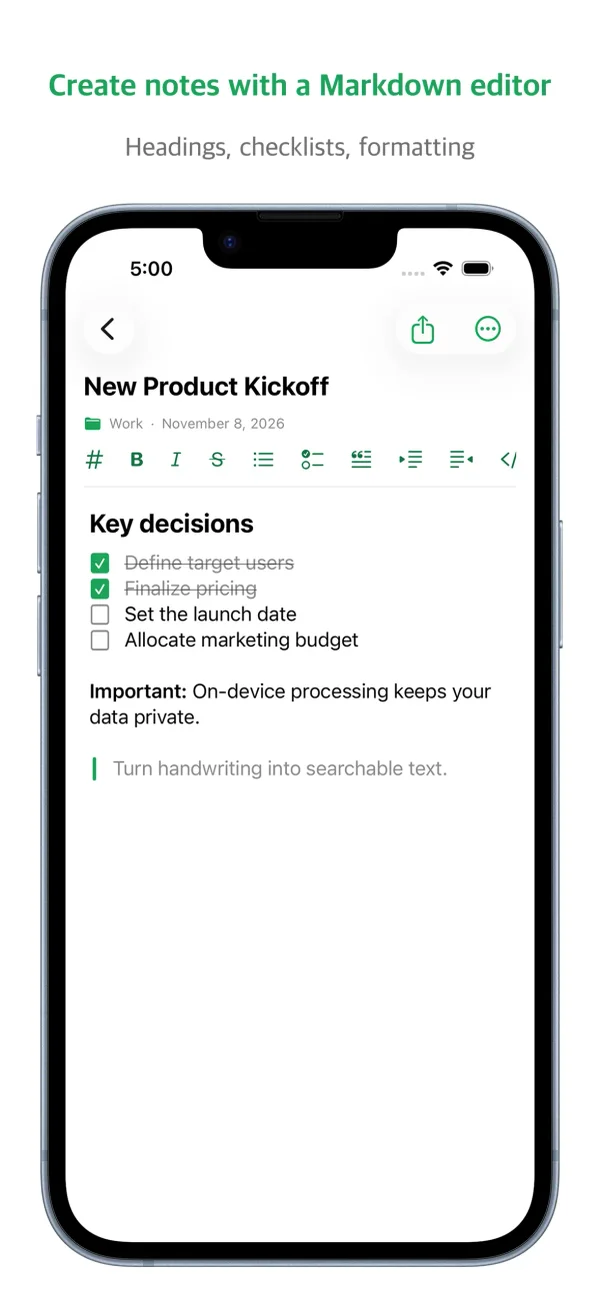
Easily convert handwriting, photos, and files into text, then organize everything with a clean Markdown editor.
NoteScribe is a note-taking app that lets you quickly capture moments as notes and manage them with folders and search.
Simply attach a photo or file, or use the Share button to send content to NoteScribe — it'll be converted to text instantly.
Key Features
Markdown Editor — Supports headings, bold, italic, strikethrough, bullets, checkboxes, code blocks, quotes, and more
Handwriting, Photo & File Conversion - Convert handwritten notes, images, and attachments into text
Easy Sharing - Share directly from GoodNotes, Photos, or any app using the Share button
On-Device OCR - Recognizes text without an internet connection; your handwriting is never sent to a server
Korean + English Recognition - Automatically recognizes mixed Korean and English handwriting
Folder Organization - Create folders to organize notes by topic
Search - Search note titles and content to find what you need instantly
Export - Export notes as TXT or Markdown (.md) files
iCloud Sync - Sync and continue writing across iPhone and iPad
Who It's For
Professionals who want to quickly capture meeting and work notes
Students who want to take class notes and study materials digitally
Writers who want to convert handwritten drafts into text
GoodNotes users who want to organize accumulated handwriting as text
Anyone who wants to save content from photos or documents as notes
Pricing
Free to use.
What’s new
Version 1.8 · Nov 8, 2026
Fixed bugs and improved stability.
App privacy
What Kiwon Chang declares on the App Store about how this app handles data.
-
Data not linked to you
May be collected but is not linked to your identity.
- Identifiers
- Usage data
- Diagnostics
Privacy practices may vary, for example with the features you use or your age.
Information
- Seller
- Kiwon Chang
- Category
- Productivity
- Version
- 1.8
- Updated
- Nov 8, 2026
- Released
- Aug 26, 2026
- Size
- 3.9 MB
- Requires
- iOS 17.6 or later
- Age rating
- 4+
- Languages
- Korean, English
- Copyright
- © 2026 장기원
You might also like
-
 MemoTree - Notes OrganizerOrganize Notes in Folders
-
 memo:we - Shared NotesNotes, checklists & photos
-
 추로 - 구독 없는 AI 회의록Productivity
-
 MemoJetProductivity
-
 Skyblue NoteProductivity
-
 PhotoDiet - Compress Photos앨범 다이어트
-
 dol - Markdown NotesOffline, synced to your server
-
 talkdam - Capture daily chatsPersonal chat-style notepad
-
 QueryPie AIPAutomate work with AI Agents