SideTVs
ADB Control, TV Casting
Entwickelt für iPhone, iPad
Kostenlos · In-App-Käufe
- Altersfreigabe4+
- KategorieDienstprogramme
- Entwickler强 王
- SprachenEnglisch+ 12 weitere
- Größe22,3 MB
Verlinkt auf die offizielle App Store-Seite
Download.org hostet keine Datei von SideTVs. Die Schaltfläche öffnet die App-Seite bei App Store, wo 强 王 die App veröffentlicht. Eintrag zuletzt geprüft am 15.11.2026.
Screenshots
Info
Der Entwickler hat diesen Text nicht in Ihrer Sprache bereitgestellt.
SideTVs — Turn Your iPhone into a TV Control Hub
SideTVs is a wireless control and screen-casting tool designed for TVs, smart TVs, and VR headsets. Simply connect your phone and device to the same Wi-Fi network to enable remote control, media casting, and screen mirroring—no extra hardware required.
【Device Connection】
• Supports three connection methods: manual IP entry, LAN scanning, and wireless debugging pairing codes
• Automatically saves device history and reconnects upon returning to the app
• Displays real-time connection status and device information
【Virtual Remote Control】
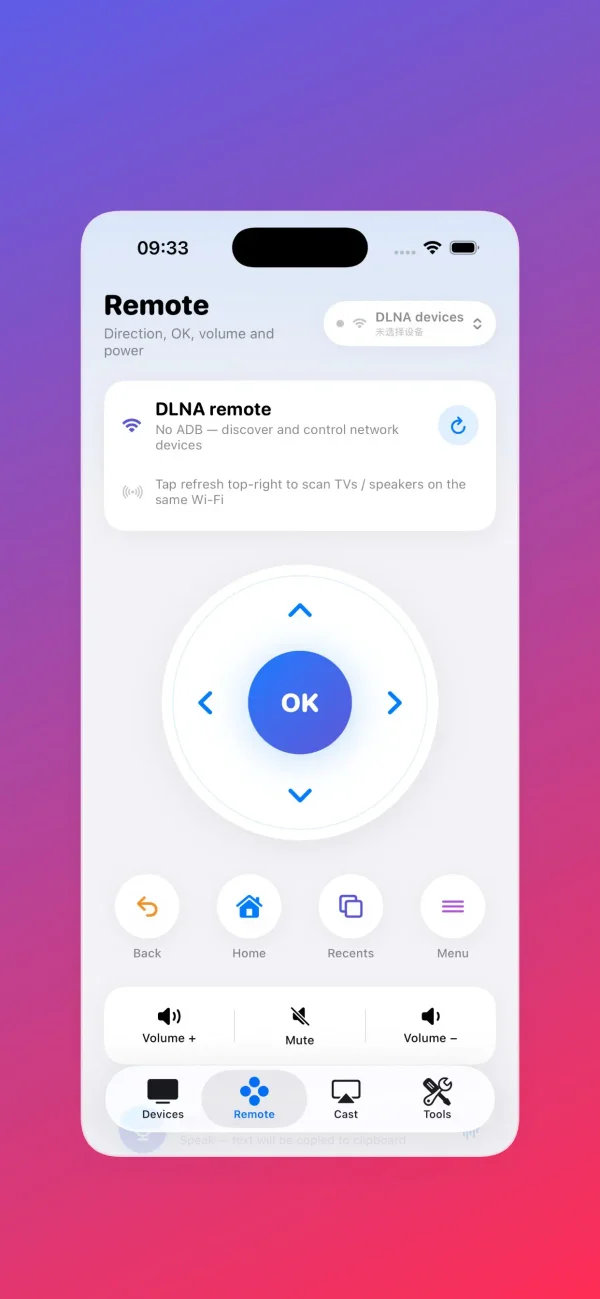
• Includes full directional keys, OK, Back, Home, Volume, Power, and media controls
• Supports ADB command transmission for controlling Android TVs and TV boxes
• Supports DLNA remote control and bridges ADB devices on the same IP for a complete control experience
• Compatible with native remote protocols for brands like Samsung, LG, Sony, and Roku
• Supports voice input for sending text to the TV for searches or data entry
【Casting Hub】
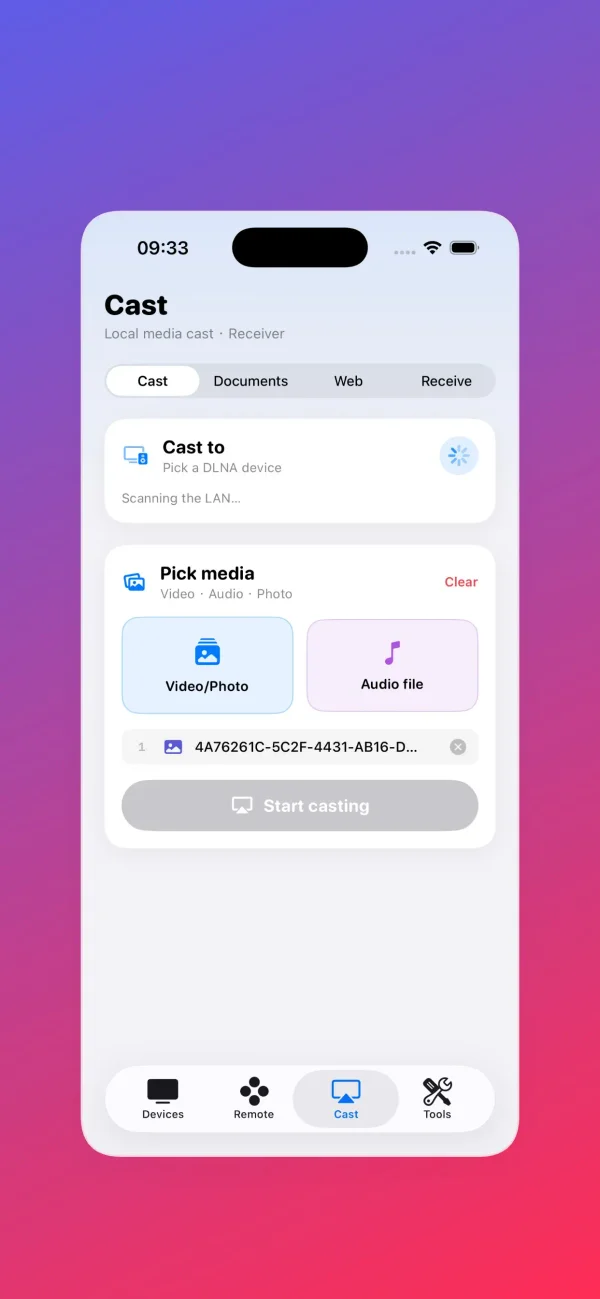
• Media Casting: Cast local videos, audio, and images to DLNA-enabled TVs or speakers; supports simultaneous playback on multiple devices
• Document Casting: Import PDFs, PPTs, Word docs, etc., and cast them page-by-page to the TV; supports zooming and automatic slideshows
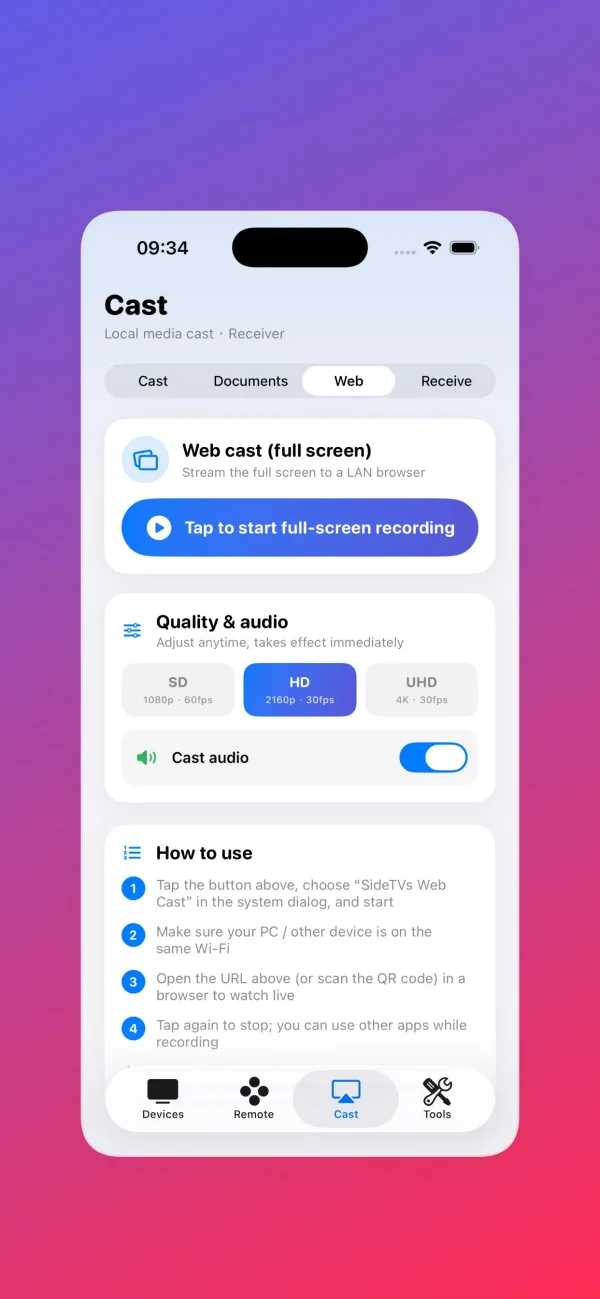
• Web Casting: Capture and stream the full screen to a LAN-based browser; viewable on computers or tablets via the link
• Receiver Mode: Turn your phone into a DLNA receiver to accept casts from other devices on the LAN
【Pro Tools】 (SideTV Pro)
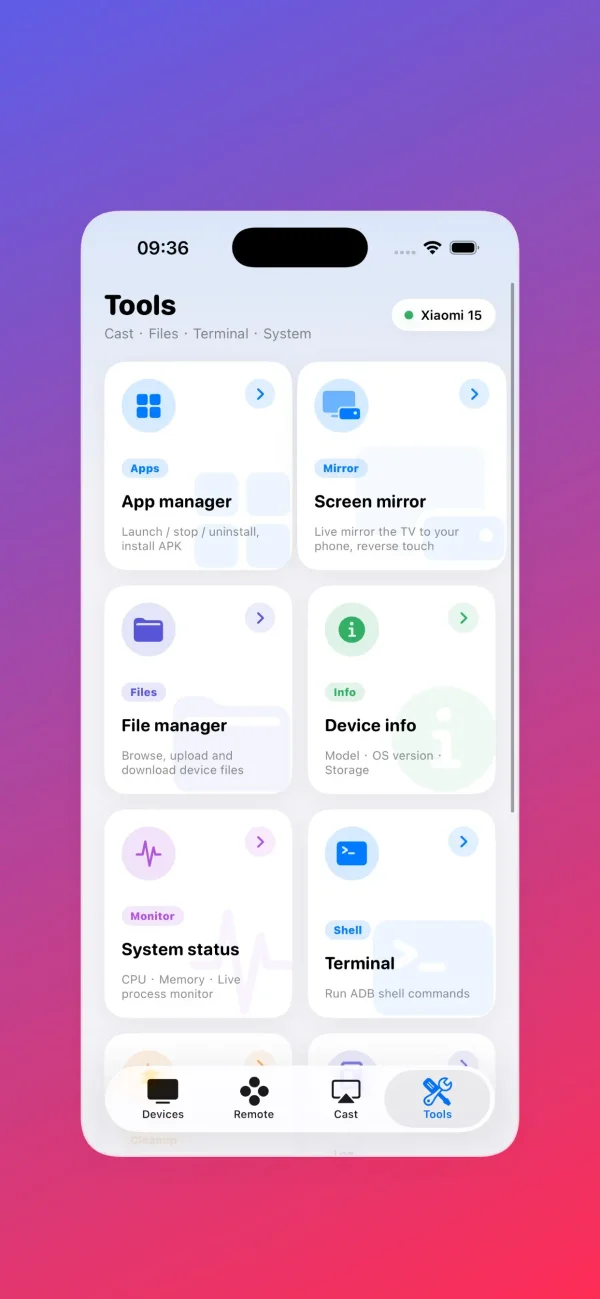
• App Management: View, launch, uninstall, and install APKs
• Screen Mirroring: Low-latency H.264 mirroring with touch feedback; supports ultra-high-definition casting for Quest headsets
• File management, terminal shell, system status, log viewing, quick text input, one-tap cleanup, and more
【More Features】
• Home Screen widgets and Dynamic Island support for quick status checks and remote control
• Optimized for iPhone and iPad widescreen layouts
Usage Note
SideTVs requires local network permissions to discover and control devices on the same LAN. Some features rely on the device's wireless debugging (ADB) or DLNA capabilities; please ensure the corresponding options are enabled on your TV or streaming box. You can try the remote control and screen casting functions for free five times; upgrade to SideTVs Pro to unlock all professional features.
Terms of Use (EULA): https://www.apple.com/legal/internet-services/itunes/dev/stdeula/
Privacy Policy: https://www.termsfeed.com/live/c9a159bf-3dc0-4ee8-84fd-7d47f5ad3edd
Neue Funktionen
Version 1.5.2 · 15.10.2026
General fixes and updates
App-Datenschutz
Was 强 王 im App Store zum Umgang dieser App mit Daten angibt.
-
Keine Daten erfasst
Der Entwickler erfasst keine Daten von dieser App.
Die Datenschutzpraktiken können variieren, zum Beispiel je nach den von Ihnen verwendeten Funktionen oder Ihrem Alter.
Informationen
- Anbieter
- 强 王
- Kategorie
- Dienstprogramme
- Version
- 1.5.2
- Aktualisiert
- 15.10.2026
- Veröffentlicht
- 13.06.2026
- Größe
- 22,3 MB
- Erfordert
- iOS 16.0 oder neuer
- Altersfreigabe
- 4+
- Preis
- Kostenlos
- In-App-Käufe
- Ja
- Sprachen
- Englisch, Arabisch, Dänisch, Niederländisch, Französisch, Deutsch, Japanisch, Koreanisch, Russisch, Vereinf. Chinesisch, Schwedisch, Tradit. Chinesisch + 1 weitere
- Copyright
- © 2026 wangqiang
Das könnte Ihnen auch gefallen
-
 Pinger - Network MonitorDienstprogramme
-
 Private Vault – Offline SafeDienstprogramme
-
 SilentProof: Noise ComplaintDienstprogramme
-
 小吉历-小清新万年历老黄历农历卡片日历节日节气实况天气预报Dienstprogramme
-
 Unicode Symbol-TastaturSonderzeichen, Pfeile, Glyphen
-
 FastCut-快剪Dienstprogramme
-
 MileageMate: Fuel TrackerDienstprogramme
-
 Countix – Simple CounterDienstprogramme
-
 Diktiergerät: KI-TranskriptionSprecher-Tags, KI-Protokolle
-
 Quick Check SplitterDienstprogramme