
SmartClick TV Remote Control
Channel Tools for Home Use
Entwickelt für iPhone
Kostenlos · In-App-Käufe
- Altersfreigabe4+
- KategorieFoto und Video
- EntwicklerELITE SOFTWARE AUTOMATION INTL LLC
- SprachenEnglisch
- Größe13,9 MB
Verlinkt auf die offizielle App Store-Seite
Download.org hostet keine Datei von SmartClick TV Remote Control. Die Schaltfläche öffnet die App-Seite bei App Store, wo ELITE SOFTWARE AUTOMATION INTL LLC die App veröffentlicht. Eintrag zuletzt geprüft am 16.11.2026.
Screenshots

Info
Der Entwickler hat diesen Text nicht in Ihrer Sprache bereitgestellt.
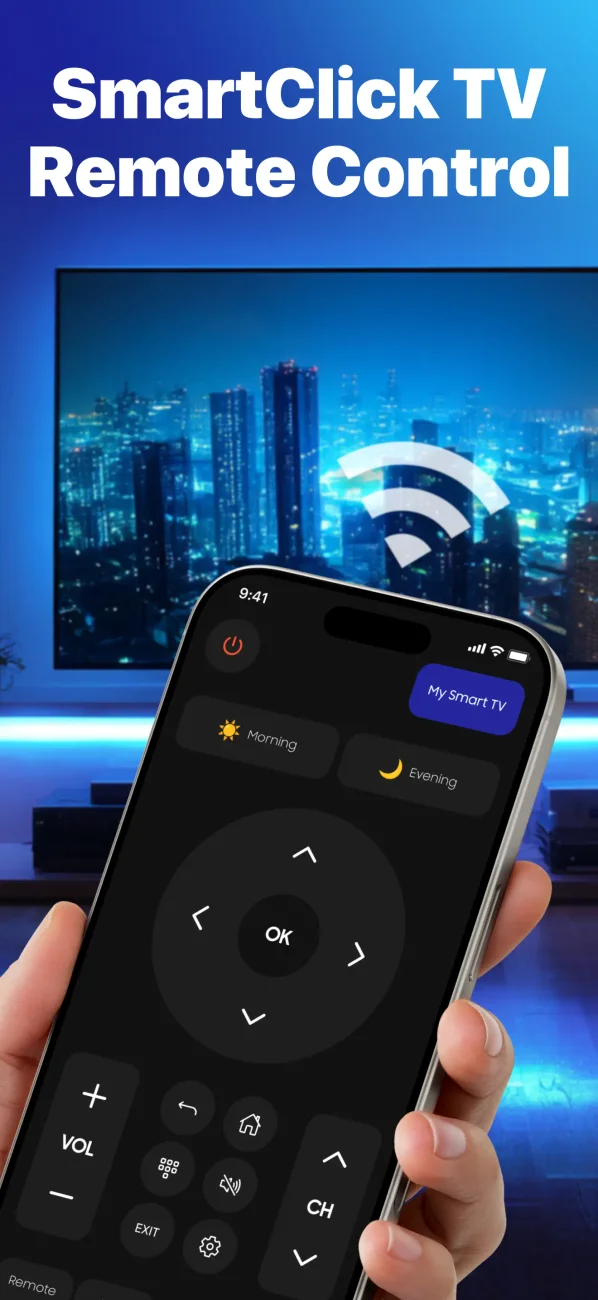
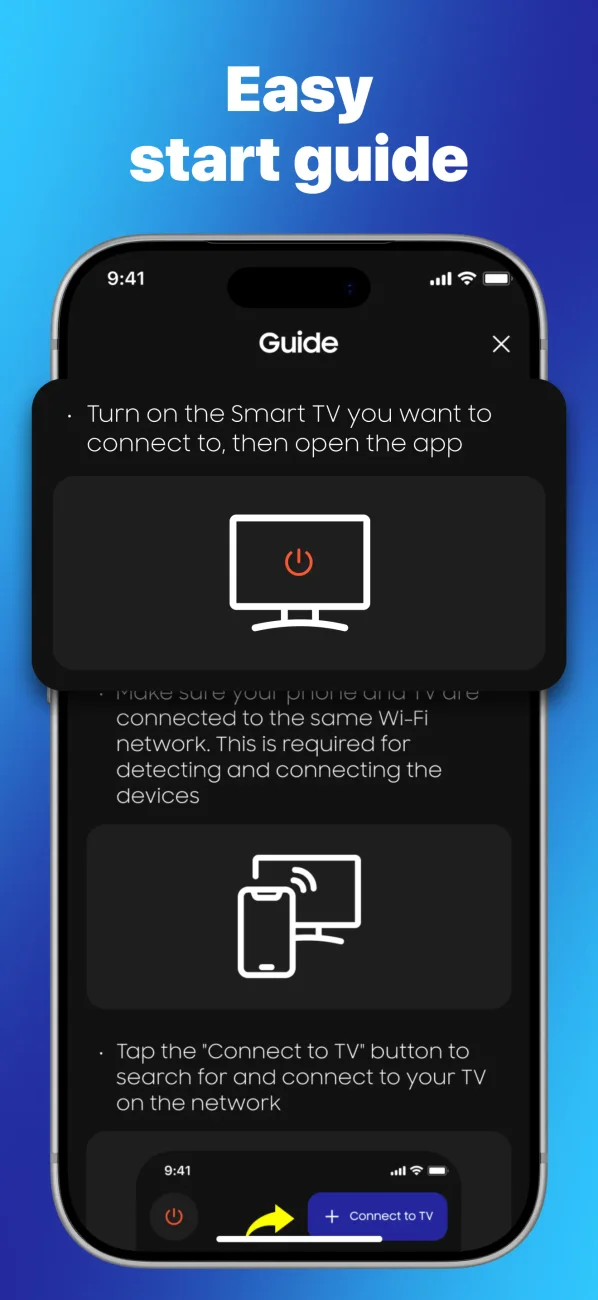
Experience smoother viewing with SmartClick TV Remote Control, turning your phone into a convenient tool for managing channels, sound, apps, and custom shortcuts from a smooth, thoughtfully arranged interface.
Core Features:
1. Universal Remote Screen: Control your Smart TV directly from your phone. Power on/off, change channels, adjust volume, mute, navigate menus, or return to Home — everything you need in one place.
2. Smart App Control: Browse and launch installed TV apps directly from your smartphone. Navigate effortlessly with arrow and OK buttons for smooth, fast interaction across your favorite content platforms.
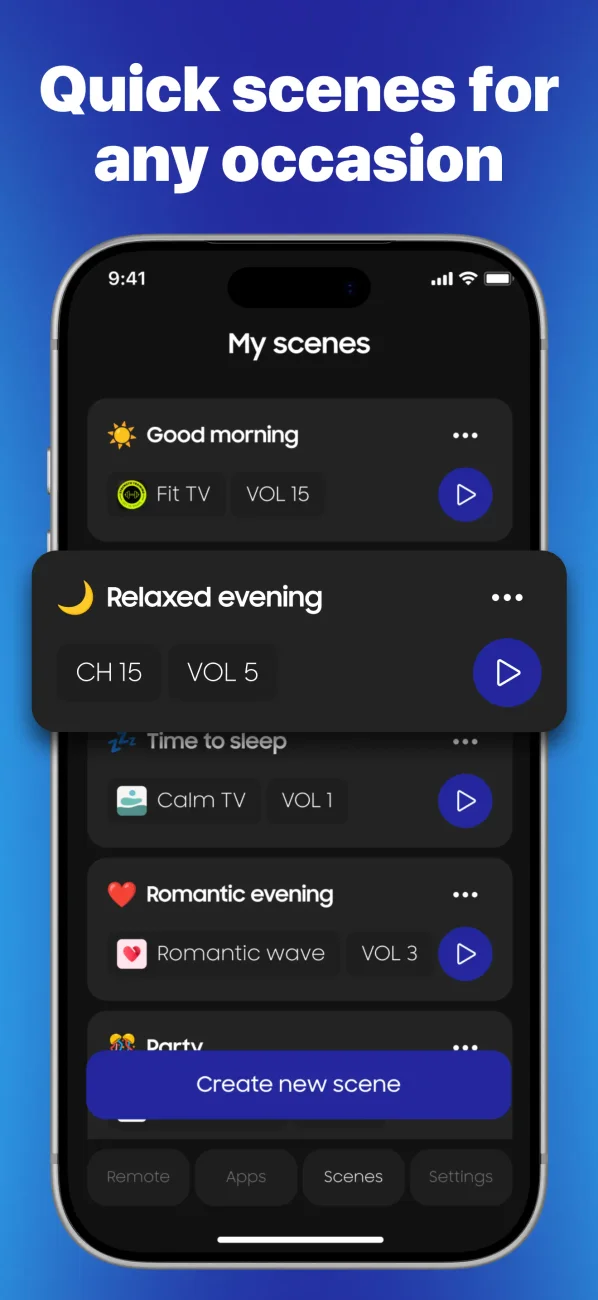
3. Quick Scenes: Automate your favorite actions with personalized “Scenes.” Combine multiple commands into one tap — for example:
• Quiet Evening — lower the volume three times and mute.
• Quick Channel Access — open the number pad, enter your favorite channel, and confirm.
• Energetic Morning — increase the volume and switch to the next channel.
• Return to TV — close all open menus and go back to live viewing.
4. My Scenes: View, edit, and organize your saved Scenes. Create new ones with custom steps, timing, and sequence order. Add your favorite Scenes to the main remote screen for instant access.
Premium Features:
• Launch apps on your Smart TV directly from your phone.
• Create unlimited custom Scenes.
Disclaimer:
The app supports working with Samsung Smart TVs.
This application is a third-party remote control and is not affiliated with Samsung Electronics Inc.
The Samsung name and brand are used solely to identify compatible devices.
Privacy Policy: https://docs.google.com/document/d/1id5dCl0GvnK5vz572PEjy13bRWzXHyVbohIT32-Ix1A/edit?usp=sharing
Term of Use: https://docs.google.com/document/d/1XXeKCTOgCgwuES0PWp71Lmo0fUzPjv0vhY8gjZ9PvV4/edit?usp=sharing
Neue Funktionen
Version 1.0.3 · 07.07.2026
Improved application productivity.
App-Datenschutz
Was ELITE SOFTWARE AUTOMATION INTL LLC im App Store zum Umgang dieser App mit Daten angibt.
-
Keine Daten erfasst
Der Entwickler erfasst keine Daten von dieser App.
Die Datenschutzpraktiken können variieren, zum Beispiel je nach den von Ihnen verwendeten Funktionen oder Ihrem Alter.
Informationen
- Anbieter
- ELITE SOFTWARE AUTOMATION INTL LLC
- Kategorie
- Foto und Video
- Version
- 1.0.3
- Aktualisiert
- 07.07.2026
- Veröffentlicht
- 25.11.2025
- Größe
- 13,9 MB
- Erfordert
- iOS 16.4 oder neuer
- Altersfreigabe
- 4+
- Preis
- Kostenlos
- In-App-Käufe
- Ja
- Sprachen
- Englisch
- Copyright
- © ELITE SOFTWARE AUTOMATION INTL LLC
Das könnte Ihnen auch gefallen
-
 Smart Remote control for LGFoto und Video
-
 Cast to TV for ChromecastFoto und Video
-
 Tapaz AI: Photo Editor MakerCreative edits made simple
-
 AI Headshot Pro・Bild GeneratorKI Picture Editor for Passfoto
-
 Screen Cast TV: Air DisplaySmart Mirroring: View & Mirror
-
 TuneAI: Body & Face EditorFoto und Video
-
 Syntes.AI: Generate MagicViral Content Sofort Erzeugen
-
 CartoonAI GPTAnime avatar, Comic character
-
 SeeD.AI: Video Generator.Deine Fantasie Wird Echt