- Altersfreigabe17+
- KategorieEntwickler-Tools
- Entwickler越 王
- SprachenEnglisch+ 1 weitere
- Größe10,3 MB
Zcode Mobile ist bei App Store derzeit möglicherweise nicht verfügbar
Bei unserer letzten Prüfung war der Store-Eintrag nicht erreichbar. Der Link führt weiterhin zur offiziellen App Store-Seite.
Screenshots
Info
Der Entwickler hat diesen Text nicht in Ihrer Sprache bereitgestellt.
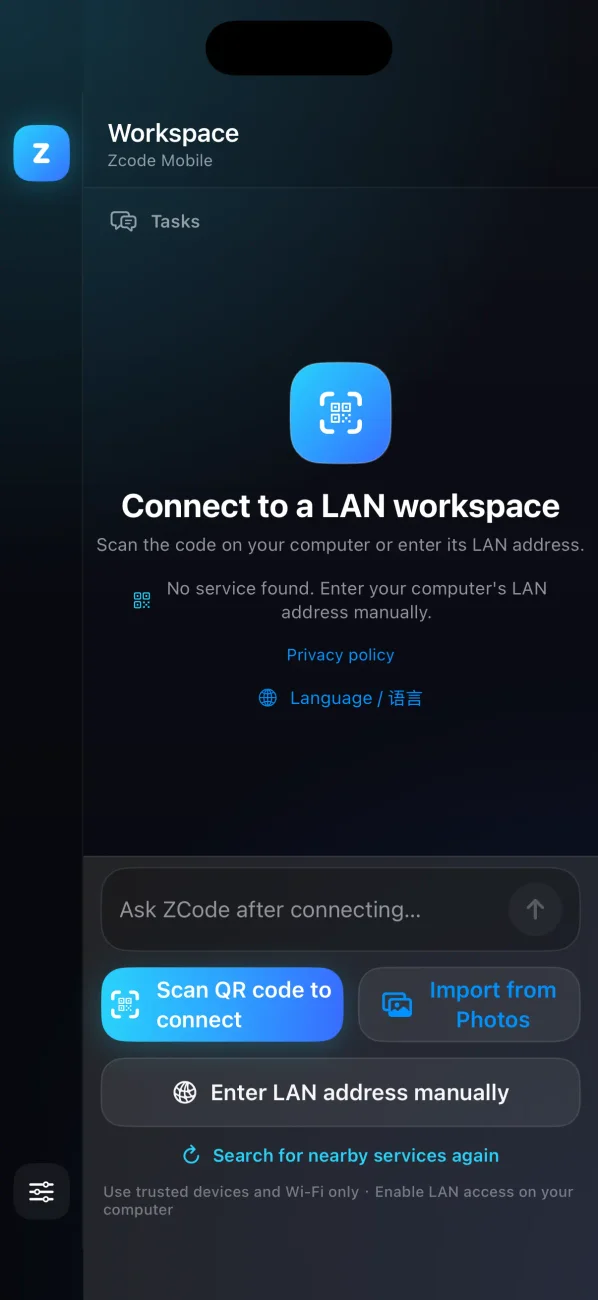
Zcode Mobile is an independent third-party mobile client for the ZCode desktop workspace. Connect over your local network and keep viewing and working in your development workspace from your iPhone.
Key features:
• Scan the mobile-connection QR code shown by ZCode on your computer
• Import a connection code directly from your photo library
• Enter your computer's private IPv4 address, .local hostname, or IPv6 address by hand
• Automatically discover compatible services on your local network
• Remember your last connection and verify it automatically on the next launch
• Enter the main workspace only after it has been confirmed reachable
• Refresh, rescan, or disconnect with one tap
• Once connected, hide web-page toolbars and other elements that aren't needed on mobile wherever possible, leaving more screen space for your workspace
How the app stays free:
Zcode Mobile is free. After 3 cumulative foreground minutes in an online workspace, a dismissible full-screen native advertising page opens over the current workspace, without changing conversations or navigating away. The web page stays mounted; close the ad to continue with unsent input retained. The keyboard is dismissed while the ad is visible. At most one attempt is made in any continuous 48 hours, including after restarting. This placement renders Google Native Advanced assets with ad attribution, AdChoices, and a separate close control; it does not call an interstitial popup. At the first eligible page, choose consented non-personalized ads or decline extra data and try eligible limited ads. Later pages use the saved mode automatically, with no View ad or Play button. Limited ads still use IP/technical data and may use fraud-only storage; Google UMP requirements apply and fill is not guaranteed. Google personalization and publisher first-party ID remain disabled, and iOS tracking is not required. Close immediately or fully disable automatic ads in settings. Image/video assets depend on the network, video starts muted, and no reward is offered. Declining, failure, or no fill never restricts the workspace. On-device diagnostic counters do not record chats, URLs, or device identifiers and are not uploaded to a developer server.
The native interface supports English and Simplified Chinese. Automatic mode uses Chinese for the mainland China App Store storefront and English elsewhere, falling back to device region if no storefront is available. Use "Language / 语言" on the connection screen to choose either language manually. Workspace content and its own interface come from the connected desktop service and are not automatically translated.
Zcode Mobile requires the mobile remote-control feature of the ZCode desktop app. It is an independently developed third-party client and is not an official ZCode product.
Neue Funktionen
Version 2.1.1 · 30.10.2026
After 3 cumulative foreground minutes in an online workspace, a dismissible full-screen native ad page appears automatically, without navigating away or changing conversations. Close it to resume the same workspace; unsent input is retained.
Improved iOS ad-attribution configuration and added on-device-only ad diagnostics.
At most one attempt in any continuous 48 hours. Non-personalized/limited modes and skip/disable choices remain available. Image or video assets depend on network availability; no reward is offered.
App-Datenschutz
Was 越 王 im App Store zum Umgang dieser App mit Daten angibt.
-
Daten, die zum Tracking Ihrer Person verwendet werden
Können verwendet werden, um Sie über Apps und Websites anderer Unternehmen hinweg zu verfolgen.
- Kennungen
-
Mit Ihnen verknüpfte Daten
Können erfasst und mit Ihrer Identität verknüpft werden.
- Standort
- Kennungen
- Nutzungsdaten
-
Nicht mit Ihnen verknüpfte Daten
Können erfasst werden, sind aber nicht mit Ihrer Identität verknüpft.
- Diagnose
Die Datenschutzpraktiken können variieren, zum Beispiel je nach den von Ihnen verwendeten Funktionen oder Ihrem Alter.
Informationen
- Anbieter
- 越 王
- Kategorie
- Entwickler-Tools
- Version
- 2.1.1
- Aktualisiert
- 30.10.2026
- Veröffentlicht
- 25.08.2026
- Größe
- 10,3 MB
- Erfordert
- iOS 17.0 oder neuer
- Altersfreigabe
- 17+
- Sprachen
- Englisch, Vereinf. Chinesisch
- Copyright
- © 2026 Yue Wang
Das könnte Ihnen auch gefallen
-
 zcode connectEntwickler-Tools
-
 Lody - Run Code Agent AnywhereEntwickler-Tools
-
 Agents AnywhereEntwickler-Tools
-
 OpenClient for OpenCodeEntwickler-Tools
-
 OpenCode Mobile AppEntwickler-Tools
-
 掌中鲸Entwickler-Tools
-
 NowdexTrack your agent usage
-
 Happier - Claude, Codex remoteOpenCode, Pi, Grok Coding-App
-
 Hermes ConduitEntwickler-Tools
-
 QuickTUI: AI Agent TerminalClaude, Codex, herdr & tmux