AVIATOR WorldTimer Watch face
WatchBase- PEGI 3Clasificación por edad
- PersonalizaciónCategoría
- 28/10/2026Actualizado
- 1,79 €Precio
Enlaza a la ficha oficial de wb.worldtimer.aviator en Google Play. Última comprobación el 13/11/2026.
Acerca de esta aplicación
Traducción automática de Google. Idioma original: Inglés (Estados Unidos).
¡Un cronómetro mundial en tu muñeca!
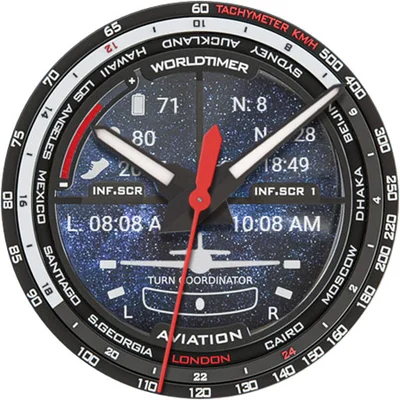
¡Un AVIATOR WorldTimer único y realista con una esfera de reloj TURN Coordinator funcional para Wear OS!
Disfrute del aspecto clásico con funcionalidad.
¡Con dos complicaciones personalizadas intercambiables, puedes personalizar la información que te importa!
NOTA: ¡Lea la sección de instrucciones y la sección de instalación!
ⓘ Características:
- Diseño AVIADOR.
- Diseño de temporizador mundial.
- Coordinador de giros (rango -45°/+45°).
- Muy realista.
- Dos complicaciones personalizadas cambiables.
- 5 manecillas principales cambiables de diferentes colores.
- 8 colores diferentes cambiables SEGUNDOS color de mano.
- 3 colores/temas de FONDO cambiables.
- Tema negro, tema blanco, tema nocturno.
- Hora y fecha.
- Recuento de notificaciones (no leídas).
- Visualización de frecuencia cardíaca.
- Visualización del recuento de pasos.
- Indicador de bateria
- Analógico
- digitales
- 13 zonas horarias diferentes (principales ciudades del mundo).
- Vista rápida de dónde está el día/la noche en todo el mundo.
- Hora de Londres (Digital).
- Hora actual (Digital).
- AOD (Siempre en exhibición).
ⓘ Cómo:
- Para personalizar la esfera de tu reloj, toca y mantén presionada la pantalla, luego toca personalizar.
No te pierdas nuestras mejores esferas de reloj REALISTAS:
LUNA BENEDICTA - https://play.google.com/store/apps/details?id=wb.luna.benedicta
ILUMINADOR Digital: https://play.google.com/store/apps/details?id=wb.illuminator.digital
MAESTRO ANALÓGICO: https://play.google.com/store/apps/details?id=wb.analog.master
ⓘ Instalación
Cómo instalar: https://watchbase.store/static/ai/
Después de la instalación: https://watchbase.store/static/ai/ai.html
Si tiene algún problema al instalar la esfera del reloj, tenga en cuenta que no tenemos control sobre el proceso de instalación ni sobre ningún otro proceso de Google Play/Watch. El problema más común al que se enfrenta la gente es que después de comprar la esfera del reloj y instalarla, no pueden verla ni encontrarla.
Para aplicar la esfera del reloj después de instalarla, toque y mantenga presionada la pantalla principal (la esfera del reloj actual) y deslice el dedo hacia la izquierda para buscarla. Si no puede verlo, toque el signo "+" al final (agregue una esfera de reloj) y busque nuestra esfera de reloj allí.
Usamos una aplicación complementaria para el teléfono para facilitar el proceso de instalación. Si compra nuestra esfera de reloj, toque el botón de instalación (en la aplicación del teléfono), debe verificar su reloj... aparecerá una pantalla con la esfera del reloj... toque instalar nuevamente y espere a que finalice la instalación. Si ya compraste la esfera del reloj y todavía te pide que la compres nuevamente en el reloj, no te preocupes, no se te cobrará dos veces. Este es un problema de sincronización común, solo espera un poco o intenta reiniciar tu reloj.
Otra solución para instalar la esfera del reloj es intentar instalarla desde un navegador, iniciado sesión con su cuenta (cuenta de Google Play que usa en el reloj).
ÚNETE a WatchBase.
Grupo de Facebook (grupo de esferas de reloj generales):
https://www.facebook.com/groups/1170256566402887/
Pagina de Facebook:
https://www.facebook.com/WatchBase
Instagram:
https://www.instagram.com/watch.base/
SUSCRÍBETE a nuestro canal de YouTube:
https://www.youtube.com/c/WATCHBASE?sub_confirmation=1
https://www.youtube.com/c/WATCHBASE
Mostrar el texto original
A unique and realistic AVIATOR WorldTimer with a working TURN Coordinator watch face for Wear OS!
Enjoy the classic look with functionality.
With two changeable custom complications, you can customize the info that matters to you!
NOTE: Please read the how to section and installation section !!!
ⓘ Features:
- AVIATOR design.
- WorldTimer design.
- Turn coordinator (-45°/+45° range).
- Very realistic.
- Two changeable custom complications.
- 5 different color changeable main hands.
- 8 different color changeable SECONDS hand color.
- 3 changeable BACKGROUND color/theme.
- Black theme, white theme, night theme.
- Time and date.
- Notifications count (unread).
- Heart rate display.
- Steps count display.
- Battery indicator
- Analog
- Digital
- 13 different Time Zones (Major cities around the world).
- Quick glance where is Day/Night around the world.
- London time (Digital).
- Current time (Digital).
- AOD (Always on display).
ⓘ How to:
- To customize your watch face, touch and hold on the screen, then tap on customize.
Don't miss out our top REALISTIC watch faces:
LUNA BENEDICTA - https://play.google.com/store/apps/details?id=wb.luna.benedicta
ILLUMINATOR Digital - https://play.google.com/store/apps/details?id=wb.illuminator.digital
ANALOG MASTER - https://play.google.com/store/apps/details?id=wb.analog.master
ⓘ Installation
How to install: https://watchbase.store/static/ai/
After installation: https://watchbase.store/static/ai/ai.html
If you have any issues installing the watch face, please note that we have no control over the installation process or any other Google Play / Watch processes. The most common issue that people face is after they buy the watch face and install it, they can't see/find it.
In order to apply the watch face after you install it, touch and hold on the main screen (your current watch face) the swipe left to look for it. If you can't see it, tap on the " + " sign at the end (add a watch face) and find our watch face there.
We use a companion app for the phone to make the installation process easier. If you buy our watch face, tap on the install button (on the phone app) you must check your watch.. a screen will appear with the watch face.. tap install again and wait for the installation to finish. If you already bought the watch face and it still asks you to buy it again on the watch, don't worry you will not be charged twice. This is a common synchronization issue, just wait a little or try to restart your watch.
Another solution for installing the watch face is to try to install it from a browser, logged with your account (google play account that you use on the watch).
JOIN WatchBase.
Facebook group (General watch faces group):
https://www.facebook.com/groups/1170256566402887/
Facebook page:
https://www.facebook.com/WatchBase
Instagram:
https://www.instagram.com/watch.base/
SUBSCRIBE to our YouTube channel:
https://www.youtube.com/c/WATCHBASE?sub_confirmation=1
https://www.youtube.com/c/WATCHBASE
Seguridad de los datos
Lo que WatchBase declara en Google Play sobre los datos que esta aplicación recopila y comparte.
- No se comparten datos con tercerosMás información sobre cómo los desarrolladores declaran lo que comparten
- No se recogen datosMás información sobre cómo los desarrolladores declaran lo que recogen
Contacto del desarrollador
- Correo electrónicosupport@belvek.com
- Política de privacidadwatchbase.store
- Dirección6 Prof. Georgi Bradistilov str./blvd. 1700 Sofia Bulgaria
Información
- Ofrecida por
- WatchBase
- Categoría
- Personalización
- Actualizado
- 28/10/2026
- Publicado
- 29/11/2023
- Clasificación por edad
- PEGI 3
- Precio
- 1,79 €
- Nombre del paquete
- wb.worldtimer.aviator