AVIATOR WorldTimer Watch face
WatchBase- Classificação LivreClassificação etária
- PersonalizaçãoCategoria
- 28/10/2026Atualizado
- R$ 8,00Preço
Leva à página oficial de wb.worldtimer.aviator na Google Play. Última verificação em 13/11/2026.
Sobre este app
Tradução automática do Google. Idioma original: Inglês (Estados Unidos).
Um cronômetro mundial no seu pulso!
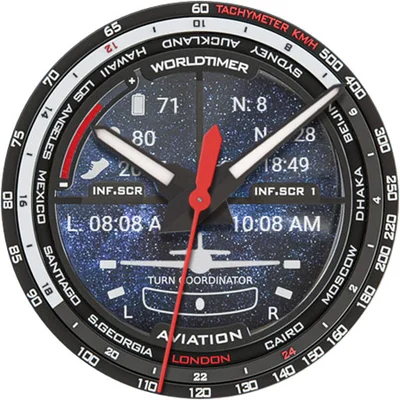
Um AVIATOR WorldTimer único e realista com um mostrador de relógio TURN Coordinator funcional para Wear OS!
Aproveite o visual clássico com funcionalidade.
Com duas complicações personalizadas mutáveis, você pode personalizar as informações que são importantes para você!
NOTA: Por favor, leia a seção como fazer e a seção de instalação!!!
ⓘ Recursos:
- Projeto AVIADOR.
- Projeto WorldTimer.
- Coordenador de giro (faixa -45°/+45°).
- Muito realista.
- Duas complicações personalizadas mutáveis.
- 5 ponteiros principais mutáveis em cores diferentes.
- 8 cores diferentes de ponteiros de SEGUNDOS mutáveis.
- 3 cores/temas de FUNDO mutáveis.
- Tema preto, tema branco, tema noturno.
- Hora e data.
- Contagem de notificações (não lidas).
- Exibição da frequência cardíaca.
- Exibição de contagem de passos.
- Indicador de bateria
- Analógico
- Digitais
- 13 fusos horários diferentes (principais cidades do mundo).
- Uma rápida olhada onde está o dia/noite em todo o mundo.
- Horário de Londres (Digital).
- Hora atual (Digital).
- AOD (sempre em exibição).
ⓘ Como fazer:
- Para personalizar o mostrador do relógio, toque e segure na tela e toque em personalizar.
Não perca nossos principais mostradores de relógio REALÍSTICOS:
LUNA BENEDICTA - https://play.google.com/store/apps/details?id=wb.luna.benedicta
ILUMINADOR Digital - https://play.google.com/store/apps/details?id=wb.illuminator.digital
MESTRE ANALÓGICO - https://play.google.com/store/apps/details?id=wb.analog.master
ⓘ Instalação
Como instalar: https://watchbase.store/static/ai/
Após a instalação: https://watchbase.store/static/ai/ai.html
Se você tiver algum problema ao instalar o mostrador do relógio, observe que não temos controle sobre o processo de instalação ou qualquer outro processo do Google Play/Watch. O problema mais comum que as pessoas enfrentam é que depois de comprarem o mostrador do relógio e instalá-lo, elas não conseguem vê-lo/encontrá-lo.
Para aplicar o mostrador do relógio após instalá-lo, toque e segure na tela principal (o mostrador do relógio atual) e deslize para a esquerda para procurá-lo. Se você não consegue vê-lo, toque no sinal "+" no final (adicione um mostrador do relógio) e encontre o mostrador do relógio lá.
Usamos um aplicativo complementar para o telefone para facilitar o processo de instalação. Se você comprar nosso mostrador de relógio, toque no botão de instalação (no aplicativo do telefone), você deve verificar seu relógio.. uma tela aparecerá com o mostrador do relógio.. toque em instalar novamente e aguarde a conclusão da instalação. Se você já comprou o mostrador do relógio e ele ainda pede para você comprá-lo novamente no relógio, não se preocupe, você não será cobrado duas vezes. Este é um problema comum de sincronização, espere um pouco ou tente reiniciar o relógio.
Outra solução para instalar o mostrador do relógio é tentar instalá-lo a partir de um navegador, logado na sua conta (conta do Google Play que você usa no relógio).
JUNTE-SE ao WatchBase.
Grupo do Facebook (grupo geral de mostradores de relógio):
https://www.facebook.com/groups/1170256566402887/
Página do Facebook:
https://www.facebook.com/WatchBase
Instagram:
https://www.instagram.com/watch.base/
INSCREVA-SE em nosso canal no YouTube:
https://www.youtube.com/c/WATCHBASE?sub_confirmation=1
https://www.youtube.com/c/WATCHBASE
Mostrar o texto original
A unique and realistic AVIATOR WorldTimer with a working TURN Coordinator watch face for Wear OS!
Enjoy the classic look with functionality.
With two changeable custom complications, you can customize the info that matters to you!
NOTE: Please read the how to section and installation section !!!
ⓘ Features:
- AVIATOR design.
- WorldTimer design.
- Turn coordinator (-45°/+45° range).
- Very realistic.
- Two changeable custom complications.
- 5 different color changeable main hands.
- 8 different color changeable SECONDS hand color.
- 3 changeable BACKGROUND color/theme.
- Black theme, white theme, night theme.
- Time and date.
- Notifications count (unread).
- Heart rate display.
- Steps count display.
- Battery indicator
- Analog
- Digital
- 13 different Time Zones (Major cities around the world).
- Quick glance where is Day/Night around the world.
- London time (Digital).
- Current time (Digital).
- AOD (Always on display).
ⓘ How to:
- To customize your watch face, touch and hold on the screen, then tap on customize.
Don't miss out our top REALISTIC watch faces:
LUNA BENEDICTA - https://play.google.com/store/apps/details?id=wb.luna.benedicta
ILLUMINATOR Digital - https://play.google.com/store/apps/details?id=wb.illuminator.digital
ANALOG MASTER - https://play.google.com/store/apps/details?id=wb.analog.master
ⓘ Installation
How to install: https://watchbase.store/static/ai/
After installation: https://watchbase.store/static/ai/ai.html
If you have any issues installing the watch face, please note that we have no control over the installation process or any other Google Play / Watch processes. The most common issue that people face is after they buy the watch face and install it, they can't see/find it.
In order to apply the watch face after you install it, touch and hold on the main screen (your current watch face) the swipe left to look for it. If you can't see it, tap on the " + " sign at the end (add a watch face) and find our watch face there.
We use a companion app for the phone to make the installation process easier. If you buy our watch face, tap on the install button (on the phone app) you must check your watch.. a screen will appear with the watch face.. tap install again and wait for the installation to finish. If you already bought the watch face and it still asks you to buy it again on the watch, don't worry you will not be charged twice. This is a common synchronization issue, just wait a little or try to restart your watch.
Another solution for installing the watch face is to try to install it from a browser, logged with your account (google play account that you use on the watch).
JOIN WatchBase.
Facebook group (General watch faces group):
https://www.facebook.com/groups/1170256566402887/
Facebook page:
https://www.facebook.com/WatchBase
Instagram:
https://www.instagram.com/watch.base/
SUBSCRIBE to our YouTube channel:
https://www.youtube.com/c/WATCHBASE?sub_confirmation=1
https://www.youtube.com/c/WATCHBASE
Segurança dos dados
O que WatchBase declara na Google Play sobre os dados que este app coleta e compartilha.
- Os dados não são compartilhados com terceirosSaiba mais sobre como os desenvolvedores declaram o compartilhamento
- Nenhum dado foi coletadoSaiba mais sobre como os desenvolvedores declaram a coleta
Contato do desenvolvedor
- E-mailsupport@belvek.com
- Política de privacidadewatchbase.store
- Endereço6 Prof. Georgi Bradistilov str./blvd. 1700 Sofia Bulgaria
Informações
- Oferecido por
- WatchBase
- Categoria
- Personalização
- Atualizado
- 28/10/2026
- Lançamento
- 29/11/2023
- Classificação etária
- Classificação Livre
- Preço
- R$ 8,00
- Nome do pacote
- wb.worldtimer.aviator