Programmers Code 1 Watch Face
Time As Art Watch Faces- PEGI 3Clasificación por edad
- PersonalizaciónCategoría
- 8/11/2026Actualizado
- 0,89 €Precio
Enlaza a la ficha oficial de com.watchfacestudio.program_code1 en Google Play. Última comprobación el 20/11/2026.
Acerca de esta aplicación
Traducción automática de Google. Idioma original: Inglés (Estados Unidos).
Coder 1, la innovadora esfera del reloj para programadores, desarrolladores y codificadores web.
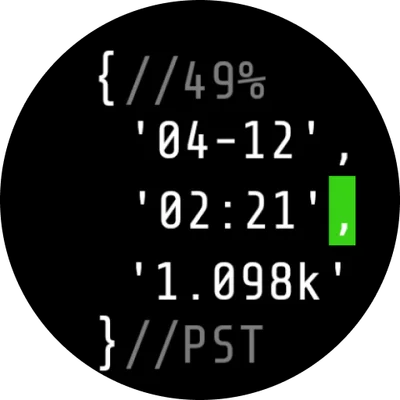
La esfera de reloj perfecta para programadores, desarrolladores de TI y programadores: innovadora, interactiva y divertida. 2 conjuntos de datos controlados por cursor en tiempo real: simplemente mueve el cursor hacia la izquierda inclinando la muñeca para acceder al segundo conjunto de datos. El diseño incluye cursor en tiempo real, comentarios de código, resaltado de sintaxis, llaves, comillas simples... ¡lo que quieras!
*Funciona solo y exclusivamente con Samsung Galaxy Watch 4, 5, 6, 7 y 8.
BREVE VISTA PREVIA ANIMADA:
Visita: https://timeasart.com/video-webm-coder.html
Características de la esfera de reloj para Wear OS:
CONJUNTOS DE DATOS CONTROLADOS POR CURSOR EN TIEMPO REAL (2)
Accede al segundo conjunto de datos simplemente inclinando la muñeca y moviendo el cursor hacia la izquierda (en cualquier fila).
PRIMER CONJUNTO DE DATOS
- % de batería
- Fecha (Mes/Día)
- Hora (HORA:MIN)
- Pasos (k = abreviatura = mil)
- Zona horaria actual
SEGUNDO CONJUNTO DE DATOS:
Accede al segundo conjunto de datos simplemente inclinando la muñeca y moviendo el cursor hacia el extremo izquierdo (en cualquier fila).
- Bandeja de entrada (Recuento de notificaciones)
- Frecuencia cardíaca
- Porcentaje del objetivo de pasos
5 ACCESO DIRECTO A APLICACIONES PERSONALIZADOS (definidas por área)
Totalmente personalizable con un acceso directo a una aplicación u otra función del reloj a tu elección. Todo a un toque.
CONSEJO: Si configuras "Aplicaciones recientes" y "Ajustes" como accesos directos a aplicaciones, podrás acceder fácilmente a cualquier aplicación en ejecución, así como cerrar rápidamente todas las aplicaciones que se ejecutan en segundo plano o acceder rápidamente a cualquier ajuste del reloj. Como la esfera del reloj tiene 5 accesos directos a aplicaciones personalizados, ¡aún te quedan 3 accesos directos a aplicaciones para personalizar!
CONSEJO: Personaliza los accesos directos de las apps. Para ello, mantén pulsada la esfera del reloj y luego pulsa "Personalizar > Complicaciones" en el selector de esferas, para acceder a la mayor cantidad de opciones.
CARACTERÍSTICAS DE BATERÍA INTELIGENTE
- Batería < 15 % (resaltada)
- Indicador de carga de la batería al conectar el dispositivo (+xx %, actualización en tiempo real)
- Indicador de batería al 100 % (carga completa)
OTRAS CARACTERÍSTICAS
- Cursor controlado por el movimiento de la muñeca y visualización de datos
TEMAS
6 temas de resaltado de sintaxis de código.
CARACTERÍSTICAS VARIAS
- Pantalla AOD de ahorro de batería
- Pantalla de bajo consumo
Para ver más creaciones de esferas de reloj emocionantes con "El tiempo como arte", visita https://play.google.com/store/apps/dev?id=6844562474688703926.
¿Tienes alguna pregunta o necesitas ayuda? Visite https://timeasart.com/support o envíenos un correo electrónico a design@timeasart.com.
Mostrar el texto original
The perfect watch face for programmers, IT developers and coders – innovative, interactive, fun. 2 live cursor controlled data sets – just move the cursor to the very left by tilting your wrist to access the 2nd data set. Design includes live cursor, code comments, syntax highlighting, curly braces, single quotes, … you name it!
*Works only and exclusively on Samsung Galaxy Watch 4, 5, 6, 7 and 8.
SHORT ANIMATED PREVIEW:
Please visit: https://timeasart.com/video-webm-coder.html
Wear OS watch face features:
LIVE CURSOR CONTROLLED DATA SETS (2)
Access the 2nd data set by simply tilting your wrist and moving the cursor to the very left (any row).
1st DATA SET
- Battery %
- Date (Month/Day)
- Time HOUR:MIN
- Steps (k = abbreviation = one thousand)
- Current Time Zone
2nd DATA SET:
Access the 2nd data set by simply tilting your wrist and moving the cursor to the very left (any row).
- Inbox (Notification count)
- Heart rate
- Percentage of Step Goal
5 CUSTOM APP SHORTCUTS (area-defined)
Fully customizable with an app shortcut or other watch function of your choice. Everything is ‘One Tap Away’.
TIP: if you set ‘Recent Apps’ and ‘Settings’ as app shortcuts you can easily access any running app as well as quickly close all apps that run in the background - or reach any setting on your watch quickly. Since the watch face has 5 custom app shortcuts you then still have 3 app shortcuts left to customize!
TIP: Customizing the customizable app shortcuts by long pressing on the watch face and then tapping on ‘Customize > Complications’ in the watch face selector on the watch gives you the most app options/choices.
SMART BATTERY FEATURES
- Battery < 15% (highlighting)
- Battery charging indicator when plugged in (+xx%, live update)
- Battery 100% charged indicator (‘full’)
OTHER FEATURES
- Wrist movement controlled cursor and data display
THEMES
6 code syntax highlighting themes.
MISC FEATURES
- Battery saving AOD screen
- Energy Efficient Display
To see more exciting 'Time As Art' watch face creations
please visit https://play.google.com/store/apps/dev?id=6844562474688703926.
Have questions or need support?
Please visit https://timeasart.com/support or email us at design@timeasart.com.
Seguridad de los datos
Lo que Time As Art Watch Faces declara en Google Play sobre los datos que esta aplicación recopila y comparte.
- No se comparten datos con tercerosMás información sobre cómo los desarrolladores declaran lo que comparten
- No se recogen datosMás información sobre cómo los desarrolladores declaran lo que recogen
Contacto del desarrollador
- Sitio webtimeasart.com
- Correo electrónicodesign@timeasart.com
- Política de privacidadtimeasart.com
- Dirección929 Notre Dame Ave Concord, CA 94518-2531 United States
Información
- Ofrecida por
- Time As Art Watch Faces
- Categoría
- Personalización
- Actualizado
- 8/11/2026
- Publicado
- 25/4/2024
- Clasificación por edad
- PEGI 3
- Precio
- 0,89 €
- Nombre del paquete
- com.watchfacestudio.program_code1