Programmers Code 1 Watch Face
Time As Art Watch Faces- PEGI 3Classification d’âge
- PersonnalisationCatégorie
- 08/11/2026Mis à jour
- 0,89 €Prix
Renvoie vers la fiche Google Play officielle de com.watchfacestudio.program_code1. Dernière vérification le 20/11/2026.
À propos de cette application
Traduction automatique par Google. Langue d’origine : Anglais (États-Unis).
Coder 1, le cadran innovant pour les programmeurs, les développeurs et les codeurs Web.
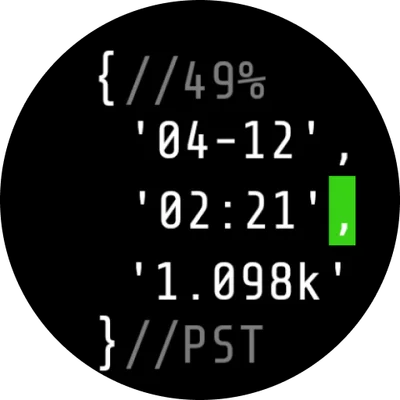
Le cadran idéal pour les programmeurs, les développeurs informatiques et les codeurs : innovant, interactif et ludique. Deux jeux de données contrôlés par un curseur en temps réel : déplacez le curseur vers l'extrême gauche en inclinant votre poignet pour accéder au deuxième jeu de données. Le design inclut un curseur en temps réel, des commentaires de code, la coloration syntaxique, des accolades, des guillemets simples, etc.
*Fonctionne uniquement et exclusivement sur les Samsung Galaxy Watch 4, 5, 6, 7 et 8.
COURT APERÇU ANIMÉ :
Veuillez consulter : https://timeasart.com/video-webm-coder.html
Fonctionnalités du cadran Wear OS :
JEUX DE DONNÉES CONTRÔLÉS PAR UN CURSEUR EN TEMPS RÉEL (2)
Accédez au deuxième jeu de données en inclinant simplement votre poignet et en déplaçant le curseur vers l'extrême gauche (n'importe quelle ligne).
1er ENSEMBLE DE DONNÉES
- % Batterie
- Date (mois/jour)
- Heure HEURE:MIN
- Pas (k = abréviation = mille)
- Fuseau horaire actuel
2e ENSEMBLE DE DONNÉES :
Accédez au 2e ensemble de données en inclinant simplement votre poignet et en déplaçant le curseur tout à gauche (n’importe quelle ligne).
- Boîte de réception (nombre de notifications)
- Fréquence cardiaque
- Pourcentage de pas par rapport à l’objectif
5 RACCOURCIS D’APPLICATION PERSONNALISÉS (définis par zone)
Entièrement personnalisables avec un raccourci d’application ou une autre fonction de votre montre. Tout est accessible d’un simple clic.
CONSEIL : En définissant « Applications récentes » et « Paramètres » comme raccourcis d’application, vous pouvez facilement accéder à toutes les applications en cours d’exécution, fermer rapidement toutes les applications exécutées en arrière-plan ou accéder rapidement à n’importe quel paramètre de votre montre. Le cadran de la montre disposant de 5 raccourcis d’application personnalisés, il vous en reste 3 à personnaliser !
CONSEIL : Personnalisez les raccourcis d’applications en appuyant longuement sur le cadran, puis en appuyant sur « Personnaliser > Complications » dans le sélecteur de cadrans. Vous disposez ainsi d’un plus grand choix d’applications.
FONCTIONNALITÉS DE LA BATTERIE INTELLIGENTE
- Batterie < 15 % (mise en surbrillance)
- Indicateur de charge de la batterie une fois branché (+xx %, mise à jour en direct)
- Indicateur de charge de la batterie à 100 % (pleine)
AUTRES FONCTIONNALITÉS
- Curseur et affichage des données contrôlés par le mouvement du poignet
THÈMES
6 thèmes de surlignage de la syntaxe du code.
FONCTIONNALITÉS DIVERSES
- Écran AOD économe en batterie
- Affichage économe en énergie
Pour découvrir d’autres créations de cadrans « Time As Art », rendez-vous sur https://play.google.com/store/apps/dev?id=6844562474688703926.
Vous avez des questions ou besoin d’aide ? Veuillez visiter https://timeasart.com/support ou nous envoyer un e-mail à design@timeasart.com.
Afficher le texte d’origine
The perfect watch face for programmers, IT developers and coders – innovative, interactive, fun. 2 live cursor controlled data sets – just move the cursor to the very left by tilting your wrist to access the 2nd data set. Design includes live cursor, code comments, syntax highlighting, curly braces, single quotes, … you name it!
*Works only and exclusively on Samsung Galaxy Watch 4, 5, 6, 7 and 8.
SHORT ANIMATED PREVIEW:
Please visit: https://timeasart.com/video-webm-coder.html
Wear OS watch face features:
LIVE CURSOR CONTROLLED DATA SETS (2)
Access the 2nd data set by simply tilting your wrist and moving the cursor to the very left (any row).
1st DATA SET
- Battery %
- Date (Month/Day)
- Time HOUR:MIN
- Steps (k = abbreviation = one thousand)
- Current Time Zone
2nd DATA SET:
Access the 2nd data set by simply tilting your wrist and moving the cursor to the very left (any row).
- Inbox (Notification count)
- Heart rate
- Percentage of Step Goal
5 CUSTOM APP SHORTCUTS (area-defined)
Fully customizable with an app shortcut or other watch function of your choice. Everything is ‘One Tap Away’.
TIP: if you set ‘Recent Apps’ and ‘Settings’ as app shortcuts you can easily access any running app as well as quickly close all apps that run in the background - or reach any setting on your watch quickly. Since the watch face has 5 custom app shortcuts you then still have 3 app shortcuts left to customize!
TIP: Customizing the customizable app shortcuts by long pressing on the watch face and then tapping on ‘Customize > Complications’ in the watch face selector on the watch gives you the most app options/choices.
SMART BATTERY FEATURES
- Battery < 15% (highlighting)
- Battery charging indicator when plugged in (+xx%, live update)
- Battery 100% charged indicator (‘full’)
OTHER FEATURES
- Wrist movement controlled cursor and data display
THEMES
6 code syntax highlighting themes.
MISC FEATURES
- Battery saving AOD screen
- Energy Efficient Display
To see more exciting 'Time As Art' watch face creations
please visit https://play.google.com/store/apps/dev?id=6844562474688703926.
Have questions or need support?
Please visit https://timeasart.com/support or email us at design@timeasart.com.
Sécurité des données
Ce que Time As Art Watch Faces déclare sur Google Play au sujet des données que cette application collecte et partage.
- Aucune donnée partagée avec des tiersEn savoir plus sur la manière dont les développeurs déclarent le partage
- Aucune donnée collectéeEn savoir plus sur la manière dont les développeurs déclarent la collecte
Coordonnées du développeur
- Site webtimeasart.com
- E-maildesign@timeasart.com
- Politique de confidentialitétimeasart.com
- Adresse929 Notre Dame Ave Concord, CA 94518-2531 United States
Informations
- Proposée par
- Time As Art Watch Faces
- Catégorie
- Personnalisation
- Mis à jour
- 08/11/2026
- Publié
- 25/04/2024
- Classification d’âge
- PEGI 3
- Prix
- 0,89 €
- Nom du package
- com.watchfacestudio.program_code1