SG-127
SGWatchDesign- PEGI 3Clasificación por edad
- PersonalizaciónCategoría
- 8/11/2026Actualizado
- 0,99 €Precio
Enlaza a la ficha oficial de com.watchfacestudio.sg_127 en Google Play. Última comprobación el 20/11/2026.
Acerca de esta aplicación
Traducción automática de Google. Idioma original: Inglés (Estados Unidos).
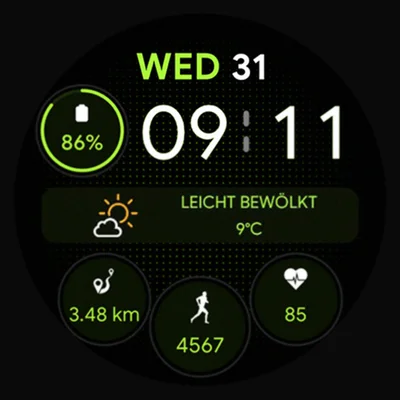
El SG-127 es una esfera de reloj digital de SGWatchDesign.
El SG-127 es una esfera de reloj digital de SGWatchDesign.
¡COMPRA UNO Y LLÉVATE OTRO! OFERTA
Solo para dispositivos Wear OS - API 30+
Funciones
• Fondo negro (compatible con OLED)
• Hora de 12/24 horas (se adapta al teléfono conectado)
• Distancia en km o millas según la configuración de idioma del smartphone
Millas (inglés y británico), km (todos los demás idiomas)
• Pasos
• Frecuencia cardíaca
• Fecha multilingüe
• Alta resolución
• 2 complicaciones personalizadas
- 1 valor de rango
- 1 texto largo
- 3 textos cortos
• Modo ambiente único con baja OPR y color adaptable
• Eficiencia energética
AJUSTES
• Pulsación larga en el centro del reloj > Abrir ajustes
Color de los primeros dígitos
2. Color 27x
3. Fondo de malla
4. Estilo AOD
5. Complicaciones
Complicación de configuración meteorológica
Mantén pulsado el centro del reloj > Ajustar > Selecciona una complicación principal y selecciona tu proveedor de complicaciones meteorológicas.
La app del tiempo debe haber configurado la ubicación meteorológica para poder determinar una complicación. Recomendamos la app Simpleweather:
https://play.google.com/store/Apps/details?id=com.thewizrd.simpleweather
Frecuencia cardíaca
Permita el acceso a la frecuencia cardíaca después de instalar la esfera.
El enlace no abre la app de frecuencia cardíaca, pero inicia la medición.
Pulse el símbolo del corazón para comenzar a medir la frecuencia cardíaca.
Asegúrese de que la pantalla del reloj esté encendida y de llevarlo correctamente en la muñeca al medir su frecuencia cardíaca.
Para una funcionalidad completa, active manualmente las autorizaciones "Sensores" y "Recibir datos de complicaciones".
La app de teléfono solo sirve como marcador para simplificar la instalación y la búsqueda de la esfera en su reloj Wear OS. Debe seleccionar su dispositivo en el menú desplegable.
Envíe todos los informes de problemas o consultas de ayuda a nuestra dirección de soporte: sgwatchdesign@gmail.com
Mostrar el texto original
The SG-127 is a digital watch face from SGWatchDesign.
BUY ONE GET ONE! OFFER
Only for Wear OS devices-API 30+
Functions
• True black background (OLED-friendly)
• 12/24-hour time (adapts to the connected phone)
• distance in km or miles based on smartphone language settings
miles english UK and UK, km all other language
• steps
• heart rate
• date multilingual
• high resolution
• 2 custom complications
- 1x range value
- 1x long text
- 3x short text
• Unique ambient mode with low OPR and adaptive color
• Energy efficient
ADJUSTMENT
• Long press on the center of the watch> Open adjustment settings
1st digits color
2. color 27x
3. Mesh background
4. AOD Style
5. complications
Weather setting complication
Hold the middle of the watch> Adjust> Select a main complication and select your provider of weather complications.
The weather app must have set the weather location before it can determine a complication.
We recommend the Simpleweather app
https://play.google.com/store/Apps/details?id=com.thewizrd.simpleweather
Heart rate
Allow access to the heart rate after installing the dial.
The link does not open the heart rate app but starts the measurement.
Tap the heart symbol to start measuring the heart rate.
Make sure that the watch screen is switched on and that you carry it properly on the wrist when you measure your heart rate.
For full functionality, please activate the authorization "Sensors" and "Receive complications data" manually!
The telephone app only serves as a placeholder to simplify the installation and finding of the dial on your Wear OS watch. You have to select your Watch device from the drop-down menu
Please send all problem reports or help inquiries to our support address
sgwatchdesign@gmail.com
Seguridad de los datos
Lo que SGWatchDesign declara en Google Play sobre los datos que esta aplicación recopila y comparte.
- No se comparten datos con tercerosMás información sobre cómo los desarrolladores declaran lo que comparten
- No se recogen datosMás información sobre cómo los desarrolladores declaran lo que recogen
Novedades
8/11/2026
V6.0.3 (Wear)
• small changes
V6.0.2 (Wear)
• rebuilt with WFS 1.6.10
• Update Target API 33
V6.0.1 (wear)
• rebuilt with WFS 1.5.7.
• new Watch Face Format
• prepared for Wear OS 4
• more custom complication options!
Update 4 (1.0.4) Delete bottom complications, display problems
First release of SG-127 for Wear OS by SG WatchDesign
Contacto del desarrollador
- Correo electrónicosgwatchdesign@gmail.com
- Política de privacidaddocs.google.com
- DirecciónSchlossblick 14 56414 Wallmerod Germany
Información
- Ofrecida por
- SGWatchDesign
- Categoría
- Personalización
- Actualizado
- 8/11/2026
- Publicado
- 31/5/2023
- Clasificación por edad
- PEGI 3
- Precio
- 0,99 €
- Nombre del paquete
- com.watchfacestudio.sg_127