SG-127
SGWatchDesign- Rating 3+Batasan usia
- PersonalisasiKategori
- 8/11/2026Diperbarui
- Rp 16.000Harga
Tertaut ke halaman resmi com.watchfacestudio.sg_127 di Google Play. Terakhir diperiksa pada 20/11/2026.
Tentang aplikasi ini
Terjemahan otomatis oleh Google. Bahasa asli: Inggris (Amerika Serikat).
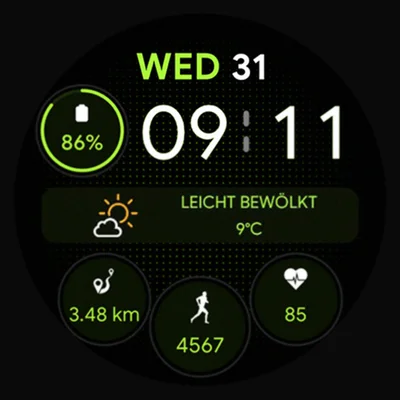
SG-127 adalah tampilan jam digital dari SGWatchDesign.
SG-127 adalah tampilan jam digital dari SGWatchDesign.
BELI SATU DAPAT SATU! PENAWARAN
Hanya untuk perangkat Wear OS-API 30+
Fungsi
• Latar belakang hitam pekat (ramah OLED)
• Waktu 12/24 jam (menyesuaikan dengan ponsel yang terhubung)
• Jarak dalam km atau mil berdasarkan pengaturan bahasa ponsel cerdas
Mil Inggris Inggris dan Inggris Raya, km semua bahasa lainnya
• Langkah
• Detak jantung
• Tanggal multibahasa
• Resolusi tinggi
• 2 komplikasi khusus
- Nilai rentang 1x
- Teks panjang 1x
- Teks pendek 3x
• Mode ambient unik dengan OPR rendah dan warna adaptif
• Hemat energi
PENYESUAIAN
• Tekan lama di bagian tengah jam tangan> Buka pengaturan penyesuaian
Warna digit pertama
2. Warna 27x
3. Latar belakang jala
4. Gaya AOD
5. Komplikasi
Komplikasi pengaturan cuaca
Tahan bagian tengah jam tangan> Sesuaikan> Pilih komplikasi utama dan pilih penyedia komplikasi cuaca Anda. Aplikasi cuaca harus menyetel lokasi cuaca sebelum dapat menentukan komplikasi.
Kami merekomendasikan aplikasi Simpleweather
https://play.google.com/store/Apps/details?id=com.thewizrd.simpleweather
Detak jantung
Izinkan akses ke detak jantung setelah memasang dial.
Tautan tidak membuka aplikasi detak jantung tetapi memulai pengukuran.
Ketuk simbol jantung untuk mulai mengukur detak jantung.
Pastikan layar jam tangan menyala dan Anda membawanya dengan benar di pergelangan tangan saat mengukur detak jantung.
Untuk fungsionalitas penuh, harap aktifkan otorisasi "Sensor" dan "Terima data komplikasi" secara manual!
Aplikasi telepon hanya berfungsi sebagai pengganti untuk menyederhanakan pemasangan dan pencarian dial pada jam tangan Wear OS Anda. Anda harus memilih perangkat Watch Anda dari menu tarik-turun
Silakan kirim semua laporan masalah atau pertanyaan bantuan ke alamat dukungan kami
sgwatchdesign@gmail.com
Tampilkan teks asli
The SG-127 is a digital watch face from SGWatchDesign.
BUY ONE GET ONE! OFFER
Only for Wear OS devices-API 30+
Functions
• True black background (OLED-friendly)
• 12/24-hour time (adapts to the connected phone)
• distance in km or miles based on smartphone language settings
miles english UK and UK, km all other language
• steps
• heart rate
• date multilingual
• high resolution
• 2 custom complications
- 1x range value
- 1x long text
- 3x short text
• Unique ambient mode with low OPR and adaptive color
• Energy efficient
ADJUSTMENT
• Long press on the center of the watch> Open adjustment settings
1st digits color
2. color 27x
3. Mesh background
4. AOD Style
5. complications
Weather setting complication
Hold the middle of the watch> Adjust> Select a main complication and select your provider of weather complications.
The weather app must have set the weather location before it can determine a complication.
We recommend the Simpleweather app
https://play.google.com/store/Apps/details?id=com.thewizrd.simpleweather
Heart rate
Allow access to the heart rate after installing the dial.
The link does not open the heart rate app but starts the measurement.
Tap the heart symbol to start measuring the heart rate.
Make sure that the watch screen is switched on and that you carry it properly on the wrist when you measure your heart rate.
For full functionality, please activate the authorization "Sensors" and "Receive complications data" manually!
The telephone app only serves as a placeholder to simplify the installation and finding of the dial on your Wear OS watch. You have to select your Watch device from the drop-down menu
Please send all problem reports or help inquiries to our support address
sgwatchdesign@gmail.com
Keamanan data
Yang dinyatakan SGWatchDesign di Google Play tentang data yang dikumpulkan dan dibagikan aplikasi ini.
- Tidak ada data yang dibagikan kepada pihak ketigaPelajari lebih lanjut cara developer menyatakan pembagian data
- Tidak ada data yang dikumpulkanPelajari lebih lanjut cara developer menyatakan pengumpulan data
Yang baru
8/11/2026
V6.0.3 (Wear)
• small changes
V6.0.2 (Wear)
• rebuilt with WFS 1.6.10
• Update Target API 33
V6.0.1 (wear)
• rebuilt with WFS 1.5.7.
• new Watch Face Format
• prepared for Wear OS 4
• more custom complication options!
Update 4 (1.0.4) Delete bottom complications, display problems
First release of SG-127 for Wear OS by SG WatchDesign
Kontak pengembang
- Emailsgwatchdesign@gmail.com
- Kebijakan Privasidocs.google.com
- AlamatSchlossblick 14 56414 Wallmerod Germany
Informasi
- Ditawarkan oleh
- SGWatchDesign
- Kategori
- Personalisasi
- Diperbarui
- 8/11/2026
- Dirilis
- 31/5/2023
- Batasan usia
- Rating 3+
- Harga
- Rp 16.000
- Nama paket
- com.watchfacestudio.sg_127