SMZ ACTIVITY3
SMZ™- PEGI 3Clasificación por edad
- PersonalizaciónCategoría
- 1/11/2025Actualizado
- 1,09 €Precio
Enlaza a la ficha oficial de com.smzjdh.activity3 en Google Play. Última comprobación el 13/11/2026.
Acerca de esta aplicación
Traducción automática de Google. Idioma original: Inglés (Estados Unidos).
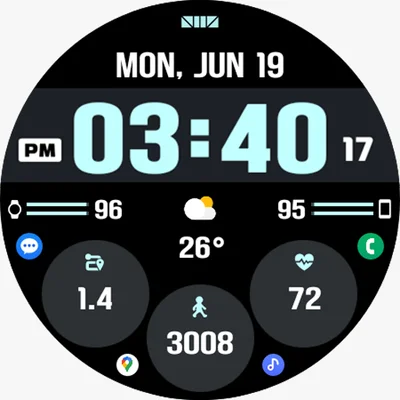
Esfera digital SMZ para Wear OS
[Cómo utilizar el formato de 24 horas]
Si desea cambiar el formato de hora, puede configurarlo en la ruta a continuación en el teléfono conectado al reloj.
*El teléfono conectado - Ajustes - Gestión general - Fecha y hora - Usar formato 24 horas.
Si está marcada, el reloj también estará en formato de 24 horas y, si no está marcada, el reloj estará en formato de 12 horas.
[PERSONALIZAR]
Para personalizar la esfera del reloj, toque y mantenga presionada la pantalla y toque el botón [Personalizar].
[La OSCURIDAD de la pantalla AOD]
En la sección Personalizar, 'AOD Dim' ajusta la oscuridad de toda la pantalla AOD.
[Nivel de batería del teléfono]
Aplicación de complicaciones de la batería del teléfono de amoledwatchfaces™
Enlace del desarrollador: https://play.google.com/store/apps/dev?id=5591589606735981545
Para utilizar esta función, la aplicación 'Complicación de la batería del teléfono' debe estar instalada en su teléfono y reloj.
Ruta de descarga:
https://play.google.com/store/apps/details?id=com.weartools.phonebattcomp
*Cómo configurar. - https://cafe.naver.com/smzwatch/22
[Instagram SMZ]
http://www.instagram.com/smz.watch.tech
[Facebook SMZ]
https://www.facebook.com/smz.watchface
[Página de inicio de SMZ]
https://www.smzwatch.com
[El correo electrónico siempre es bienvenido]
smz.watch.tech@gmail.com
Mostrar el texto original
[How to use 24-hour format]
If you want to change the time format, you can set it in the path below on the phone connected to the watch.
*The connected phone - Settings - General management - Date and time - Use 24-hour format.
If checked, the watch will also be in 24-hour format, and if unchecked, the watch will be in 12-hour format.
[CUSTOMIZE]
For customization of watchface, touch and hold the screen and touch on [Coustomize] button.
[The DARKNESS of the AOD screen]
In the Customize section, 'AOD Dim' adjusts the darkness of all the AOD screen.
[Phone Battery Level]
Phone Battery Complications app from amoledwatchfaces™
Dev's link - https://play.google.com/store/apps/dev?id=5591589606735981545
To use this function, the 'Phone Battery Complication' app must be installed on your phone and watch.
Download path :
https://play.google.com/store/apps/details?id=com.weartools.phonebattcomp
*How to set. - https://cafe.naver.com/smzwatch/22
[SMZ Instagram]
http://www.instagram.com/smz.watch.tech
[SMZ Facebook]
https://www.facebook.com/smz.watchface
[SMZ Homepage]
https://www.smzwatch.com
[E-mail is always welcome]
smz.watch.tech@gmail.com
Seguridad de los datos
Lo que SMZ™ declara en Google Play sobre los datos que esta aplicación recopila y comparte.
- No se comparten datos con tercerosMás información sobre cómo los desarrolladores declaran lo que comparten
- No se recogen datosMás información sobre cómo los desarrolladores declaran lo que recogen
Contacto del desarrollador
- Sitio webinstagram.com
- Correo electrónicosmz.watch.tech@gmail.com
- Política de privacidadsmzwatch.com
- Dirección거제대로 275 거제미소지움더퍼스트, 102동 1101호 연제구, 부산광역시 47512 South Korea
Información
- Ofrecida por
- SMZ™
- Categoría
- Personalización
- Actualizado
- 1/11/2025
- Publicado
- 23/6/2023
- Clasificación por edad
- PEGI 3
- Precio
- 1,09 €
- Nombre del paquete
- com.smzjdh.activity3