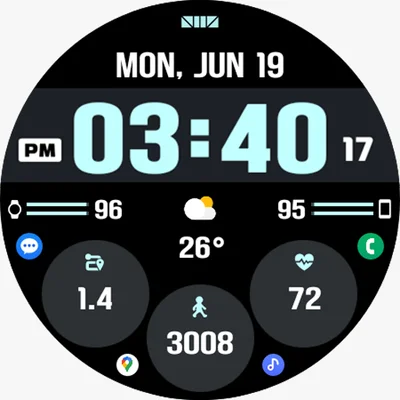
SMZ ACTIVITY3
SMZ™- PEGI 3Yaş sınırı
- KişiselleştirmeKategori
- 01.11.2025Güncellendi
- ₺30,99Fiyat
com.smzjdh.activity3 için resmi Google Play sayfasına bağlanır. Son kontrol: 13.11.2026.
Bu uygulama hakkında
Google tarafından otomatik çeviri. Orijinal dil: İngilizce (Amerika Birleşik Devletleri).
Wear OS için SMZ Digital Watchface
[24 saatlik format nasıl kullanılır]
Saat formatını değiştirmek istiyorsanız saate bağlı telefonda aşağıdaki yoldan ayarlayabilirsiniz.
*Bağlı telefon - Ayarlar - Genel yönetim - Tarih ve saat - 24 saat biçimini kullanın.
İşaretlenirse saat aynı zamanda 24 saat formatında, işaretlenmezse saat 12 saat formatında olacaktır.
[ÖZELLEŞTİRMEK]
Saat yüzünü özelleştirmek için ekrana dokunup basılı tutun ve [Özelleştir] düğmesine dokunun.
[AOD ekranının KARANLIĞI]
Özelleştirme bölümünde 'AOD Dim', tüm AOD ekranının koyuluğunu ayarlar.
[Telefon Pil Seviyesi]
amoledwatchfaces™'ten Telefon Pil Komplikasyonları uygulaması
Geliştiricinin bağlantısı - https://play.google.com/store/apps/dev?id=5591589606735981545
Bu fonksiyonu kullanabilmeniz için telefonunuza ve saatinize 'Telefon Bataryası Komplikasyonu' uygulamasının kurulu olması gerekmektedir.
İndirme yolu:
https://play.google.com/store/apps/details?id=com.weartools.phonebattcomp
*Nasıl ayarlanır? - https://cafe.naver.com/smzwatch/22
[SMZ Instagram'da]
http://www.instagram.com/smz.watch.tech
[SMZFacebook]
https://www.facebook.com/smz.watchface
[SMZ Ana Sayfası]
https://www.smzwatch.com
[E-posta her zaman memnuniyetle karşılanır]
smz.watch.tech@gmail.com
Orijinal metni göster
[How to use 24-hour format]
If you want to change the time format, you can set it in the path below on the phone connected to the watch.
*The connected phone - Settings - General management - Date and time - Use 24-hour format.
If checked, the watch will also be in 24-hour format, and if unchecked, the watch will be in 12-hour format.
[CUSTOMIZE]
For customization of watchface, touch and hold the screen and touch on [Coustomize] button.
[The DARKNESS of the AOD screen]
In the Customize section, 'AOD Dim' adjusts the darkness of all the AOD screen.
[Phone Battery Level]
Phone Battery Complications app from amoledwatchfaces™
Dev's link - https://play.google.com/store/apps/dev?id=5591589606735981545
To use this function, the 'Phone Battery Complication' app must be installed on your phone and watch.
Download path :
https://play.google.com/store/apps/details?id=com.weartools.phonebattcomp
*How to set. - https://cafe.naver.com/smzwatch/22
[SMZ Instagram]
http://www.instagram.com/smz.watch.tech
[SMZ Facebook]
https://www.facebook.com/smz.watchface
[SMZ Homepage]
https://www.smzwatch.com
[E-mail is always welcome]
smz.watch.tech@gmail.com
Veri güvenliği
Bu uygulamanın topladığı ve paylaştığı veriler hakkında SMZ™ tarafından Google Play üzerinde yapılan beyan.
- Üçüncü taraflarla veri paylaşımı yokGeliştiricilerin, veri paylaşımını nasıl beyan ettikleri hakkında daha fazla bilgi edinin
- Veri toplanamadıGeliştiricilerin, veri toplamayı nasıl beyan ettikleri hakkında daha fazla bilgi edinin
Geliştirici iletişim bilgileri
- Web sitesiinstagram.com
- E-postasmz.watch.tech@gmail.com
- Gizlilik politikasısmzwatch.com
- Adres거제대로 275 거제미소지움더퍼스트, 102동 1101호 연제구, 부산광역시 47512 South Korea
Bilgiler
- Sunan
- SMZ™
- Kategori
- Kişiselleştirme
- Güncellendi
- 01.11.2025
- Yayın tarihi
- 23.06.2023
- Yaş sınırı
- PEGI 3
- Fiyat
- ₺30,99
- Paket adı
- com.smzjdh.activity3