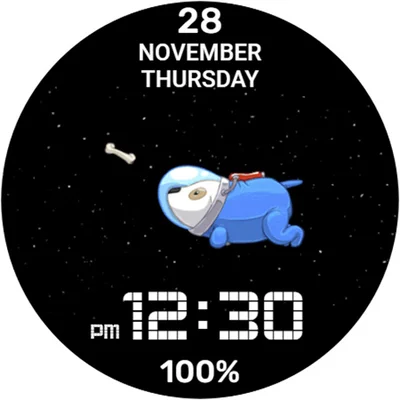
Space Dog
Eugeniy Radzivill- PEGI 3Clasificación por edad
- PersonalizaciónCategoría
- 26/8/2025Actualizado
- 0,99 €Precio
Enlaza a la ficha oficial de com.watchfacestudio.dogspace en Google Play. Última comprobación el 27/11/2026.
Acerca de esta aplicación
Traducción automática de Google. Idioma original: Ruso (Rusia).
Esfera de reloj animada para relojes inteligentes en la plataforma Wear OS
El dial para relojes inteligentes en la plataforma Wear OS admite las siguientes funciones:
- Visualización multilingüe del día de la semana y del mes. El idioma se sincroniza con la configuración de tu smartphone.
- Cambio automático de modos de 12/24 horas. La sincronización se produce de acuerdo con la configuración de su teléfono inteligente.
- Visualización de carga de batería
PERSONALIZACIÓN
Puede configurar uno de los colores para la hora, el día de la semana y el mes en el menú de configuración del dial
Puede personalizar la zona de información en la esfera de su reloj para mostrar el clima actual. Para hacer esto, en el menú de la esfera del reloj, configure esta complicación para generar datos desde la aplicación correspondiente. Por supuesto, puede generar datos desde cualquier otra aplicación de su reloj. Pero quiero advertirles que es posible que no estén optimizados para su visualización en la esfera del reloj y que se muestren incorrectamente o no aparezcan en absoluto.
¡IMPORTANTE! Puedo garantizar el correcto funcionamiento de la zona de información sólo en relojes Samsung. Lamentablemente, no puedo garantizar el funcionamiento de relojes de otros fabricantes. Tenga esto en cuenta al comprar la esfera de su reloj.
También hay una peculiaridad al mostrar el clima en el Samsung Galaxy Watch Ultra: a partir del 30/11/24, los datos meteorológicos (aplicación de stock de Samsung) en este reloj se muestran incorrectamente debido al software. Puede utilizar datos meteorológicos de aplicaciones de terceros.
Hice un modo AOD original para esta esfera de reloj. Para que se muestre, debes activarlo en el menú de tu reloj.
Para comentarios y sugerencias, escriba al correo electrónico: eradzivill@mail.ru
Únase a nosotros en las redes sociales
https://vk.com/eradzivill
https://radzivill.com
https://t.me/eradzivill
https://www.facebook.com/groups/radzivill
Atentamente
Evgeniy
Mostrar el texto original
The watch face for Wear OS smartwatches supports the following functionality:
- Multilingual display of the day of the week and month. The language is synchronized with the settings of your smartphone
- Automatic switching of 12/24 hour modes. Synchronization occurs in accordance with the settings of your smartphone
- Display of battery charge
CUSTOMIZATION
You can set one of the color solutions for the time, day of the week and month in the watch face settings menu
You can customize the information zone on the watch face to display the current weather. To do this, set the output of data from the corresponding application to this complication in the watch face menu. Of course, you can set the output of data from any other application of your watch. But I want to warn you that they may not be optimized for display on the watch face and either be displayed incorrectly or not be displayed at all.
IMPORTANT! I can guarantee the correct operation of the information zone only on Samsung watches. Unfortunately, I cannot guarantee the operation on watches from other manufacturers. Please take this into account when purchasing a watch face.
There is also one peculiarity in displaying the weather on the Samsung Galaxy Watch Ultra watch - as of 11/30/24, weather data (stock Samsung application) in this watch is displayed incorrectly due to software. You can use weather data from third-party applications.
I made an original AOD mode for this watch face. To display it, you need to activate it in the menu of your watch.
For comments and suggestions, please write to e-mail: eradzivill@mail.ru
Join us on social networks
https://vk.com/eradzivill
https://radzivill.com
https://t.me/eradzivill
https://www.facebook.com/groups/radzivill
Sincerely,
Eugeniy Radzivill
Seguridad de los datos
Lo que Eugeniy Radzivill declara en Google Play sobre los datos que esta aplicación recopila y comparte.
- No se comparten datos con tercerosMás información sobre cómo los desarrolladores declaran lo que comparten
- No se recogen datosMás información sobre cómo los desarrolladores declaran lo que recogen
Contacto del desarrollador
- Sitio webradzivill.com
- Correo electrónicoeradzivill@mail.ru
- Política de privacidaderadzivill.wixsite.com
- Direcciónдер. Терновка, ул. Песочная, д. 4 Наро-Фоминск Московская область Россия 143300
Información
- Ofrecida por
- Eugeniy Radzivill
- Categoría
- Personalización
- Actualizado
- 26/8/2025
- Publicado
- 29/11/2024
- Clasificación por edad
- PEGI 3
- Precio
- 0,99 €
- Nombre del paquete
- com.watchfacestudio.dogspace