Space Dog
Eugeniy Radzivill- PEGI 3Classification d’âge
- PersonnalisationCatégorie
- 26/08/2025Mis à jour
- 0,99 €Prix
Renvoie vers la fiche Google Play officielle de com.watchfacestudio.dogspace. Dernière vérification le 27/11/2026.
À propos de cette application
Traduction automatique par Google. Langue d’origine : Russe (Russie).
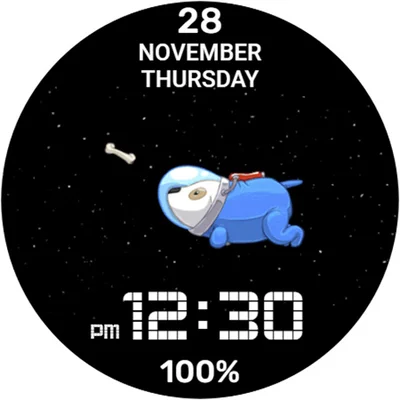
Cadran animé pour les montres intelligentes sur la plateforme Wear OS
Le cadran des montres intelligentes sur la plateforme Wear OS prend en charge les fonctionnalités suivantes :
- Affichage multilingue du jour de la semaine et du mois. La langue est synchronisée avec les paramètres de votre smartphone
- Commutation automatique des modes 12/24 heures. La synchronisation s'effectue conformément aux paramètres de votre smartphone
- Affichage de la charge de la batterie
PERSONNALISATION
Vous pouvez définir l'une des couleurs pour l'heure, le jour de la semaine et le mois dans le menu des paramètres du cadran.
Vous pouvez personnaliser la zone d'informations sur le cadran de votre montre pour afficher la météo actuelle. Pour ce faire, dans le menu du cadran de la montre, définissez cette complication pour qu'elle génère les données de l'application correspondante. Vous pouvez bien entendu extraire des données de n’importe quelle autre application sur votre montre. Mais je tiens à vous avertir qu’ils peuvent ne pas être optimisés pour l’affichage sur le cadran de la montre et qu’ils s’afficheront de manière incorrecte ou ne s’afficheront pas du tout.
IMPORTANT! Je peux garantir le bon fonctionnement de la zone d'information uniquement sur les montres Samsung. Malheureusement, je ne peux pas garantir le fonctionnement des montres d'autres fabricants. Veuillez en tenir compte lors de l’achat de votre cadran de montre.
Il existe également une particularité dans l'affichage de la météo sur la Samsung Galaxy Watch Ultra : à partir du 30/11/24, les données météorologiques (application stock Samsung) dans cette montre ne s'affichent pas correctement en raison du logiciel. Vous pouvez utiliser les données météorologiques d'applications tierces.
J'ai créé un mode AOD original pour ce cadran de montre. Pour qu'il s'affiche, vous devez l'activer dans le menu de votre montre.
Pour vos commentaires et suggestions, veuillez écrire à l'e-mail : eradzivill@mail.ru
Rejoignez-nous sur les réseaux sociaux
https://vk.com/eradzivill
https://radzivill.com
https://t.me/eradzivill
https://www.facebook.com/groups/radzivill
Sincèrement
Evgeny
Afficher le texte d’origine
The watch face for Wear OS smartwatches supports the following functionality:
- Multilingual display of the day of the week and month. The language is synchronized with the settings of your smartphone
- Automatic switching of 12/24 hour modes. Synchronization occurs in accordance with the settings of your smartphone
- Display of battery charge
CUSTOMIZATION
You can set one of the color solutions for the time, day of the week and month in the watch face settings menu
You can customize the information zone on the watch face to display the current weather. To do this, set the output of data from the corresponding application to this complication in the watch face menu. Of course, you can set the output of data from any other application of your watch. But I want to warn you that they may not be optimized for display on the watch face and either be displayed incorrectly or not be displayed at all.
IMPORTANT! I can guarantee the correct operation of the information zone only on Samsung watches. Unfortunately, I cannot guarantee the operation on watches from other manufacturers. Please take this into account when purchasing a watch face.
There is also one peculiarity in displaying the weather on the Samsung Galaxy Watch Ultra watch - as of 11/30/24, weather data (stock Samsung application) in this watch is displayed incorrectly due to software. You can use weather data from third-party applications.
I made an original AOD mode for this watch face. To display it, you need to activate it in the menu of your watch.
For comments and suggestions, please write to e-mail: eradzivill@mail.ru
Join us on social networks
https://vk.com/eradzivill
https://radzivill.com
https://t.me/eradzivill
https://www.facebook.com/groups/radzivill
Sincerely,
Eugeniy Radzivill
Sécurité des données
Ce que Eugeniy Radzivill déclare sur Google Play au sujet des données que cette application collecte et partage.
- Aucune donnée partagée avec des tiersEn savoir plus sur la manière dont les développeurs déclarent le partage
- Aucune donnée collectéeEn savoir plus sur la manière dont les développeurs déclarent la collecte
Coordonnées du développeur
- Site webradzivill.com
- E-maileradzivill@mail.ru
- Politique de confidentialitéeradzivill.wixsite.com
- Adresseдер. Терновка, ул. Песочная, д. 4 Наро-Фоминск Московская область Россия 143300
Informations
- Proposée par
- Eugeniy Radzivill
- Catégorie
- Personnalisation
- Mis à jour
- 26/08/2025
- Publié
- 29/11/2024
- Classification d’âge
- PEGI 3
- Prix
- 0,99 €
- Nom du package
- com.watchfacestudio.dogspace