Tempus Aqua Android Watch Face
Rousseau Design Ltd- PEGI 3Clasificación por edad
- Arte y diseñoCategoría
- 27/3/2026Actualizado
- 5,99 €Precio
Enlaza a la ficha oficial de com.benrousseau.tempusaqua_blue_ben_rousseau en Google Play. Última comprobación el 13/11/2026.
Acerca de esta aplicación
Traducción automática de Google. Idioma original: Inglés (Estados Unidos).
Reloj inteligente Tempus Aqua obra del artista y diseñador de iluminación Ben Rousseau
Nuestra "Esfera de reloj Android Tempus Aqua" ahora es compatible con Wear OS de Google, lo que le ofrece una esfera de reloj elegante y funcional para su reloj inteligente. Disfrute de una experiencia perfecta en su dispositivo Wear OS con Tempus Watch.'
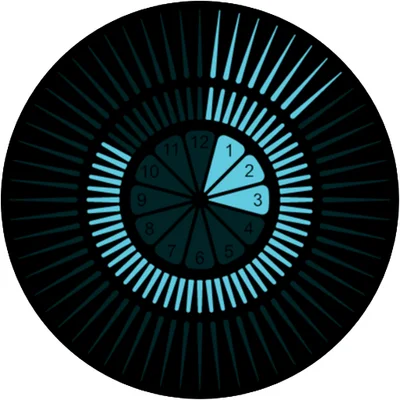
Un patrón de luz único del reloj Tempus del diseñador Ben Rousseau. Una obra de arte de reloj inteligente que representa el tiempo durante 12 horas en tiempo real utilizando un patrón de luz que se construye constantemente en 3 arreglos uniformes con 12 para las horas en el centro, 60 para los minutos en el anillo central y 60 para los segundos en el anillo exterior.
Tiempo rediseñado.
Descárguelo ahora y experimente el tiempo bajo una nueva luz.
Protegido por el registro internacional de diseño No. DM/222085 Copyright Rousseau Design LTD. Miembro de Acid - Anti Copying In Design.
Acerca de: Ben Rousseau es un artista de iluminación y diseñador enfocado en crear hermosas creaciones experienciales que aportan luz y energía positiva a las vidas y los entornos de las personas.
www.benrousseau.com
www.tempustime.com
Enlace de video sobre cómo descargar e instalar Tempus Watch face en su reloj inteligente:
https://youtu.be/O0SVGG0xw8Y?si=30M-HBwpqk9Jhv6L
Guía paso a paso para instalar la esfera del reloj Tempus
Descargue y abra la aplicación Tempus Companion
Teléfono: descargue la aplicación Tempus Companion desde Play Store.
Reloj: asegúrese de que su reloj inteligente esté conectado a su teléfono y tenga conexión a Internet.
Habilite Bluetooth en ambos dispositivos
Teléfono: asegúrese de que Bluetooth esté activado. La aplicación te pedirá que la actives si aún no está habilitada. Otorgue a la aplicación todos los permisos necesarios.
Reloj: asegúrese de que Bluetooth esté habilitado y que su reloj inteligente sea reconocible.
Conecte su reloj inteligente a la aplicación
Teléfono: abra la aplicación Tempus Companion. Verá un botón: 'Conectar'.
Teléfono: toque el botón 'Conectar'. La aplicación buscará dispositivos Bluetooth cercanos.
Teléfono: seleccione su reloj inteligente de la lista de dispositivos disponibles. Espere a que se establezca la conexión. Una vez conectado, aparecerá un botón "Instalar".
Iniciar la instalación de la esfera del reloj
Teléfono: toque el botón 'Instalar'. Esto abrirá la página de Play Store para la esfera del reloj Tempus en su reloj inteligente.
Reloj: En su reloj inteligente, verá la página de Play Store de la esfera del reloj Tempus.
Compra y descarga la esfera del reloj
Reloj: haga clic en el botón de precio para comprar la esfera del reloj.
Mira: sigue las indicaciones para completar tu compra. Es posible que tengas que confirmar la compra en tu teléfono siguiendo las instrucciones proporcionadas (por ejemplo, abre la notificación de Google Play Store o visita g.co/continue en tu teléfono o navegador).
Reloj: una vez completada la compra, la esfera del reloj comenzará a descargarse. Espere a que finalice la descarga.
Aplicar la esfera del reloj
Teléfono: abra la aplicación Galaxy Wearable (descárguela desde Play Store si no está disponible) y navegue hasta "Watch faces".
Teléfono: desplácese hacia abajo hasta "Esferas de reloj descargadas" y seleccione la esfera del reloj Tempus que acaba de comprar.
Teléfono: aparecerá una barra de progreso que indica que la esfera del reloj se está aplicando a su reloj inteligente. Espere a que se complete el proceso.
Reloj: la esfera del reloj Tempus ahora será visible y se aplicará en su reloj inteligente.
Consejos para solucionar problemas
Problemas de conexión: asegúrese de que tanto su teléfono como su reloj inteligente tengan Bluetooth habilitado y estén muy cerca.
Problemas de pago: siga atentamente las instrucciones para completar la compra. Asegúrese de haber iniciado sesión en la cuenta de Google correcta.
La esfera del reloj no es visible: si la esfera del reloj no aparece inmediatamente, intente reiniciar su reloj inteligente y verifique en la aplicación Galaxy Wearable la esfera del reloj descargada.
Mostrar el texto original
Our "Tempus Aqua Android Watch Face" is now compatible with Wear OS by Google, bringing you a stylish and functional watch face for your smartwatch. Enjoy a seamless experience on your Wear OS device with Tempus Watch.'
A unique Tempus timepiece light pattern by designer Ben Rousseau. A smart watch artwork that represents the time over 12 hours in real time using a constantly building pattern of light over 3 uniform arrangements with 12 for hours in centre, 60 for minutes in middle ring and 60 for the seconds on outer ring.
Time redesigned.
Download now and experience time in a new light.
Protected by international design registration No. DM/222085 Copyright Rousseau Design LTD. Member of Acid - Anti Copying In Design.
About: Ben Rousseau is a lighting artist and designer focused on creating beautiful experiential creations that bring light and positive energy into people’s lives and environments.
www.benrousseau.com
www.tempustime.com
Video link on how to download and install Tempus Watch face on your smartwatch:
https://youtu.be/O0SVGG0xw8Y?si=30M-HBwpqk9Jhv6L
Step-by-Step Guide to Install the Tempus Watch Face
Download and Open the Tempus Companion App
Phone: Download the Tempus Companion App from the Play Store.
Watch: Ensure your smartwatch is connected to your phone and has an internet connection.
Enable Bluetooth on Both Devices
Phone: Make sure Bluetooth is turned on. The app will prompt you to turn it on if it's not already enabled. Grant the app all required permissions.
Watch: Ensure Bluetooth is enabled and your smartwatch is discoverable.
Connect Your Smartwatch to the App
Phone: Open the Tempus Companion App. You will see a button: 'Connect'.
Phone: Tap on the 'Connect' button. The app will search for nearby Bluetooth devices.
Phone: Select your smartwatch from the list of available devices. Wait for the connection to be established. Once connected, a 'Install' button will become visible.
Initiate the Installation of the Watch Face
Phone: Tap on the 'Install' button. This will open the Play Store page for the Tempus watch face on your smartwatch.
Watch: On your smartwatch, you will see the Tempus watch face Play Store page.
Purchase and Download the Watch Face
Watch: Click on the price button to purchase the watch face.
Watch: Follow the prompts to complete your purchase. You may need to confirm the purchase on your phone by following the instructions provided (e.g., open the notification from Google Play Store or visit g.co/continue on your phone or browser).
Watch: Once the purchase is complete, the watch face will begin downloading. Wait for the download to finish.
Apply the Watch Face
Phone: Open the Galaxy Wearable app (download from the Play Store if not available) and navigate to 'Watch faces'.
Phone: Scroll down to 'Downloaded watch faces' and select the Tempus watch face you just purchased.
Phone: A progress bar will appear, indicating that the watch face is being applied to your smartwatch. Wait for the process to complete.
Watch: The Tempus watch face will now be visible and applied on your smartwatch.
Troubleshooting Tips
Connection Issues: Ensure both your phone and smartwatch have Bluetooth enabled and are in close proximity.
Payment Issues: Follow the instructions carefully for completing the purchase. Ensure you are logged into the correct Google account.
Watch Face Not Visible: If the watch face does not appear immediately, try restarting your smartwatch and checking the Galaxy Wearable app for the downloaded watch face.
Seguridad de los datos
Lo que Rousseau Design Ltd declara en Google Play sobre los datos que esta aplicación recopila y comparte.
- No se comparten datos con tercerosMás información sobre cómo los desarrolladores declaran lo que comparten
- No se recogen datosMás información sobre cómo los desarrolladores declaran lo que recogen
Contacto del desarrollador
- Sitio webbenrousseau.com
- Correo electrónicostudio@benrousseau.com
- Política de privacidadfreeprivacypolicy.com
- DirecciónPlus X Innovation Hub Lewes Road BRIGHTON BN2 4GL United Kingdom
Información
- Ofrecida por
- Rousseau Design Ltd
- Categoría
- Arte y diseño
- Actualizado
- 27/3/2026
- Publicado
- 6/11/2023
- Clasificación por edad
- PEGI 3
- Precio
- 5,99 €
- Nombre del paquete
- com.benrousseau.tempusaqua_blue_ben_rousseau