
Aria: AI Task Manager
To-do list, planner & calendar
Diseñada para iPhone, iPad, Mac
Gratis · Compras en la aplicación
- Clasificación por edad4+
- CategoríaProductividad
- Desarrollador(주)립슨
- IdiomasInglés+ 1 más
- Tamaño133,4 MB
Enlaza a la página oficial de App Store
Download.org no aloja ningún archivo de Aria: AI Task Manager. El botón abre la página de la aplicación en App Store, donde la publica (주)립슨. Ficha comprobada por última vez el 26/11/2026.
Capturas de pantalla



Acerca de
El desarrollador no ha proporcionado este texto en tu idioma.
Your tasks. Your calendar. Just say it.
Aria is an AI assistant and planner that keeps your to-do list, calendar, reminders and notes in one place.
Plan your schedule, build routines and count down to the days that matter, without switching apps.
“Finish the report by Friday, team meeting tomorrow at 3 pm.” One sentence. One task, one event.
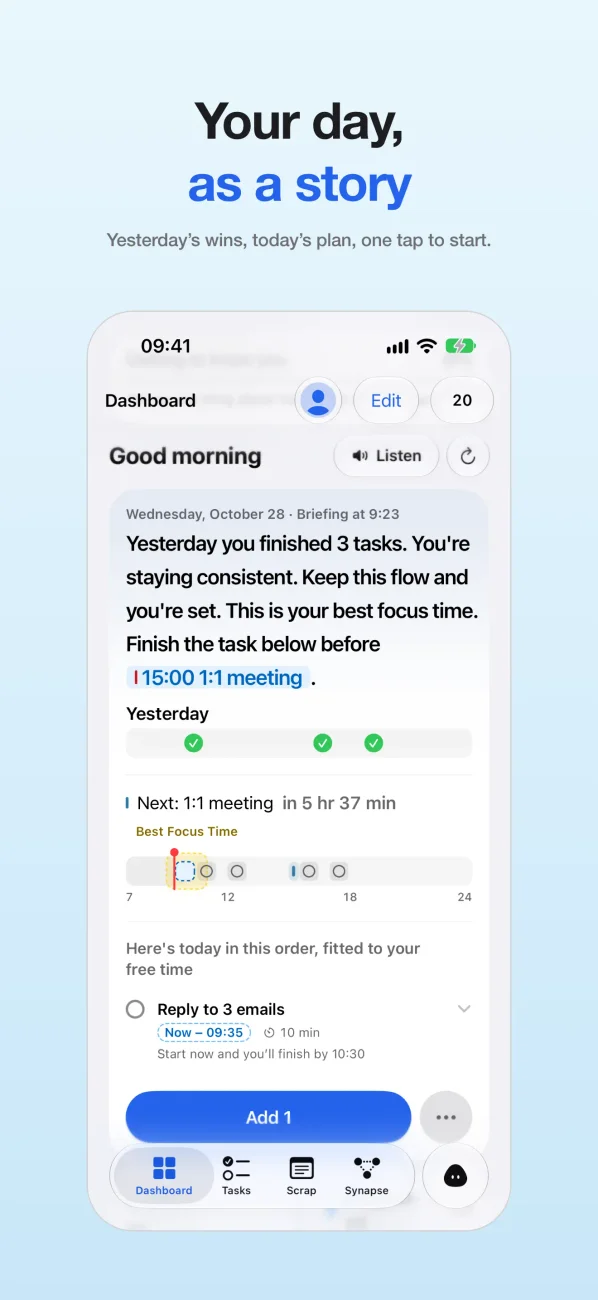
Morning. Only what matters.
A briefing of two or three sentences: today’s events and what to do first. You can listen to it, too.
Start your first task with a single timer. The time left stays on the Lock Screen and in the Dynamic Island.
Daytime. As it comes to mind.
Ramble, and Aria splits it into task suggestions you can add all at once.
A photo, a shared screenshot or a PDF: Aria finds the dates and suggests reminders.
What you can’t miss rings as an alarm, even in Silent mode or a Focus.
Evening. Move the rest to tomorrow.
See what’s left and what’s overdue, then reschedule it all in one go.
At the end of the week, the Weekly Briefing looks back on tasks, routines and mood.
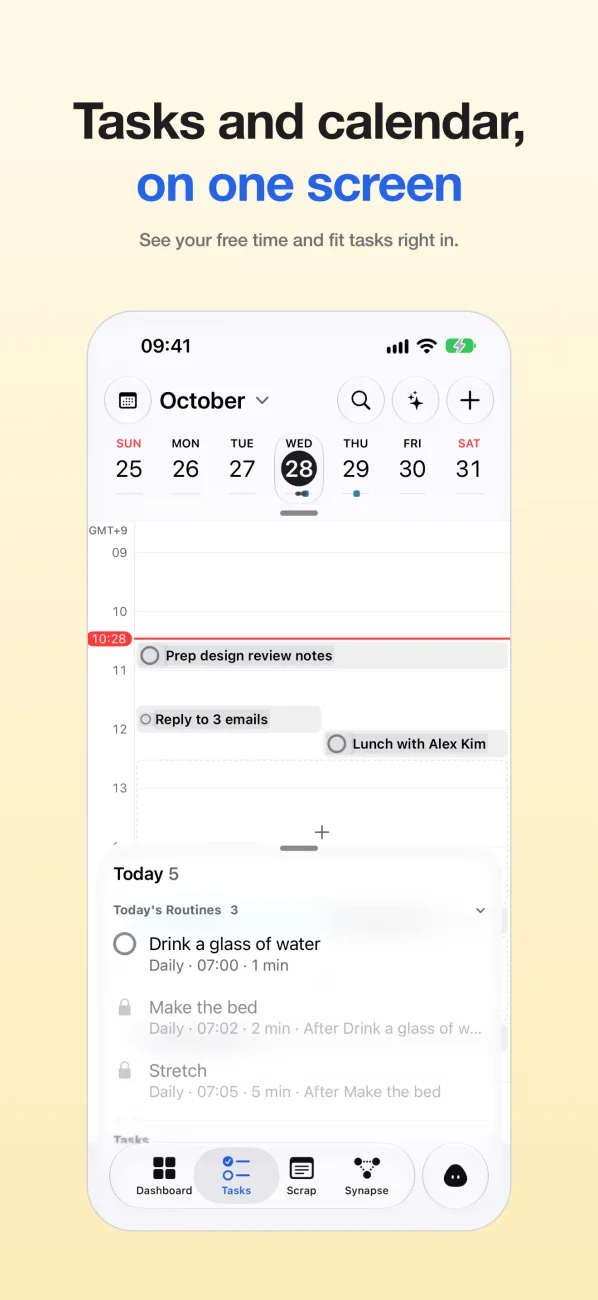
Tasks and calendar, on one screen.
• Today, Upcoming, Someday and Inbox, with Day, 3-Day, Week and Month views
• Drag a task onto the grid to schedule it; type “tomorrow 3 pm” and it’s understood
• Repeating tasks, subtasks, categories and an Eisenhower Matrix
• Routines with streaks, and a step-by-step routine timer
• D-day countdowns and widgets, deadline alerts that step up, arrive-and-leave reminders
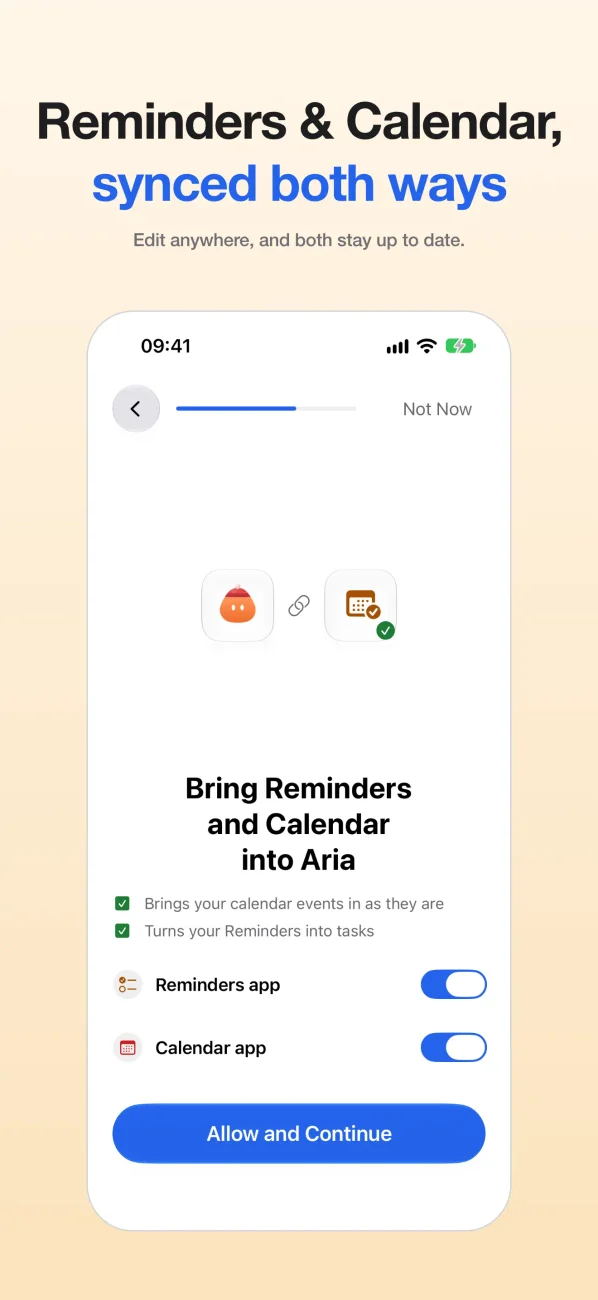
• Your device calendar alongside, and sync with the Reminders app
Notes that become knowledge.
• Scraps: notes, links and files in one place. Time Capsule (Aria Pro): this day, 1 week to 1 year ago.
• Synapse: people, topics and ideas linked into a map. Search by meaning.
• Memory: what you tell Aria carries into the next chat; review, edit or delete it in Settings.
iPhone, iPad, Apple Watch, Mac.
Home and Lock Screen widgets, Control Center and the Action button, Siri and Shortcuts, the Apple Watch app and the Mac menu bar. Sign in with Apple and every device shares the same notes. In English and Korean.
AI and your data
• Aria tells you what goes where and asks for your consent before using AI: Anthropic (Claude) handles chat, briefings, organizing and Synapse; OpenAI embeddings power search by meaning. Attached photos and files are included. Withdraw consent anytime in Settings › AI.
• Only what a request needs is sent, encrypted, without your account ID or email. Neither Aria nor its AI providers train AI models on your data.
• No ads in the app. Ad measurement can be turned off in Settings › Privacy Policy.
• Start without an account, and delete your account and data in the app.
Aria Pro subscription
• Tasks, calendar, Scraps and Synapse are free, and you get 20 AI questions a day for free, refilled daily.
• Aria reads attached photos to make tasks, free plan included. Aria Pro raises AI to 200 questions a day. A daily fair-use limit applies.
• Aria Pro also adds more than one alarm per task, Remind until it’s done, Fill free time with tasks, Weekly report & stats, Time Capsule, 6 personal themes, Overnight recap, and Plan my prep for D-days. Web lookups, including Look it up, are 3 a day on the free plan and 10 on Aria Pro.
• Monthly or yearly plans that renew automatically. Prices appear in your local currency before you buy, and if a free trial is available, it’s shown on the purchase screen.
• Payment is charged to your Apple Account when the trial ends, or at purchase if there is no trial. A subscription renews unless canceled at least 24 hours before the period ends, and renewal is charged within 24 hours before the period ends. Manage or cancel in your Apple Account settings.
Terms of Use (EULA): https://www.apple.com/legal/internet-services/itunes/dev/stdeula/
Privacy Policy: https://letsaria.com/en/privacy.html
Developer: Lipson Inc., Seoul, Republic of Korea · support@letsaria.com
Novedades
Versión 1.2.1 · 24/11/2026
Start the virtual computer with a single tap.
More accurate chat answers and polish throughout the app.
Privacidad de la aplicación
Lo que (주)립슨 declara en App Store sobre cómo esta aplicación gestiona los datos.
-
Datos vinculados a ti
Pueden recopilarse y vincularse a tu identidad.
- Compras
- Ubicación
- Información de contacto
- Contactos
- Contenido del usuario
- Identificadores
- Datos de uso
- Otros datos
-
Datos no vinculados a ti
Pueden recopilarse, pero no se vinculan a tu identidad.
- Compras
- Información de contacto
- Historial de búsqueda
- Datos de uso
- Diagnóstico
Las prácticas de privacidad pueden variar, por ejemplo, según las funciones que uses o tu edad.
Información
- Vendedor
- LIPSON Inc.
- Categoría
- Productividad
- Versión
- 1.2.1
- Actualizado
- 24/11/2026
- Publicado
- 13/10/2026
- Tamaño
- 133,4 MB
- Requiere
- iOS 26.0 o posterior
- Clasificación por edad
- 4+
- Precio
- Gratis
- Compras en la aplicación
- Sí
- Idiomas
- Inglés, Coreano
- Copyright
- © 2026 Lipson Inc.
Quizá también te guste
-
 Untangle: ADHD Planner & To-DoDivide tus tareas en pasos
-
 Timing - Gestión del TiempoProductividad
-
 더닝 - 쌓아두면 정리되는 메모Productividad
-
 Plantri: Planificador diarioAgenda diaria, metas y hábitos
-
 Arch Calendar: Time BlockingProductividad
-
 Selah: Notas de CultoSermón · Biblia · Widget
-
 키링 - 나만의 비서Productividad
-
 Nudge31 - Goal & Daily HabitProductividad
-
 링크비 Linkbee - AI 북마크, 메모, MCPProductividad
-
 To-do CalendarCalendario y agenda diaria