Audio Unit Player
AUv3 host / Export audio
Diseñada para iPhone, iPad
Gratis · Compras en la aplicación
- Clasificación por edad4+
- CategoríaMúsica
- DesarrolladorLoop-Sessions.LLC.
- IdiomasInglés+ 1 más
- Tamaño5,3 MB
Enlaza a la página oficial de App Store
Download.org no aloja ningún archivo de Audio Unit Player. El botón abre la página de la aplicación en App Store, donde la publica Loop-Sessions.LLC. Ficha comprobada por última vez el 17/11/2026.
Capturas de pantalla

Acerca de
El desarrollador no ha proporcionado este texto en tu idioma.
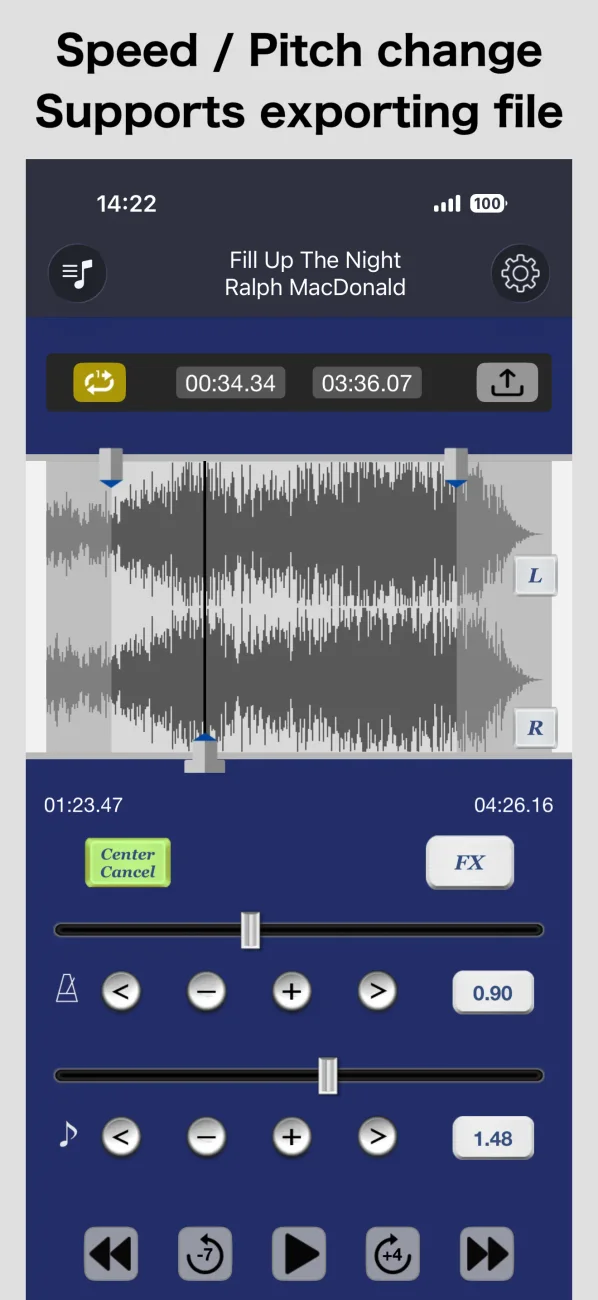
This app is a music player that can process the following effects in real time.
- Time stretch (0.5-2.0 double speed)
- Pitch shift (-1 ~ +1 octave)
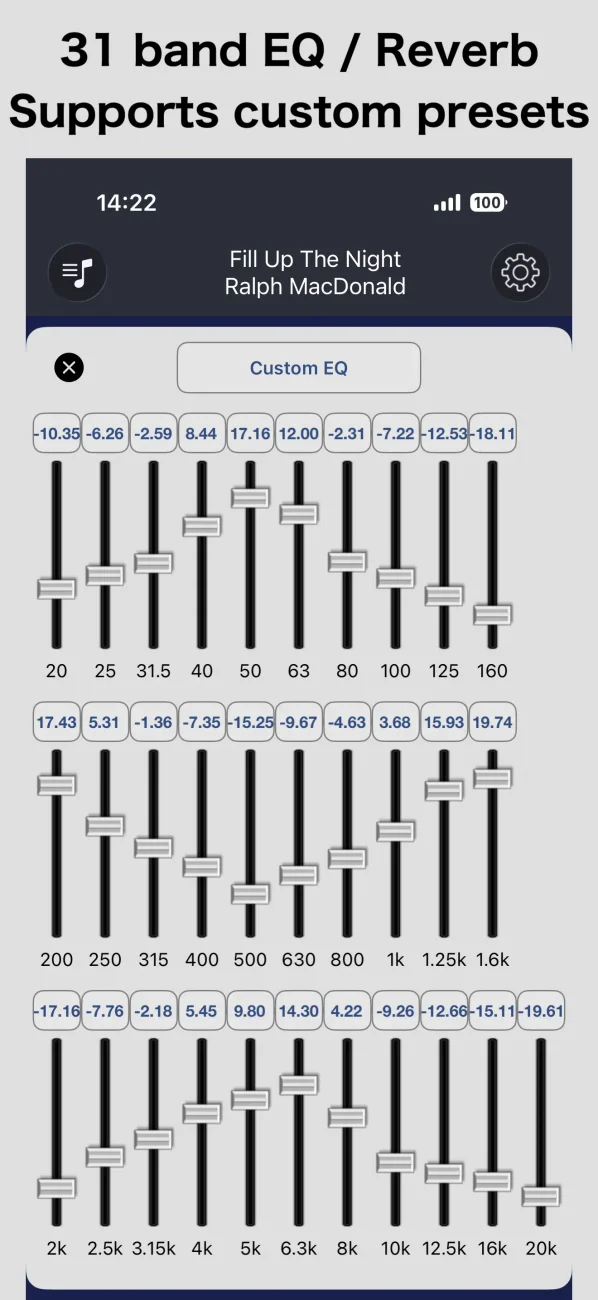
- 31 band equalizer
- Reverb
- AUv3 (Audio Unit v3) host
[Use cases]
- Karaoke's training. (Can be changed speed units of 10%, pitch shift in semitones easily)
- Can playback at reduced tempo to copy phrase for guitar or bass, the keyboard instrument.
- Can playback by changing the pitch to play by changing the key in the band performance (Developer himself has experience).
[Function]
- Perform time stretch (50 - 200%) / pitch shift (-12 - +12) in real time.
- 31 bands EQ (Hz: 20, 25, 31.5, 40, 50, 63, 80, 100, 125, 160, 200, 250, 315, 400, 500, 630, 800, 1k, 1.25k, 1.6k, 2k, 2.5k, 3.15k, 4k, 5k, 6.3k, 8k, 10k, 12.5k, 16k, 20k).
- EQ preset (Abundant Built-in Presets / Custom Presets).
- Reverb: Adjustable decay time (Low freq, High freq) / 13 presets
- Reverb preset (Built-in Presets / Custom Presets)
- Can be used as an AUv3 host.
- A-B loop playback.
- Center Cancel / Center Emphasis.
- Lch, Rch each mute.
- Quick fast forward, rewind (specify the number of seconds).
- Check and set current position graphically in wave view.
- Supports Auto-Lock ON/OFF.
- Supports background playback.
- Supports export (file writing) function (Each effect (speed/pitch/EQ) value set for each song is also reflected. The range specified in the loop section is output.)
In addition to loading "music" data included in the standard music app, it also supports the function to import audio files from other apps ("Voice Memos" etc.).
[How to import from "Voice Memos"]
1. Start the app "Voice Memos" and tap the mark "..." of the file to be imported from the list.
2. Tap "Share" on the sheet displayed from the bottom.
3. Tap "More" found by scrolling the displayed list of sharing destination apps to the right.
4. Select "AU Player" if available. The file is copied to this app.
================================================
[Note 1]
This application will not be able to read songs of the following formats.
- Songs from Apple Music, iCloud, iTunes Match
- Songs that are protected by digital copyright (DRM)
[Note 2]
Depending on the state of your device, your custom AUv3 effects may not appear in the list.
As a solution, you can solve the problem by starting "GarageBand" once and restarting this app.
================================================
Novedades
Versión 7.0.7 · 11/11/2026
Improved reverb presets so the selected preset remains active when adjusting "Dry/Wet Mix" or "Gain".
Privacidad de la aplicación
Lo que Loop-Sessions.LLC. declara en App Store sobre cómo esta aplicación gestiona los datos.
-
Datos usados para rastrearte
Pueden usarse para rastrearte en aplicaciones y sitios web propiedad de otras empresas.
- Datos de uso
-
Datos no vinculados a ti
Pueden recopilarse, pero no se vinculan a tu identidad.
- Datos de uso
Las prácticas de privacidad pueden variar, por ejemplo, según las funciones que uses o tu edad.
Información
- Vendedor
- Loop-Sessions.LLC.
- Categoría
- Música
- Versión
- 7.0.7
- Actualizado
- 11/11/2026
- Publicado
- 15/11/2013
- Tamaño
- 5,3 MB
- Requiere
- iOS 17.0 o posterior
- Clasificación por edad
- 4+
- Precio
- Gratis
- Compras en la aplicación
- Sí
- Idiomas
- Inglés, Japonés
- Copyright
- © Loop-Sessions.LLC.