
Audio Unit Player
AUv3 host / Export audio
Designed for iPhone, iPad
Free · In-app purchases
- Age rating4+
- CategoryMusic
- DeveloperLoop-Sessions.LLC.
- LanguagesEnglish+ 1 more
- Size5.3 MB
Links to the official App Store page
Download.org hosts no file of Audio Unit Player. The button opens its official App Store page, published by Loop-Sessions.LLC. Listing last checked on Nov 17, 2026.
Screenshots

About
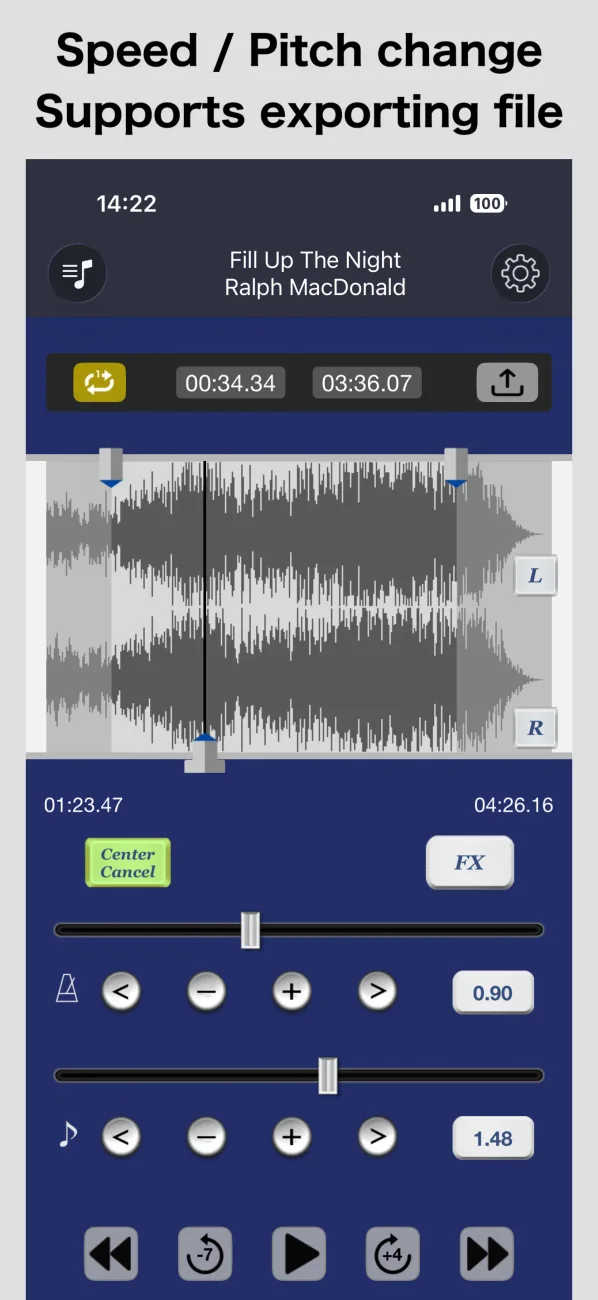
This app is a music player that can process the following effects in real time.
- Time stretch (0.5-2.0 double speed)
- Pitch shift (-1 ~ +1 octave)
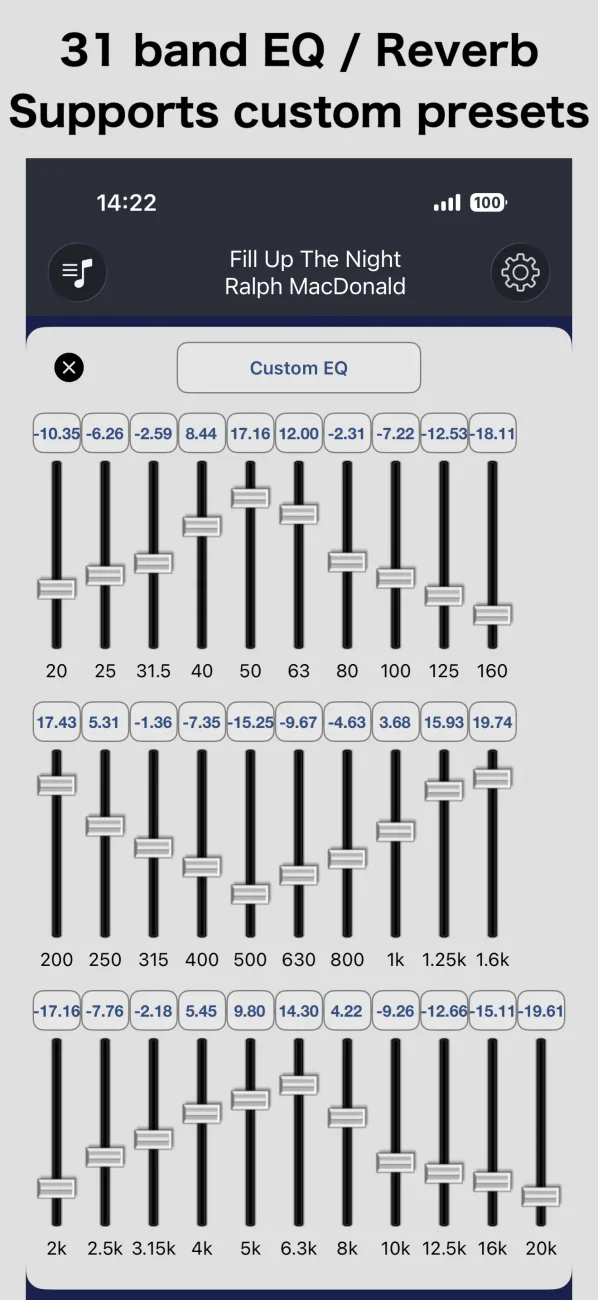
- 31 band equalizer
- Reverb
- AUv3 (Audio Unit v3) host
[Use cases]
- Karaoke's training. (Can be changed speed units of 10%, pitch shift in semitones easily)
- Can playback at reduced tempo to copy phrase for guitar or bass, the keyboard instrument.
- Can playback by changing the pitch to play by changing the key in the band performance (Developer himself has experience).
[Function]
- Perform time stretch (50 - 200%) / pitch shift (-12 - +12) in real time.
- 31 bands EQ (Hz: 20, 25, 31.5, 40, 50, 63, 80, 100, 125, 160, 200, 250, 315, 400, 500, 630, 800, 1k, 1.25k, 1.6k, 2k, 2.5k, 3.15k, 4k, 5k, 6.3k, 8k, 10k, 12.5k, 16k, 20k).
- EQ preset (Abundant Built-in Presets / Custom Presets).
- Reverb: Adjustable decay time (Low freq, High freq) / 13 presets
- Reverb preset (Built-in Presets / Custom Presets)
- Can be used as an AUv3 host.
- A-B loop playback.
- Center Cancel / Center Emphasis.
- Lch, Rch each mute.
- Quick fast forward, rewind (specify the number of seconds).
- Check and set current position graphically in wave view.
- Supports Auto-Lock ON/OFF.
- Supports background playback.
- Supports export (file writing) function (Each effect (speed/pitch/EQ) value set for each song is also reflected. The range specified in the loop section is output.)
In addition to loading "music" data included in the standard music app, it also supports the function to import audio files from other apps ("Voice Memos" etc.).
[How to import from "Voice Memos"]
1. Start the app "Voice Memos" and tap the mark "..." of the file to be imported from the list.
2. Tap "Share" on the sheet displayed from the bottom.
3. Tap "More" found by scrolling the displayed list of sharing destination apps to the right.
4. Select "AU Player" if available. The file is copied to this app.
================================================
[Note 1]
This application will not be able to read songs of the following formats.
- Songs from Apple Music, iCloud, iTunes Match
- Songs that are protected by digital copyright (DRM)
[Note 2]
Depending on the state of your device, your custom AUv3 effects may not appear in the list.
As a solution, you can solve the problem by starting "GarageBand" once and restarting this app.
================================================
What’s new
Version 7.0.7 · Nov 11, 2026
Improved reverb presets so the selected preset remains active when adjusting "Dry/Wet Mix" or "Gain".
App privacy
What Loop-Sessions.LLC. declares on the App Store about how this app handles data.
-
Data used to track you
May be used to track you across apps and websites owned by other companies.
- Usage data
-
Data not linked to you
May be collected but is not linked to your identity.
- Usage data
Privacy practices may vary, for example with the features you use or your age.
Information
- Seller
- Loop-Sessions.LLC.
- Category
- Music
- Version
- 7.0.7
- Updated
- Nov 11, 2026
- Released
- Nov 15, 2013
- Size
- 5.3 MB
- Requires
- iOS 17.0 or later
- Age rating
- 4+
- Price
- Free
- In-app purchases
- Yes
- Languages
- English, Japanese
- Copyright
- © Loop-Sessions.LLC.
You might also like
-
 Afro Latin Percussion MachineDrum: Salsa, Conga, Bachata
-
 KAGARIBI: AUv3 SynthShape, play, understand sound
-
 Riffer MadnessRecord, clip, & arrange audio
-
 CombustorTime bending resonator effect
-
 WavepocketPocket synth, tape & drums
-
 PanSphere: Digital HandpanImprovise and unwind anywhere
-
 1981 FM: 80s Track GeneratorChaos-driven 80s track writer
-
 2099 Techno: Generative SynthChaos-driven acid track writer
-
 irio pro: NAM Amp & Guitar FXModular audio effects & AUv3
-
 ON'NENIKUROctave Freeze Reverb AUv3