
- Clasificación por edad4+
- CategoríaUtilidades
- DesarrolladorRunqing Yang
- IdiomasInglés
- Tamaño244,0 MB
Es posible que AvatarGen no esté disponible en App Store en este momento
No se pudo acceder a la ficha de la tienda en nuestra última comprobación. El enlace sigue llevando a la página oficial de App Store.
Capturas de pantalla


Acerca de
El desarrollador no ha proporcionado este texto en tu idioma.
App Description
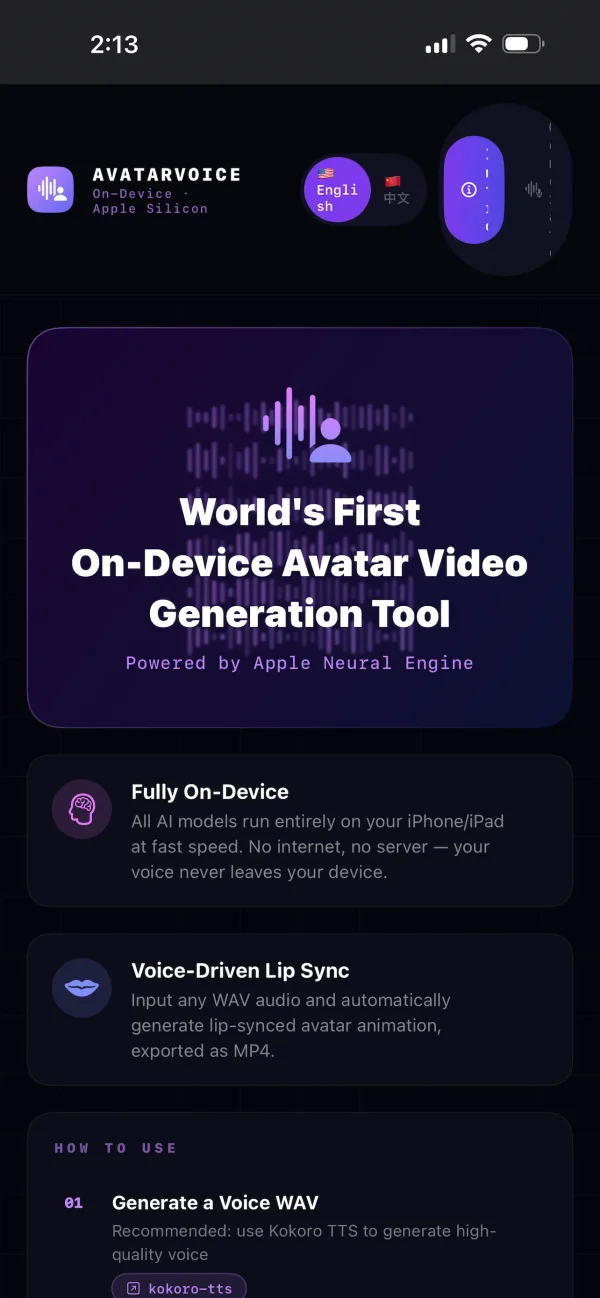
AvatarGen is an on-device avatar video generation app for iPhone and iPad.
Import a WAV audio file, and AvatarGen automatically transforms it into a lip-synced avatar video that you can preview, save, and share as MP4. From audio loading to feature extraction, model inference, post-processing, and video rendering, the entire workflow runs directly on your device.
Built for Apple Silicon and optimized with Core ML, AvatarGen is designed to deliver a fast, streamlined, and privacy-friendly creation experience without requiring a remote server for generation.
What AvatarGen Does
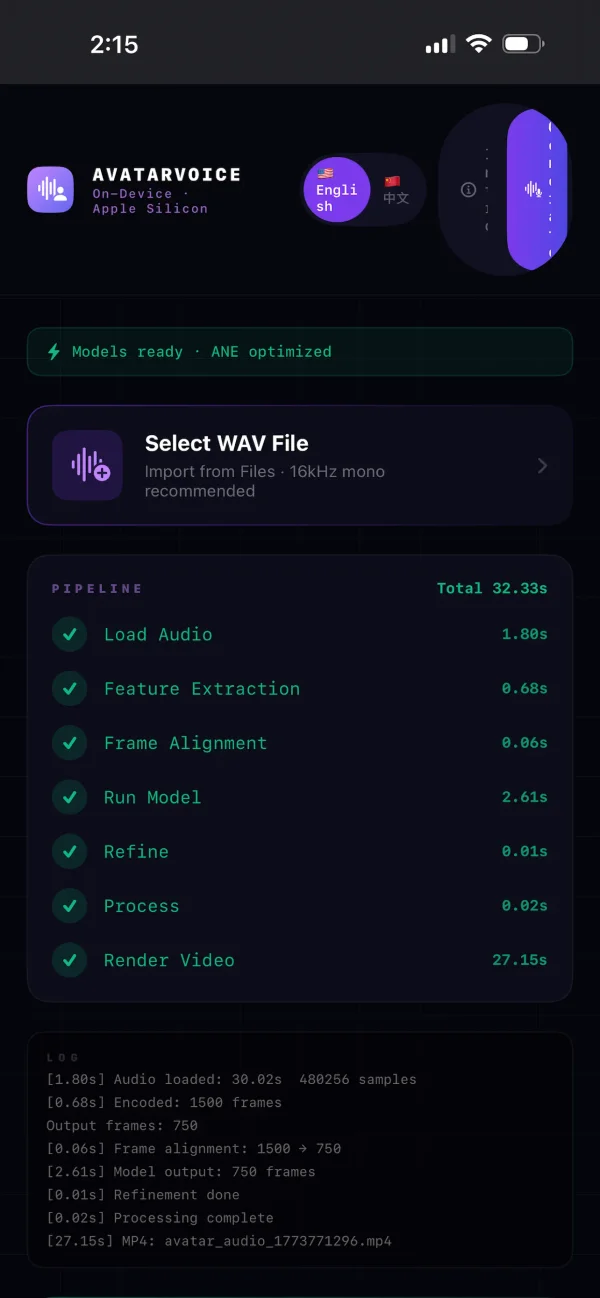
AvatarGen converts voice audio into animated avatar video in a simple mobile workflow. Once you select a WAV file, the app processes the audio, extracts speech features, aligns frames, runs AI inference, refines the generated animation data, renders video, and combines it with the original audio track.
The result is a ready-to-play MP4 avatar video generated locally on your iPhone or iPad.
Key Features
Fully On-Device AI
All core processing happens locally on your device. Your audio does not need to be uploaded to a cloud service for generation.
WAV-to-Avatar Video
Import a WAV file and automatically generate a lip-synced avatar animation video.
Fast Local Processing
AvatarGen is optimized for Apple hardware acceleration using Core ML to provide a responsive on-device workflow.
Private by Design
Because generation runs locally, AvatarGen supports a more privacy-conscious workflow for users who prefer to keep audio processing on their own device.
Built-In Progress Pipeline
The app shows each stage of generation, including audio loading, feature extraction, frame alignment, model execution, refinement, processing, and final video rendering.
In-App Video Preview
Preview the generated MP4 directly inside the app without needing to leave your workflow.
Save and Share MP4
Export your generated avatar video and share it using the standard iOS share sheet.
Simple Interface
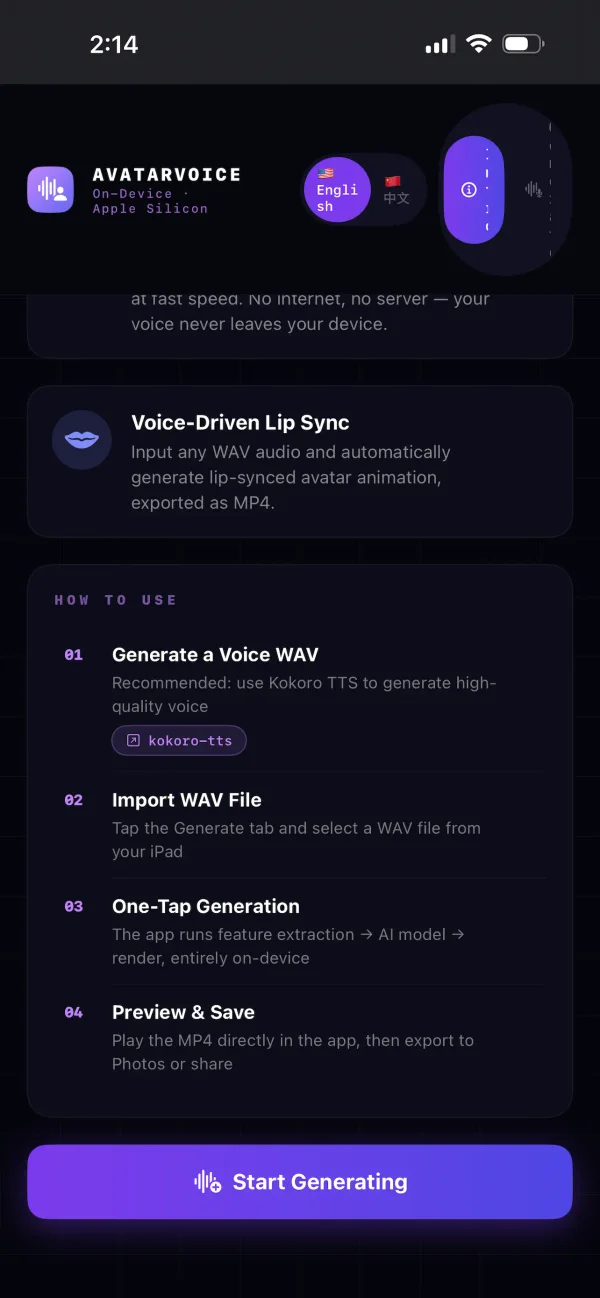
AvatarGen is designed with a clean workflow: import audio, generate video, preview the result, and share it.
Typical Workflow
1. Open AvatarGen
2. Import a WAV audio file from the Files app
3. Let the app process the audio on-device
4. Preview the generated avatar video
5. Save or share the MP4 output
Designed For
AvatarGen is useful for a wide range of creative and technical use cases, including:
• AI avatar demonstrations
• Voice-driven animation experiments
• Mobile content creation
• Offline media generation workflows
• Rapid prototyping for on-device AI experiences
• Creators, developers, researchers, and enthusiasts exploring avatar generation on Apple devices
Why On-Device Matters
Many AI media tools rely on cloud processing, remote inference, or server-based rendering. AvatarGen focuses on a different experience: keeping the generation workflow directly on your device. This can help reduce friction, improve responsiveness, and support a more private creation process.
For users who want a compact mobile workflow for turning voice into animation, AvatarGen offers a practical and modern on-device solution.
Highlights
• Generate lip-synced avatar videos from WAV audio
• Run AI locally on iPhone and iPad
• No server required for core generation workflow
• Preview results instantly in the app
• Export finished videos as MP4
• Built with Core ML and optimized for Apple devices
AvatarGen brings voice-driven avatar video generation to mobile in a direct and accessible way. Whether you are experimenting with AI animation, showcasing an avatar workflow, or creating quick demo content, AvatarGen gives you a fast and private path from audio input to shareable video output.
Novedades
Versión 2.0 · 1/4/2026
increase the video resolution of the generaated video from 128*128 to 512*512, fix some bugs related to text and feature extraction steps
Privacidad de la aplicación
Lo que Runqing Yang declara en App Store sobre cómo esta aplicación gestiona los datos.
-
No se recopilan datos
El desarrollador no recopila ningún dato de esta aplicación.
Las prácticas de privacidad pueden variar, por ejemplo, según las funciones que uses o tu edad.
Información
- Vendedor
- Runqing Yang
- Categoría
- Utilidades
- Versión
- 2.0
- Actualizado
- 1/4/2026
- Publicado
- 30/3/2026
- Tamaño
- 244,0 MB
- Requiere
- iOS 26.2 o posterior
- Clasificación por edad
- 4+
- Idiomas
- Inglés
- Copyright
- © Runqing Yang
Quizá también te guste
-
 FileBolt: File TransferUtilidades
-
 LlamaChat LocalUtilidades
-
 TidyFiles - Limpiador de fotosDuplicados y almacenamiento
-
 Convoy - Media ConverterUtilidades
-
 Digi Voice RadioUtilidades
-
 VoiceMake - Texto a VozNarrador IA y clonación de voz
-
 LocalMind: Ollama & LM StudioIA privada, local y conectada
-
 Evir – Media ConverterUtilidades
-
 WANYOOUtilidades
-
 TTS: Text to Speech ProUtilidades