
- Clasificación por edad4+
- CategoríaFinanzas
- DesarrolladorWilson Loureiro
- IdiomasInglés+ 26 más
- Tamaño186,2 MB
Es posible que CheckSense no esté disponible en App Store en este momento
No se pudo acceder a la ficha de la tienda en nuestra última comprobación. El enlace sigue llevando a la página oficial de App Store.
Capturas de pantalla


Acerca de
El desarrollador no ha proporcionado este texto en tu idioma.
Stop guessing what you can afford.
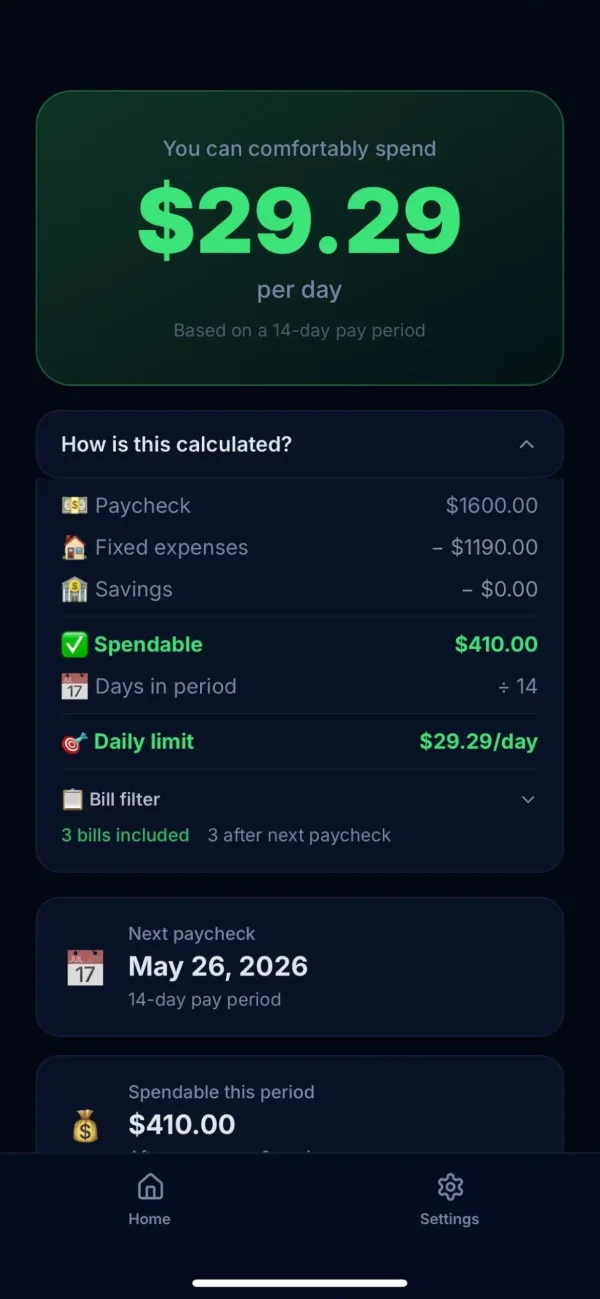
CheckSense calculates exactly how much you can safely spend based on your paycheck, bills, and expenses.
Just enter:
your paycheck schedule
your income
your upcoming bills
And instantly see:
your safe daily spending limit
what bills are included before your next paycheck
how much money you actually have available
Features
Smart paycheck-based budgeting
Automatic bill filtering by due date
Daily safe spend calculation
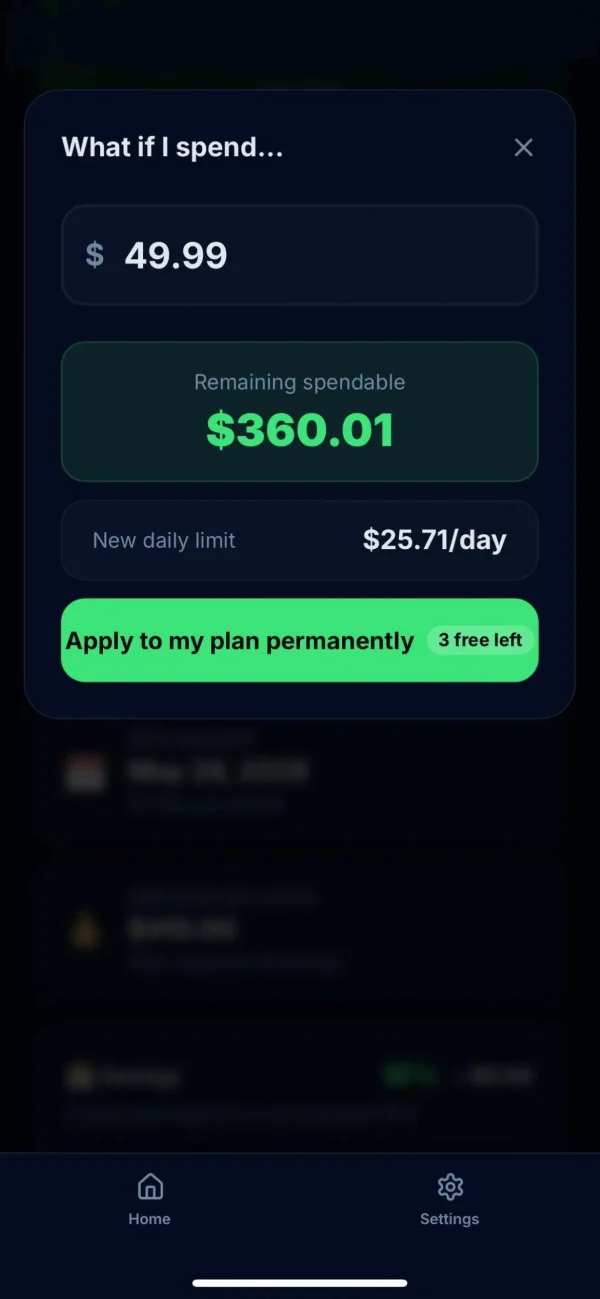
“Can I afford this?” simulator
Clear breakdown of included vs excluded expenses
Simple, fast setup in under 1 minute
Built for real life
Designed for people who get paid weekly, biweekly, or monthly and want a simple way to avoid overspending between paychecks.
No spreadsheets. No guessing. No stress.
Novedades
Versión 1.3 · 11/5/2026
CheckSense is a budgeting utility that helps users calculate how much they can safely spend between paychecks based on their paycheck amount, pay schedule, bills, and due dates.
CheckSense Pro unlocks optional advanced planning features, including unlimited “Can I afford this?” checks, adjustable savings rate, and the ability to apply purchases to the user’s plan.
Pro checkout is currently configured in Stripe test mode for App Review so reviewers can test the full subscription flow without being charged. The checkout flow, account flow, webhook verification, and Pro unlock behavior match the production flow. Before public release, the same backend configuration will be switched to live Stripe keys and live Stripe Price IDs.
To test Pro:
1. Open the app and create an account.
2. Open the Pro screen.
3. Choose Monthly or Yearly.
4. Complete Stripe checkout using test card 4242 4242 4242 4242, any future expiration date, any CVC, and any ZIP code.
5. Return to the app.
6. Tap “Refresh Pro Status” if Pro does not unlock automatically.
The app does not collect or process card details directly. Payment is completed through Stripe’s secure web checkout, and Pro access is only unlocked after server-side Stripe webhook verification confirms the subscription.
Privacidad de la aplicación
Lo que Wilson Loureiro declara en App Store sobre cómo esta aplicación gestiona los datos.
-
Datos no vinculados a ti
Pueden recopilarse, pero no se vinculan a tu identidad.
- Identificadores
Las prácticas de privacidad pueden variar, por ejemplo, según las funciones que uses o tu edad.
Información
- Vendedor
- Wilson Loureiro
- Categoría
- Finanzas
- Versión
- 1.3
- Actualizado
- 11/5/2026
- Publicado
- 7/5/2026
- Tamaño
- 186,2 MB
- Requiere
- iOS 15.1 o posterior
- Clasificación por edad
- 4+
- Idiomas
- Inglés, Árabe, Checo, Danés, Neerlandés, Finés, Francés, Alemán, Griego, Hebreo, Húngaro, Indonesio + 15 más
- Copyright
- © 2026 Wilson Loureiro
Quizá también te guste
-
 My Pocket FinanceFinanzas
-
 Even-KeepFinanzas
-
 Kova - Expense TrackerFinanzas
-
 Crumbs: Daily BudgetFinanzas
-
 Money Tracker: Ahorro y GastoExporta datos y ahorra dinero
-
 Worth It: Gasto consciente¿Mereció la pena? Sin culpas
-
 Privat - Budget TrackerFinanzas
-
 Klyro: Offline Expense TrackerFinanzas
-
 Moniq - Simple Expense TrackerFinanzas
-
 Impulse – Check Your TradeoffsFinanzas