Chorded
Chords, backing band, songs
Diseñada para iPhone, Mac
Compras en la aplicación
- Clasificación por edad4+
- CategoríaMúsica
- DesarrolladorKouhei Oto
- IdiomasInglés+ 1 más
- Tamaño7,4 MB
Es posible que Chorded no esté disponible en App Store en este momento
No se pudo acceder a la ficha de la tienda en nuestra última comprobación. El enlace sigue llevando a la página oficial de App Store.
Capturas de pantalla



Acerca de
El desarrollador no ha proporcionado este texto en tu idioma.
Chorded is a music app that starts from chords.
FIND CHORD
Press keys or frets and Chorded names the chord. Explore the circle of fifths and try well-known progressions. In Chord Rings, all 492 chords sit around your key: the farther out, the more notes outside the key, colored by what they do (Home, Away, Tension). Press one to hear it and see the chords a small move away.
PLAY ALONG
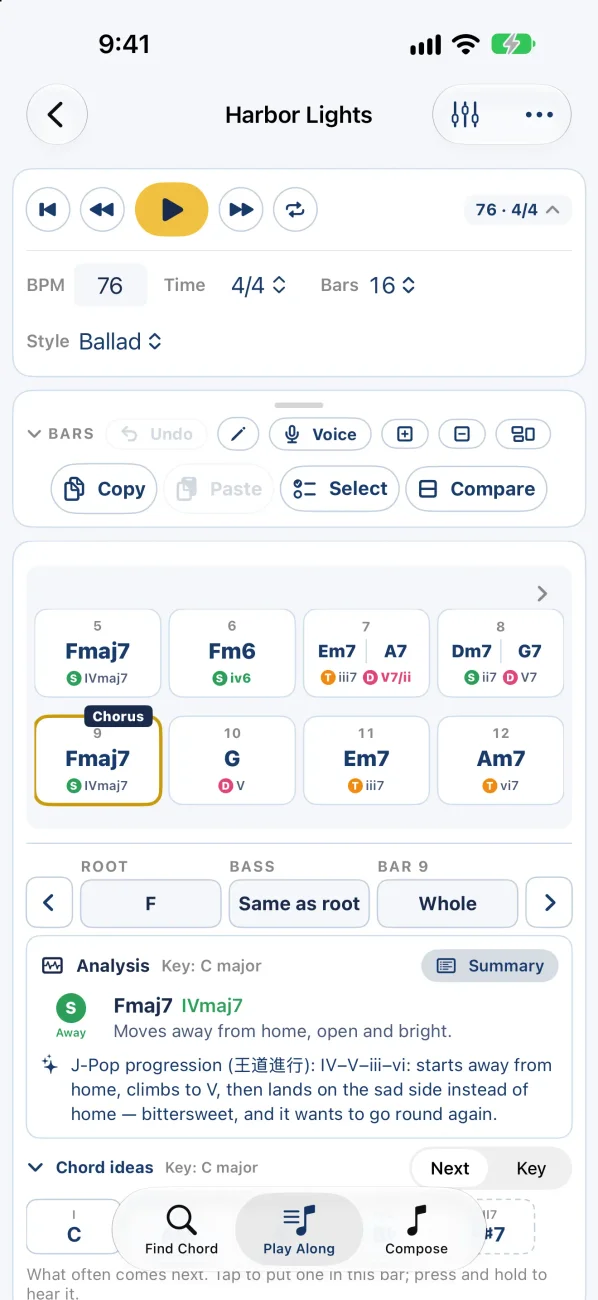
Put in a chord progression, by tapping or by saying it, or import a chord chart from a PDF, a photo or a screenshot, and a backing band plays it right away. Chord ideas suggests what could come next and why. Add sections, repeats and lyrics, and print the chart or share it with a link.
ANALYSIS
See what every chord in your song does: Roman numerals, Home, Away and Tension, secondary dominants, borrowed chords, key changes, cadences and well-known progressions, with a summary of the whole song. Part of Chorded Full.
COMPOSE
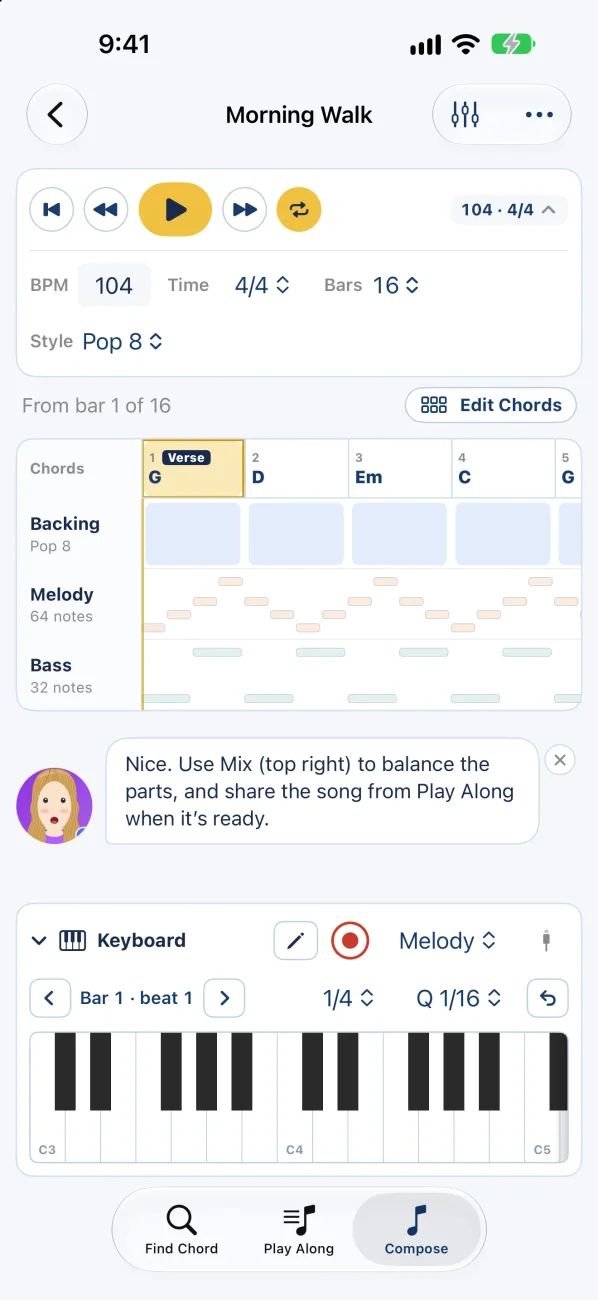
Build on your chords. Write a melody and a bass line, note by note or on the keyboard, and balance them in Mix.
MY SOUNDS
Import a SoundFont (.sf2) sound and play your chords, backing and tracks on it, beside Guitar and Piano.
FREE TO START
Find Chord, Import Score, My Sounds and up to three songs are free.
CHORDED FULL
One purchase, no subscription: any number of songs, chord progression analysis, MIDI keyboards, iCloud on all your devices, MIDI and audio files, and all of Chorded on the Mac.
Chorded speaks English and Japanese. Songs travel between onChord apps as onChord Song files.
Novedades
Versión 2.1 · 25/11/2026
• Import Score: turn a chord chart, or a lyric sheet with chords, into a Play Along song. Choose a PDF, a photo or a screenshot, check and fix the chords, then add it. It's all read on your device.
• Chord Rings, in Find Chord: all 492 chords around your key. The farther out a chord sits, the more notes it has outside the key. Press one to hear it and see the chords a small move away, add the ones you like to My Chords, and play them in Play Along.
• Chord progression analysis, part of Chorded Full: Roman numerals and each chord's role under the bars, with secondary dominants, borrowed chords, key changes, ii–V's, cadences and well-known progressions, and a summary of your song. On devices that support on-device AI, it can explain your song in plain words.
• My Sounds: import a SoundFont (.sf2) sound and play your chords, backing and Compose tracks on it, beside Guitar and Piano.
• Chorded now speaks Japanese. It follows your device's language, or choose one at the top of Settings.
Privacidad de la aplicación
Lo que Kouhei Oto declara en App Store sobre cómo esta aplicación gestiona los datos.
-
No se recopilan datos
El desarrollador no recopila ningún dato de esta aplicación.
Las prácticas de privacidad pueden variar, por ejemplo, según las funciones que uses o tu edad.
Información
- Vendedor
- Kouhei Oto
- Categoría
- Música
- Versión
- 2.1
- Actualizado
- 25/11/2026
- Publicado
- 7/10/2026
- Tamaño
- 7,4 MB
- Requiere
- iOS 17.0 o posterior
- Clasificación por edad
- 4+
- Compras en la aplicación
- Sí
- Idiomas
- Inglés, Japonés
- Copyright
- © 2026 Kouhei Oto (onChord)