
Chorded
Chords, backing band, songs
Designed for iPhone, Mac
Free · In-app purchases
- Age rating4+
- CategoryMusic
- DeveloperKouhei Oto
- LanguagesEnglish+ 1 more
- Size7.4 MB
Links to the official App Store page
Download.org hosts no file of Chorded. The button opens its official App Store page, published by Kouhei Oto. Listing last checked on Nov 26, 2026.
Screenshots



About
Chorded is a music app that starts from chords.
FIND CHORD
Press keys or frets and Chorded names the chord. Explore the circle of fifths and try well-known progressions. In Chord Rings, all 492 chords sit around your key: the farther out, the more notes outside the key, colored by what they do (Home, Away, Tension). Press one to hear it and see the chords a small move away.
PLAY ALONG
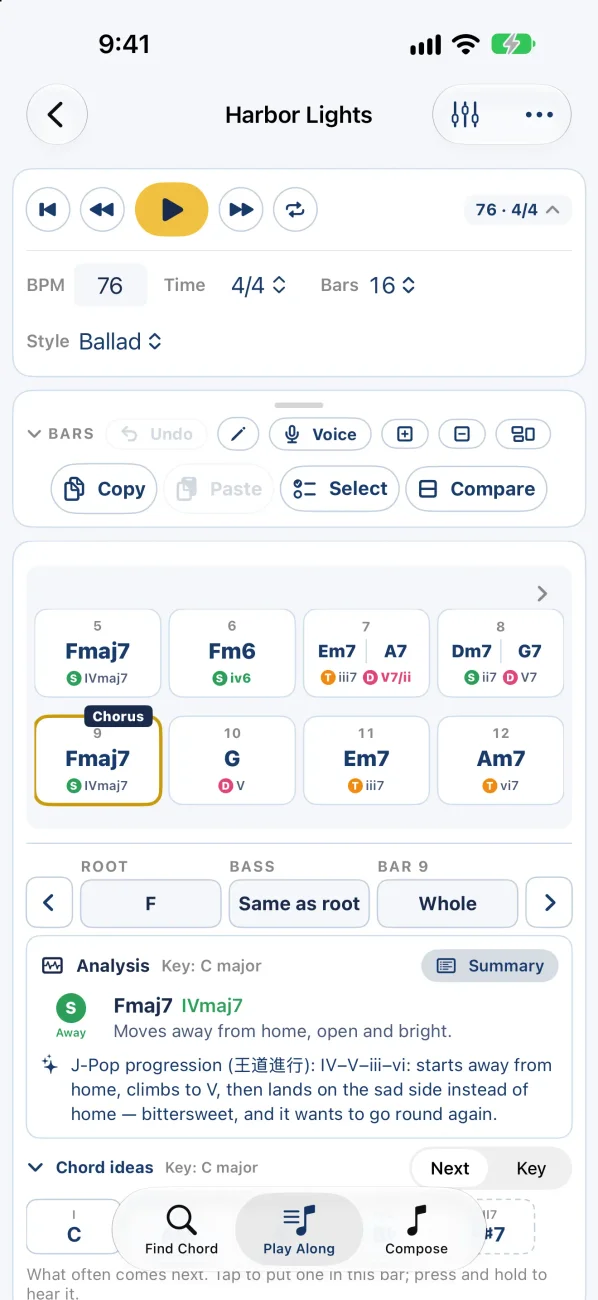
Put in a chord progression, by tapping or by saying it, or import a chord chart from a PDF, a photo or a screenshot, and a backing band plays it right away. Chord ideas suggests what could come next and why. Add sections, repeats and lyrics, and print the chart or share it with a link.
ANALYSIS
See what every chord in your song does: Roman numerals, Home, Away and Tension, secondary dominants, borrowed chords, key changes, cadences and well-known progressions, with a summary of the whole song. Part of Chorded Full.
COMPOSE
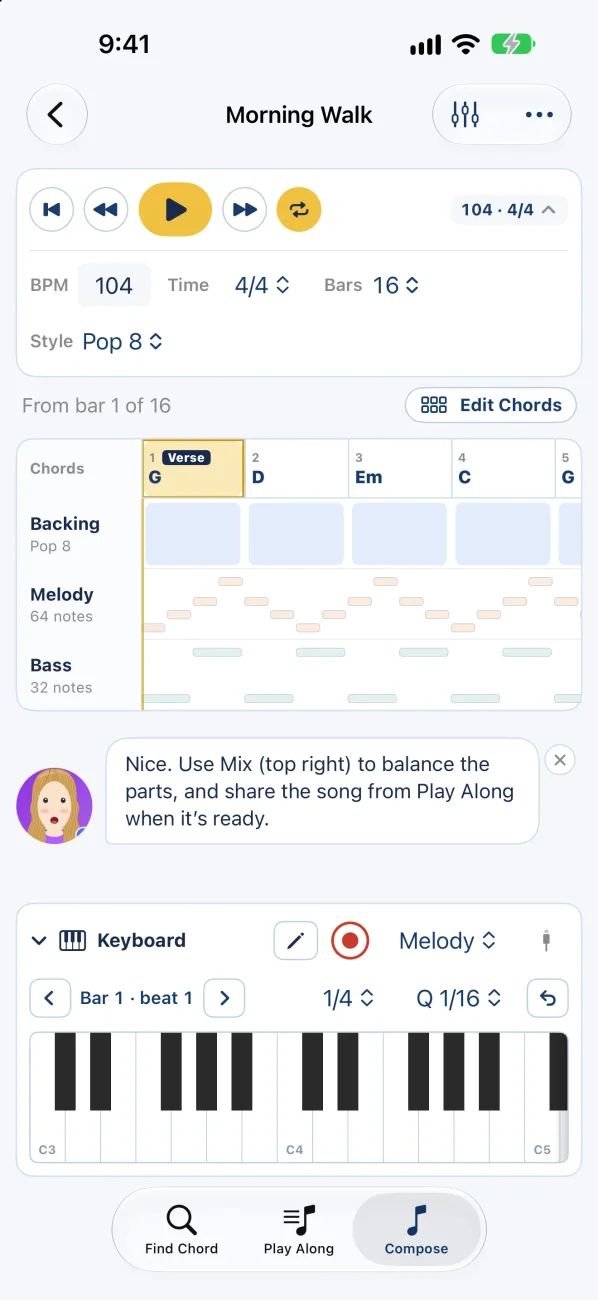
Build on your chords. Write a melody and a bass line, note by note or on the keyboard, and balance them in Mix.
MY SOUNDS
Import a SoundFont (.sf2) sound and play your chords, backing and tracks on it, beside Guitar and Piano.
FREE TO START
Find Chord, Import Score, My Sounds and up to three songs are free.
CHORDED FULL
One purchase, no subscription: any number of songs, chord progression analysis, MIDI keyboards, iCloud on all your devices, MIDI and audio files, and all of Chorded on the Mac.
Chorded speaks English and Japanese. Songs travel between onChord apps as onChord Song files.
What’s new
Version 2.1 · Nov 25, 2026
• Import Score: turn a chord chart, or a lyric sheet with chords, into a Play Along song. Choose a PDF, a photo or a screenshot, check and fix the chords, then add it. It's all read on your device.
• Chord Rings, in Find Chord: all 492 chords around your key. The farther out a chord sits, the more notes it has outside the key. Press one to hear it and see the chords a small move away, add the ones you like to My Chords, and play them in Play Along.
• Chord progression analysis, part of Chorded Full: Roman numerals and each chord's role under the bars, with secondary dominants, borrowed chords, key changes, ii–V's, cadences and well-known progressions, and a summary of your song. On devices that support on-device AI, it can explain your song in plain words.
• My Sounds: import a SoundFont (.sf2) sound and play your chords, backing and Compose tracks on it, beside Guitar and Piano.
• Chorded now speaks Japanese. It follows your device's language, or choose one at the top of Settings.
App privacy
What Kouhei Oto declares on the App Store about how this app handles data.
-
Data not collected
The developer does not collect any data from this app.
Privacy practices may vary, for example with the features you use or your age.
Information
- Seller
- Kouhei Oto
- Category
- Music
- Version
- 2.1
- Updated
- Nov 25, 2026
- Released
- Oct 7, 2026
- Size
- 7.4 MB
- Requires
- iOS 17.0 or later
- Age rating
- 4+
- Price
- Free
- In-app purchases
- Yes
- Languages
- English, Japanese
- Copyright
- © 2026 Kouhei Oto (onChord)
You might also like
-
 PianolaMIDI Player for Digital Pianos
-
 Pixelboop: Make Music VisuallyMusic production made fun!
-
 JAX ESSENTIALS : FlangerMIDI Controlled Audio Effect
-
 Vintage Rhythm StudioPro Drum Sequencer & Mixer
-
 JAX TubeFlavourTube Saturation AudioUnit
-
 Roboto AUv3 Singing SynthSinging Voice Synthesizer
-
 Tako KickGenerative Morphing Drums
-
 Nova MetronomeMinimalist and Practical
-
 Harmonaut: Chord PlayerMusic Composition & Explorer
-
 JAX MIDI Control PadTouch MIDI controller (AUv3)