
- Clasificación por edad4+
- CategoríaEconomía y empresa
- DesarrolladorPANASONIC ENTERTAINMENT & COMMUNICATION CO., LTD.
- Tamaño28,5 MB
Enlaza a la página oficial de App Store
Download.org no aloja ningún archivo de EVA ROP. El botón abre la página de la aplicación en App Store, donde la publica PANASONIC ENTERTAINMENT & COMMUNICATION CO., LTD. Ficha comprobada por última vez el 15/11/2026.
Capturas de pantalla


Acerca de
El desarrollador no ha proporcionado este texto en tu idioma.
・ Name of App
EVA ROP (EVA Remote Operation Panel)
・ Description
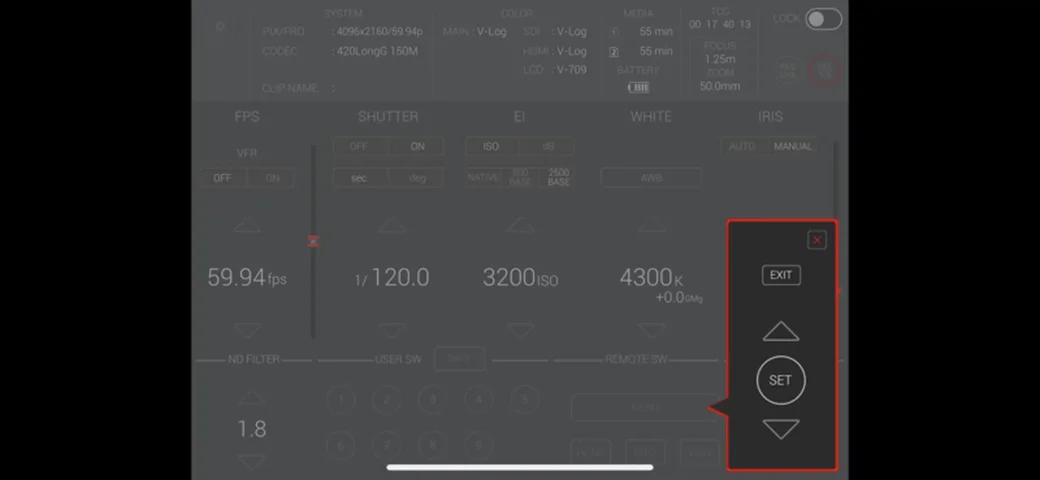
EVA ROP is a control program that enables the wireless remote control of the "AU-EVA1" camera.
It provides a GUI that displays status information, settings and user switch status in a single screen and the ability to change camera settings intuitively using a screen touch.
Buttons such as user buttons and REC S/S button in screen can manipulate AU-EVA1.
Please refer to the EVA ROP application manual for connection and usage.
* Note:
For wireless LAN connection with the camera, a wireless module needs to be purchased separately.
Refer to the web page for the wireless module.
・ Applicable Model
AU-EVA1
・ Supported OS
iOS 12 or later
・ Features
1. Camera status display
- System mode and color settings
- Remaining time of recording media
- Battery remaining time
- TCG(Time Code)
- Zoom value
- FOCUS(m/ft toggle switch)
2. Status display and settings for the following items
- FPS
- SHUTTER
- EI
- WHITE BALANCE
- IRIS
- ND FILTER
3. Record Control
REC S/S button in screen allows Rec start and stop.
4. USER SWITCH CONTROL
Each of Nine User buttons in screen can perform function assigned to its corresponding user button in connected AU-EVA1
5. Switching Control in Camera LCD status display
MENU, HOME, INFO or VIEW button in screen can switch Camera LCD display to the corresponding screen.
Menu operation panel which shows up by MENU button can manipulate menus in connected AU-EVA1
6. MENU DISPLAY Control
SDI or HDMI button in screen can toggle its corresponding output signal flow
7. Control for ZOOM and FOCUS
Zoom and FOCUS can be controlled in the ZOOM/FOCUS control panel.
Also, the m/ft switch can change display units of FOCUS.
[NOTE]
In iOS 11, camera information may not be displayed correctly on the app screen.
This can be fixed by turning on airplane mode and then turning off again.
・SETTINGS
1. Close "EVA ROP".
2. Select "Settings" on the device home screen
3. Turn on "Airplane mode"
4. Turn off "Airplane mode"
5. Launch "EVA ROP"
*These settings need to be repeated after turning off or restarting the device.
Novedades
Versión 3.0.4 · 25/4/2024
- Supported OS is now iOS12 or later.
- Fixed a bug with ZOOM/FOCUS control.
Privacidad de la aplicación
Lo que PANASONIC ENTERTAINMENT & COMMUNICATION CO., LTD. declara en App Store sobre cómo esta aplicación gestiona los datos.
-
No se recopilan datos
El desarrollador no recopila ningún dato de esta aplicación.
Las prácticas de privacidad pueden variar, por ejemplo, según las funciones que uses o tu edad.
Información
- Vendedor
- PANASONIC ENTERTAINMENT & COMMUNICATION CO., LTD.
- Categoría
- Economía y empresa
- Versión
- 3.0.4
- Actualizado
- 25/4/2024
- Publicado
- 13/10/2017
- Tamaño
- 28,5 MB
- Requiere
- iOS 12.0 o posterior
- Clasificación por edad
- 4+
- Precio
- Gratis
- Copyright
- © Panasonic Connect Co., Ltd.
Quizá también te guste
-
 HC ROPEconomía y empresa
-
 Tentacle SetupProductividad
-
 Q-SYS UCI ViewerProductividad
-
 Splashtop BusinessRemote Access and Support
-
 Scriptation: Anota GuionesDesglose y Lectura de Mesa
-
 Planning Center Check-InsEconomía y empresa
-
 RealVNC Viewer: Remote DesktopProductividad
-
 Duet DisplayBe Twice As Productive
-
 UniFi EndpointEconomía y empresa
-
 Eventbrite OrganizadorEconomía y empresa