- Batasan usia4+
- KategoriBisnis
- PengembangPANASONIC ENTERTAINMENT & COMMUNICATION CO., LTD.
- Ukuran28,5 MB
Tertaut ke halaman resmi App Store
Download.org tidak menyimpan file EVA ROP apa pun. Tombol ini membuka halaman aplikasi di App Store, tempat PANASONIC ENTERTAINMENT & COMMUNICATION CO., LTD. menerbitkannya. Halaman terakhir diperiksa pada 15/11/2026.
Tangkapan layar


Tentang
Pengembang belum menyediakan teks ini dalam bahasa Anda.
・ Name of App
EVA ROP (EVA Remote Operation Panel)
・ Description
EVA ROP is a control program that enables the wireless remote control of the "AU-EVA1" camera.
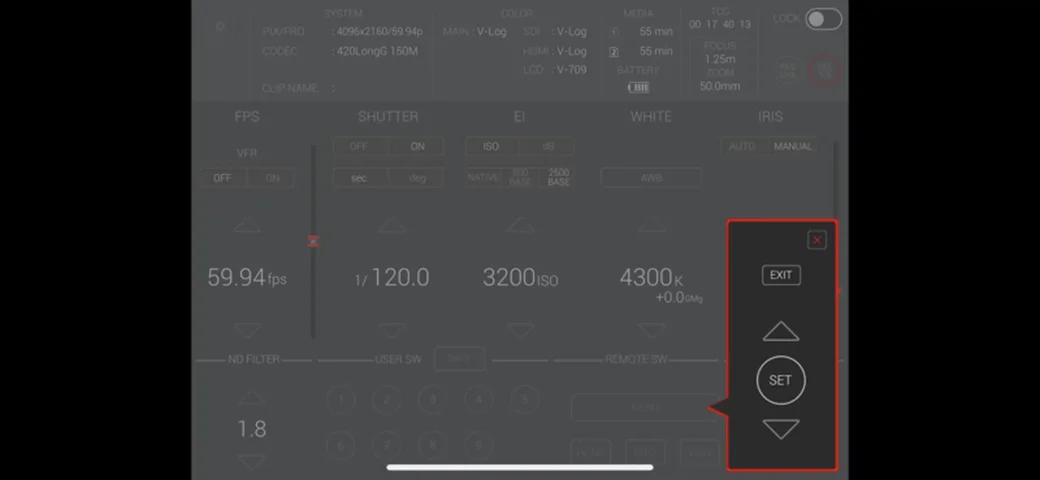
It provides a GUI that displays status information, settings and user switch status in a single screen and the ability to change camera settings intuitively using a screen touch.
Buttons such as user buttons and REC S/S button in screen can manipulate AU-EVA1.
Please refer to the EVA ROP application manual for connection and usage.
* Note:
For wireless LAN connection with the camera, a wireless module needs to be purchased separately.
Refer to the web page for the wireless module.
・ Applicable Model
AU-EVA1
・ Supported OS
iOS 12 or later
・ Features
1. Camera status display
- System mode and color settings
- Remaining time of recording media
- Battery remaining time
- TCG(Time Code)
- Zoom value
- FOCUS(m/ft toggle switch)
2. Status display and settings for the following items
- FPS
- SHUTTER
- EI
- WHITE BALANCE
- IRIS
- ND FILTER
3. Record Control
REC S/S button in screen allows Rec start and stop.
4. USER SWITCH CONTROL
Each of Nine User buttons in screen can perform function assigned to its corresponding user button in connected AU-EVA1
5. Switching Control in Camera LCD status display
MENU, HOME, INFO or VIEW button in screen can switch Camera LCD display to the corresponding screen.
Menu operation panel which shows up by MENU button can manipulate menus in connected AU-EVA1
6. MENU DISPLAY Control
SDI or HDMI button in screen can toggle its corresponding output signal flow
7. Control for ZOOM and FOCUS
Zoom and FOCUS can be controlled in the ZOOM/FOCUS control panel.
Also, the m/ft switch can change display units of FOCUS.
[NOTE]
In iOS 11, camera information may not be displayed correctly on the app screen.
This can be fixed by turning on airplane mode and then turning off again.
・SETTINGS
1. Close "EVA ROP".
2. Select "Settings" on the device home screen
3. Turn on "Airplane mode"
4. Turn off "Airplane mode"
5. Launch "EVA ROP"
*These settings need to be repeated after turning off or restarting the device.
Yang baru
Versi 3.0.4 · 25/4/2024
- Supported OS is now iOS12 or later.
- Fixed a bug with ZOOM/FOCUS control.
Privasi aplikasi
Yang dinyatakan PANASONIC ENTERTAINMENT & COMMUNICATION CO., LTD. di App Store tentang cara aplikasi ini menangani data.
-
Data tidak dikumpulkan
Pengembang tidak mengumpulkan data apa pun dari aplikasi ini.
Praktik privasi dapat bervariasi, misalnya berdasarkan fitur yang Anda gunakan atau usia Anda.
Informasi
- Penjual
- PANASONIC ENTERTAINMENT & COMMUNICATION CO., LTD.
- Kategori
- Bisnis
- Versi
- 3.0.4
- Diperbarui
- 25/4/2024
- Dirilis
- 13/10/2017
- Ukuran
- 28,5 MB
- Memerlukan
- iOS 12.0 atau yang lebih baru
- Batasan usia
- 4+
- Harga
- Gratis
- Hak cipta
- © Panasonic Connect Co., Ltd.