
- Clasificación por edad4+
- CategoríaFoto y vídeo
- DesarrolladorInstamic Inc.
- IdiomasInglés
- Tamaño13,5 MB
Enlaza a la página oficial de App Store
Download.org no aloja ningún archivo de Instamic Remote. El botón abre la página de la aplicación en App Store, donde la publica Instamic Inc. Ficha comprobada por última vez el 14/11/2026.
Capturas de pantalla


Acerca de
El desarrollador no ha proporcionado este texto en tu idioma.
Control your Instamic remotely to capture the sound you love!
Instamic Remote transforms your iPhone or iPad into an audio-video powerhouse.
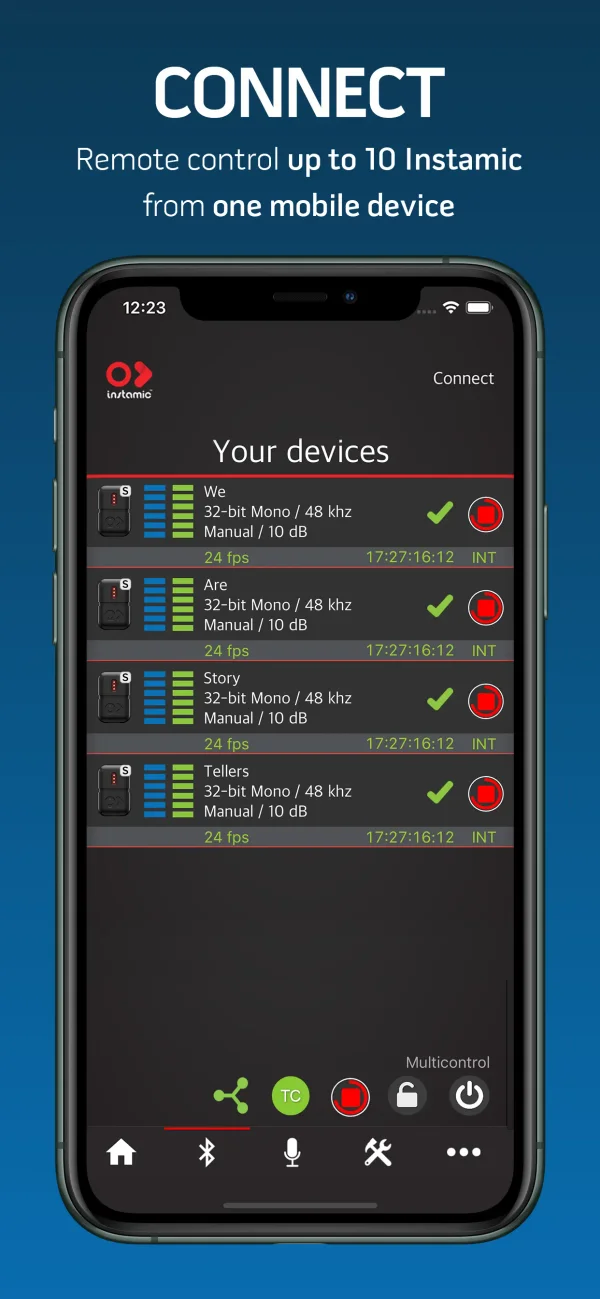
Remote control one or multiple microphones, keep them synced with Timecode and monitor the audio before recording.
You can even record video or audio only directly to your mobile device at 48kHz.
KEY FEATURES
- Remote control multiple Instamics at once (up to 10)
- Start and stop recording
- Set up the input gain while recording
- VU meter to monitor audio input
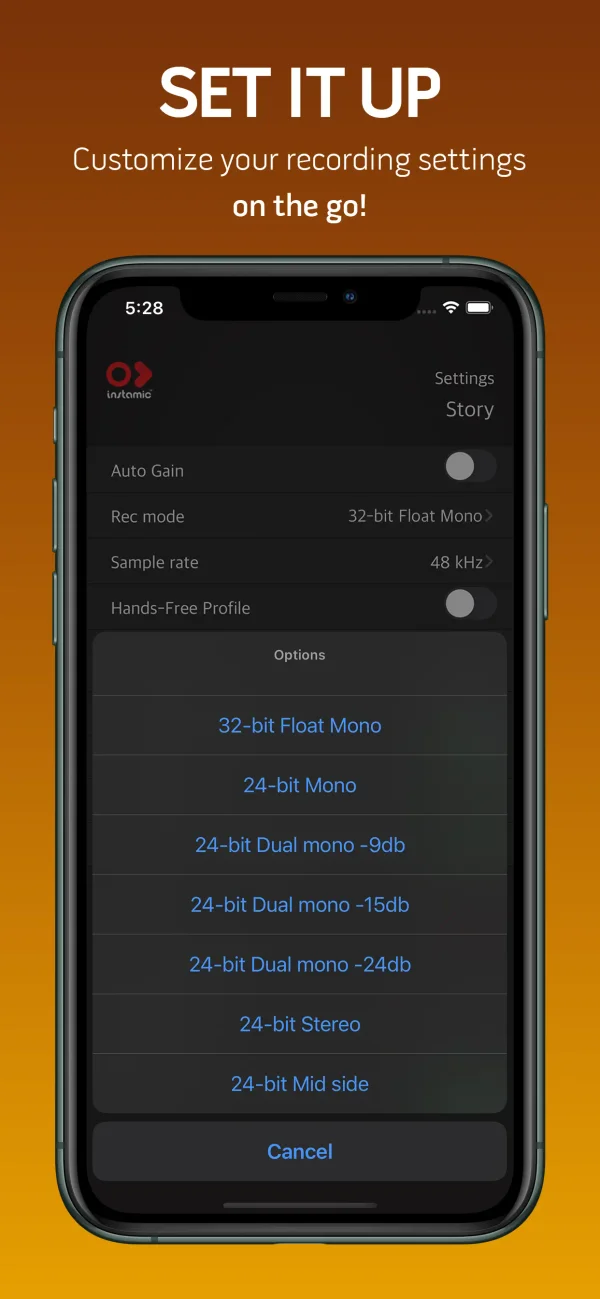
- Adjust Recording Settings
- Turn off Instamic wirelessly
- Rename each device
- Audio monitoring (pre-recording)
- Lock button
- LEDs on and off
- Save Monitoring Session
- Timecode Syncing (Atomos AirGlu, Tentacle Sync E, or Internal Time of the Day)
SETTINGS
Input Mode: 32-bit Float Mono (Instamic Pro Plus), 24-bit Mono, 24-bit Dual-Mono (Instamic Basic, Pro Mono and Stereo), 24-bit Stereo, M/S (Instamic Pro Stereo).
Input Level: Manual or Automatic
Sample Rate: 48kHz or 96kHz
Time Remaining
Battery Level
Firmware Version
Rename your device
Turn it off wirelessly
Switch to Handsfree Profile Mode.
Auto LEDs mode
Sleep Mode
Take numbering
Saving Monitoring Session
Format
#happyrecording #wearestorytellers #wearecreators
Michele and the Instamic Team
Novedades
Versión 1.6.5 · 7/11/2025
In this release, we focused on improving performance, stability, and first-time usability.
We recommend this update for all Instamic users.
Key improvements include:
- Support for iOS 26, including the new “Liquid Glass” interface design.
- Enhanced Video Capture screen for quicker and easier video recording.
- Simplified Home screen for a smoother first-time experience.
- Stability improvements and bug fixes throughout the app – especially when switching between modes.
To take full advantage of these improvements, please update your mobile app to version 1.6.5 and your Instamic firmware to version 2.3.46.
Updated documentation is available to help both new and existing customers maximize their Instamic experience, along with instructions on how to upgrade your firmware at support.instamic.io.
#happyrecording #wearestorytellers #wearecreators
Michele and the Instamic Team
Privacidad de la aplicación
Lo que Instamic Inc. declara en App Store sobre cómo esta aplicación gestiona los datos.
-
No se recopilan datos
El desarrollador no recopila ningún dato de esta aplicación.
Las prácticas de privacidad pueden variar, por ejemplo, según las funciones que uses o tu edad.
Información
- Vendedor
- Instamic, Inc.
- Categoría
- Foto y vídeo
- Versión
- 1.6.5
- Actualizado
- 7/11/2025
- Publicado
- 25/1/2017
- Tamaño
- 13,5 MB
- Requiere
- iOS 14.0 o posterior
- Clasificación por edad
- 4+
- Precio
- Gratis
- Idiomas
- Inglés
- Copyright
- © Instamic, Inc.
Quizá también te guste
-
 Tentacle TimebarFoto y vídeo
-
 CineTempFoto y vídeo
-
 Timecode Audio RecorderFoto y vídeo
-
 iFootage MocoFoto y vídeo
-
 Remoto Vídeo GrabadoraGrabación Película en línea
-
 KEV - AI White Balance MeterKelvin Color Temperature Meter
-
 MovieSlate® 8Claqueta, Registro, Informes
-
 Director ModeFoto y vídeo
-
 Canon Multi-Camera ControlFoto y vídeo
-
 Creative Fam AcademyFoto y vídeo