
- Age rating4+
- CategoryPhoto & Video
- DeveloperInstamic Inc.
- LanguagesEnglish
- Size13.5 MB
Links to the official App Store page
Download.org hosts no file of Instamic Remote. The button opens its official App Store page, published by Instamic Inc. Listing last checked on Nov 14, 2026.
Screenshots


About
Control your Instamic remotely to capture the sound you love!
Instamic Remote transforms your iPhone or iPad into an audio-video powerhouse.
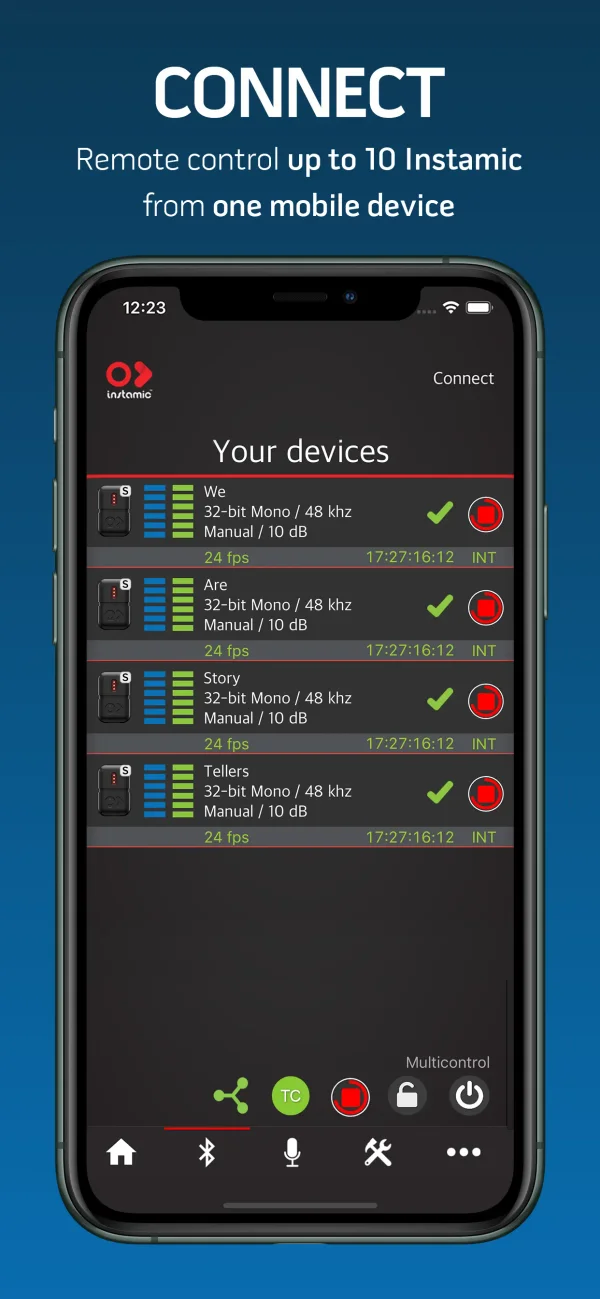
Remote control one or multiple microphones, keep them synced with Timecode and monitor the audio before recording.
You can even record video or audio only directly to your mobile device at 48kHz.
KEY FEATURES
- Remote control multiple Instamics at once (up to 10)
- Start and stop recording
- Set up the input gain while recording
- VU meter to monitor audio input
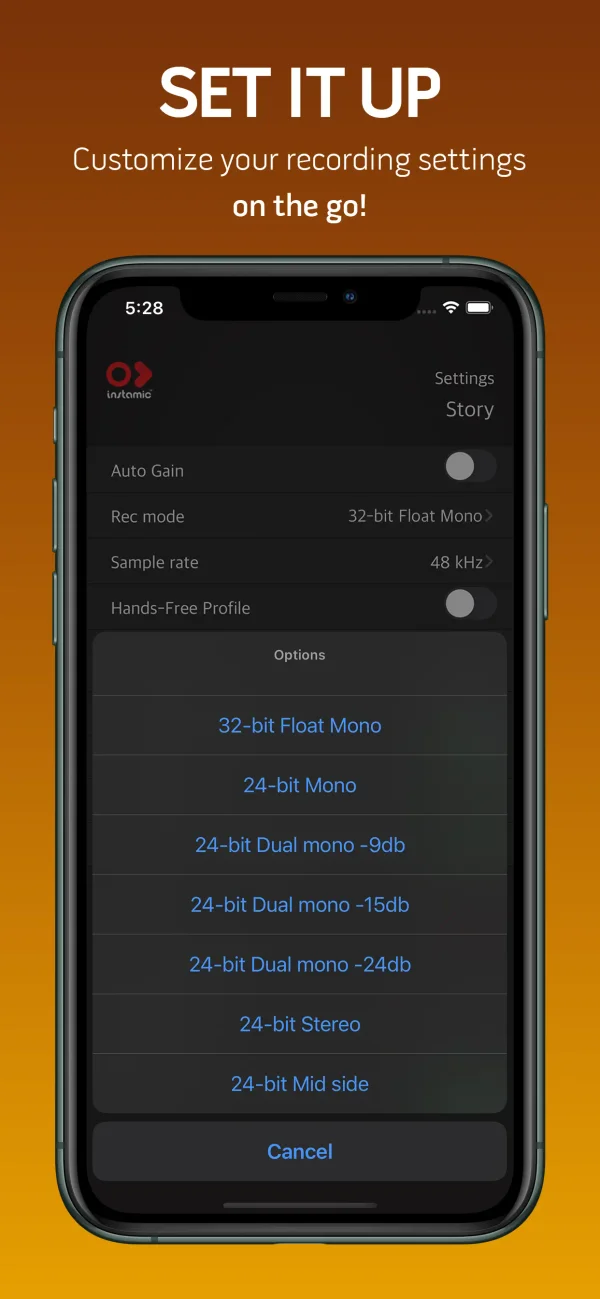
- Adjust Recording Settings
- Turn off Instamic wirelessly
- Rename each device
- Audio monitoring (pre-recording)
- Lock button
- LEDs on and off
- Save Monitoring Session
- Timecode Syncing (Atomos AirGlu, Tentacle Sync E, or Internal Time of the Day)
SETTINGS
Input Mode: 32-bit Float Mono (Instamic Pro Plus), 24-bit Mono, 24-bit Dual-Mono (Instamic Basic, Pro Mono and Stereo), 24-bit Stereo, M/S (Instamic Pro Stereo).
Input Level: Manual or Automatic
Sample Rate: 48kHz or 96kHz
Time Remaining
Battery Level
Firmware Version
Rename your device
Turn it off wirelessly
Switch to Handsfree Profile Mode.
Auto LEDs mode
Sleep Mode
Take numbering
Saving Monitoring Session
Format
#happyrecording #wearestorytellers #wearecreators
Michele and the Instamic Team
What’s new
Version 1.6.5 · Nov 7, 2025
In this release, we focused on improving performance, stability, and first-time usability.
We recommend this update for all Instamic users.
Key improvements include:
- Support for iOS 26, including the new “Liquid Glass” interface design.
- Enhanced Video Capture screen for quicker and easier video recording.
- Simplified Home screen for a smoother first-time experience.
- Stability improvements and bug fixes throughout the app – especially when switching between modes.
To take full advantage of these improvements, please update your mobile app to version 1.6.5 and your Instamic firmware to version 2.3.46.
Updated documentation is available to help both new and existing customers maximize their Instamic experience, along with instructions on how to upgrade your firmware at support.instamic.io.
#happyrecording #wearestorytellers #wearecreators
Michele and the Instamic Team
App privacy
What Instamic Inc. declares on the App Store about how this app handles data.
-
Data not collected
The developer does not collect any data from this app.
Privacy practices may vary, for example with the features you use or your age.
Information
- Seller
- Instamic, Inc.
- Category
- Photo & Video
- Version
- 1.6.5
- Updated
- Nov 7, 2025
- Released
- Jan 25, 2017
- Size
- 13.5 MB
- Requires
- iOS 14.0 or later
- Age rating
- 4+
- Price
- Free
- Languages
- English
- Copyright
- © Instamic, Inc.
You might also like
-
 Tentacle TimebarPhoto & Video
-
 CineTempColor Temp & Exposure Tool
-
 Timecode Audio RecorderRecord with embedded timecode
-
 iFootage MocoPhoto & Video
-
 Remote Video RecorderRecording Movie on Web
-
 White Balance Meter AI - KEVColor Temperature Kelvin Meter
-
 MovieSlate® 8Clapperboard, Logging, Reports
-
 Director ModeMulti-camera monitor & control
-
 Canon Multi-Camera ControlPhoto & Video
-
 Creative Fam AcademyStart Your Creative Journey