
Invoya: Invoice Maker
Time Tracker & Billable Hours
Diseñada para iPhone, iPad, Mac
Gratis · Compras en la aplicación
- Clasificación por edad4+
- CategoríaEconomía y empresa
- DesarrolladorAleksandr Gordienko
- IdiomasInglés+ 3 más
- Tamaño38,4 MB
Enlaza a la página oficial de App Store
Download.org no aloja ningún archivo de Invoya: Invoice Maker. El botón abre la página de la aplicación en App Store, donde la publica Aleksandr Gordienko. Ficha comprobada por última vez el 23/11/2026.
Capturas de pantalla



Acerca de
El desarrollador no ha proporcionado este texto en tu idioma.
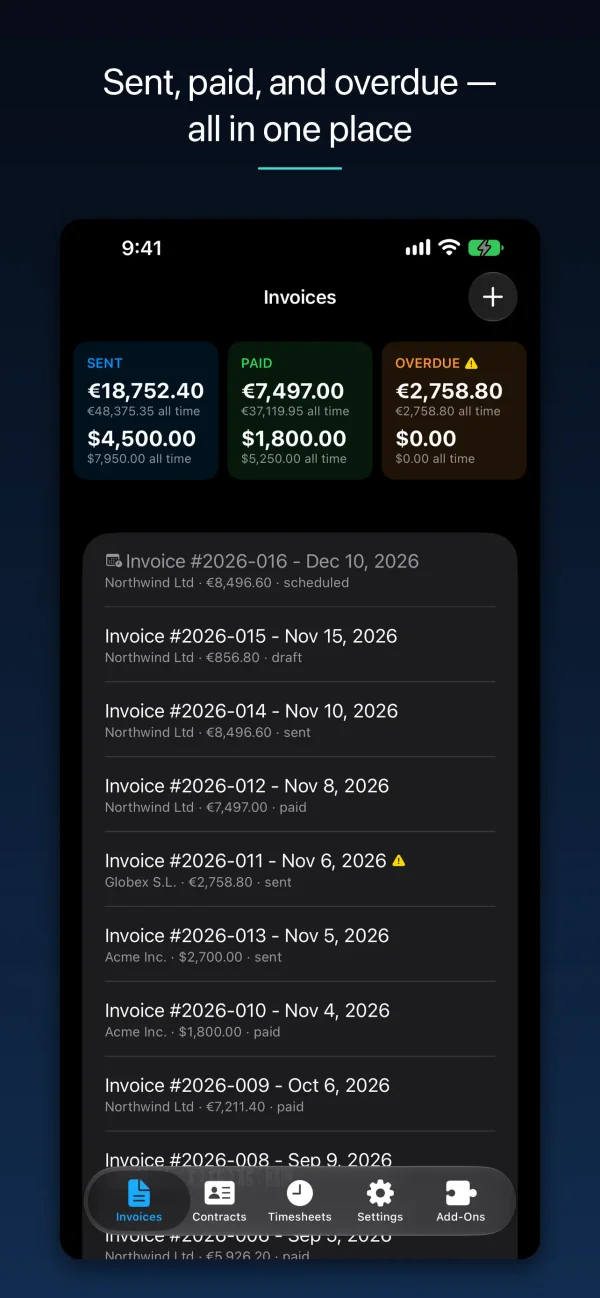
Invoice maker and time tracker for Mac, iPhone and iPad. Write an invoice, export a clean PDF, send it and get paid, for free. Add Timesheets when you bill by the hour.
No account, no signup, no Invoya server. Your data stays on your devices and in your own private iCloud.
INVOICES AND PDFs
Build an invoice, set its payment terms, and export a PDF that's ready to send. Keep your clients on file so the next invoice is a few clicks away. Duplicate an invoice in one tap, and record the date it was paid.
RECURRING INVOICES AND REMINDERS
Turn on Repeat and the next invoice is already waiting as a dated draft, ready for you to check and send. Invoya reminds you on the due date or earlier, and about invoices that are overdue.
TEMPLATES
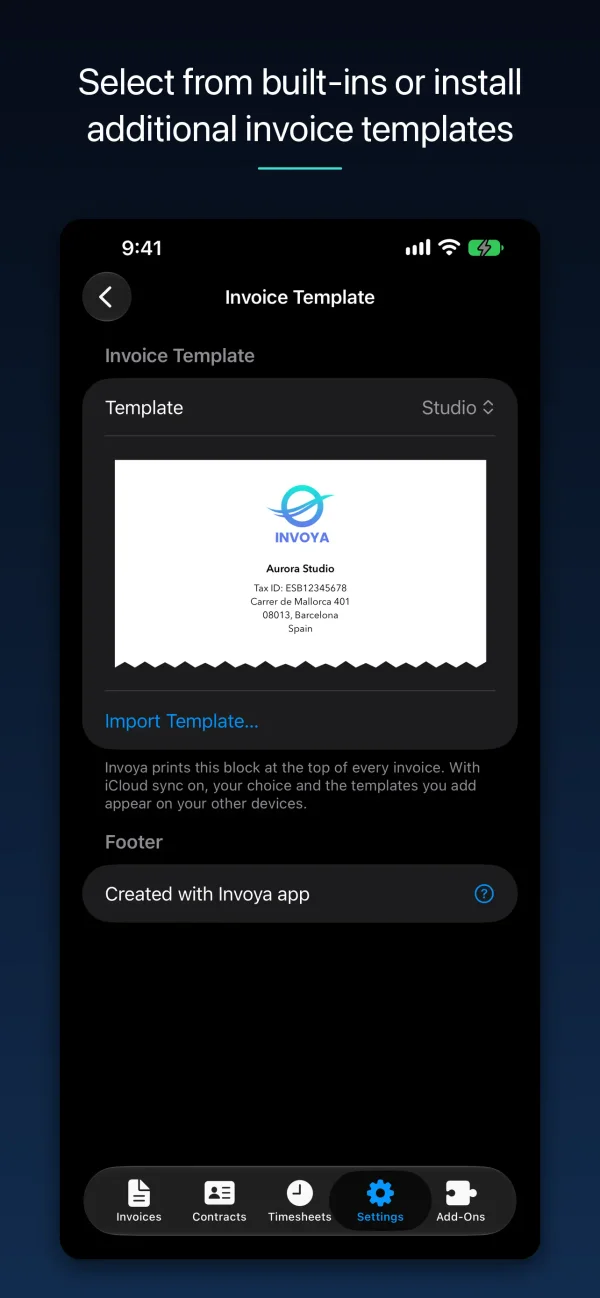
Choose Classic, Studio or Formal, or download more from the template gallery, and put your own text in the footer.
TIMESHEETS ADD-ON: TRACK HOURS, THEN BILL THEM
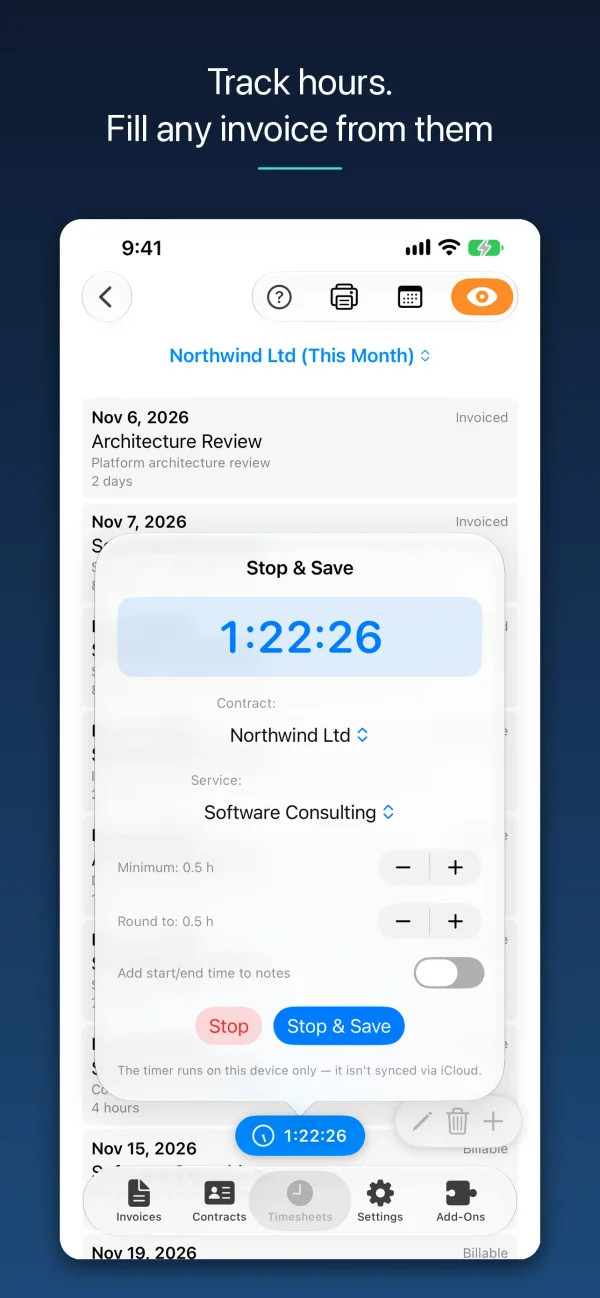
Start the timer and get on with the work, in the app or, on iPhone and iPad, from your Lock Screen or Control Center. When it's time to invoice, fill it straight from your timesheets. Records are grouped by service, so each service arrives as a single line with its hours totalled, not forty stopwatch entries your client has to wade through. Minimum durations and round-to increments put hours on the invoice the way you charge for them, not the way the stopwatch happened to stop. Coming from another time tracker? Import its CSV export, and Invoya matches the columns for you.
LOCK IT, SELL AHEAD
Face ID or Touch ID keeps invoices, clients and hours out of sight until you unlock. Sell time before you've worked it, with client credits: a paid invoice tops them up, logged time draws them down, and every service shows what's left at a glance. Bundle services into a package sold at one price, and build your rate card once in Settings so it's a couple of clicks onto any new client.
YOUR DATA STAYS YOURS
There is no Invoya account, because there is no Invoya server. Your invoices, clients and hours live on your device and sync through your own private iCloud database, which only you can read. No analytics. No telemetry. No third parties. The app works offline.
ONE NATIVE APP, THREE DEVICES
Written for Apple platforms rather than wrapped from a website. Start an invoice on the Mac, finish it on the iPad, check an hour on your iPhone. Available in English, German, Ukrainian and Russian.
FREE TO START
Invoicing is free: no trial countdown, no signup wall. Timesheets is a paid add-on for when you bill by the hour: Timesheets Lifetime, a one-time purchase you pay once and use for as long as the app is on the App Store, or a monthly or yearly subscription with a 7-day free trial, whichever suits how you work.
Timesheets Lifetime (one-time purchase): a single payment, no renewals, nothing recurring.
Timesheets Add-On (auto-renewable subscription): available as a monthly or yearly plan. Payment is charged to your Apple Account at confirmation of purchase. The subscription renews automatically unless cancelled at least 24 hours before the end of the current period. Manage or cancel anytime in your Apple Account settings.
Privacy Policy: https://invoya.app/privacy
Terms of Use (EULA): https://www.apple.com/legal/internet-services/itunes/dev/stdeula/
Novedades
Versión 1.4 · 19/11/2026
The timer on your Lock Screen, invoices you can copy in one tap, and iPhone Duo.
Timer on the Lock Screen
With Timesheets, a running timer now shows on the Lock Screen and in the Dynamic Island, so you can see the hours add up and stop it without opening the app. Control Center has a button that stops the timer or starts the one you used last.
Duplicate an invoice
Copy any invoice into a new draft with the same client, lines, VAT and discount. The number and the dates are new.
Payment date
Marking an invoice paid now records the day, and you can change it. Invoices paid before this update can take their due date in one step.
Import your hours from another app
Choose a CSV file, check which column is the date, the client, the service and the hours, and import. Common column names are matched for you, and durations like 1:30 are understood.
iPhone Duo
Invoya is laid out for iPhone Duo, on the cover screen and unfolded.
Privacidad de la aplicación
Lo que Aleksandr Gordienko declara en App Store sobre cómo esta aplicación gestiona los datos.
-
No se recopilan datos
El desarrollador no recopila ningún dato de esta aplicación.
Las prácticas de privacidad pueden variar, por ejemplo, según las funciones que uses o tu edad.
Información
- Vendedor
- Aleksandr Gordienko
- Categoría
- Economía y empresa
- Versión
- 1.4
- Actualizado
- 19/11/2026
- Publicado
- 21/7/2026
- Tamaño
- 38,4 MB
- Requiere
- iOS 17.0 o posterior
- Clasificación por edad
- 4+
- Precio
- Gratis
- Compras en la aplicación
- Sí
- Idiomas
- Inglés, Ruso, Alemán, Ucraniano
- Copyright
- © 2026 Aleksandr Gordienko
Quizá también te guste
-
 Naqdi — Invoices & VATEconomía y empresa
-
 Be Budget TodayControl de gastos e ingresos
-
 Timer by UzVIPProductividad
-
 TezClean ProEconomía y empresa
-
 SinonEconomía y empresa
-
 Mantenimiento Piscinas: RutaPartes de trabajo e informes
-
 Noor BusinessEconomía y empresa
-
 BarakaFinFinanzas
-
 FatooraZ: ZATCA Invoice KSAEconomía y empresa
-
 Smartup PharmEconomía y empresa