
- Clasificación por edad4+
- CategoríaProductividad
- DesarrolladorStudio Berlin GmbH
- IdiomasInglés+ 1 más
- Tamaño1,6 MB
Enlaza a la página oficial de App Store
Download.org no aloja ningún archivo de Logster. El botón abre la página de la aplicación en App Store, donde la publica Studio Berlin GmbH. Ficha comprobada por última vez el 17/11/2026.
Capturas de pantalla



Acerca de
El desarrollador no ha proporcionado este texto en tu idioma.
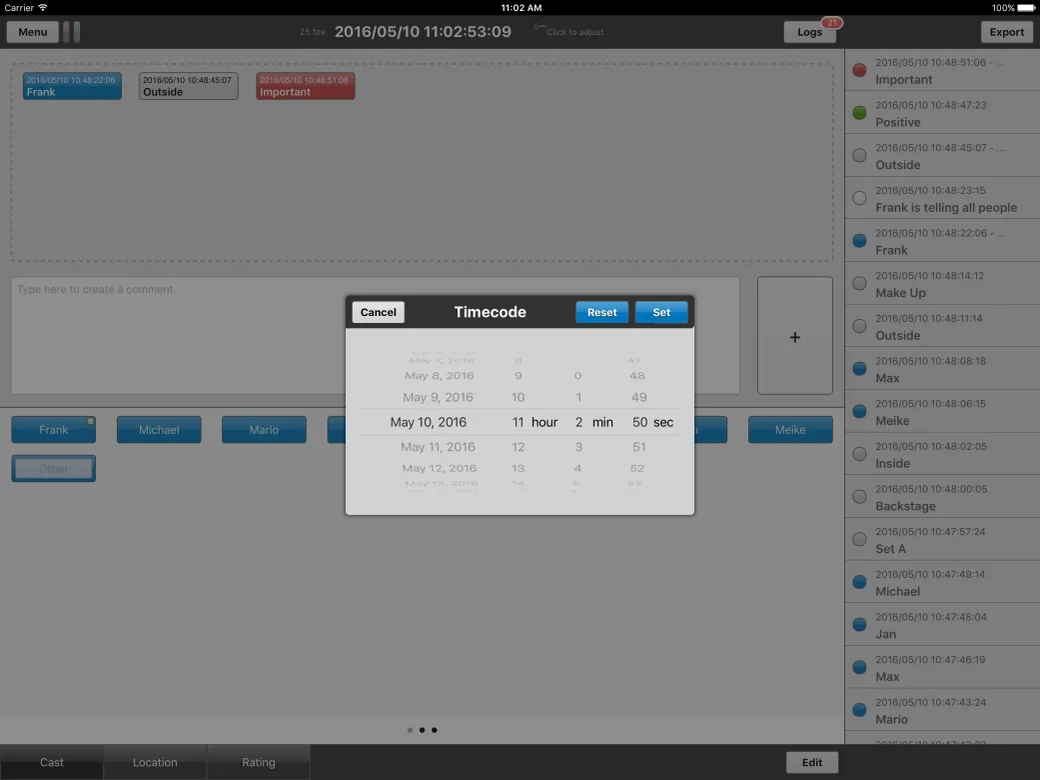
With Logster you can simply create notes for your productions. These "logs" are related to a timecode. For creating logs you can use either buttons or a comment field for individual text notes. Logster further allows you to create logs having a start- and a end timecode to describe time ranges.
+++ Internal system clock or external timecode sources
Logster can be synced with the internal system clock or an external LTC timecode by simply connecting the timecode source with the audio jack of your iPad.
+++ External keyboard support
Logster allows a faster input of the commentfield with the support of CMD+RETURN Hotkey while working with an external keyboard.
+++ Use of different frame rates
All logs are stored as a timecode value, which can be visualized and used with different frame rates (24, 25 or 30 FPS).
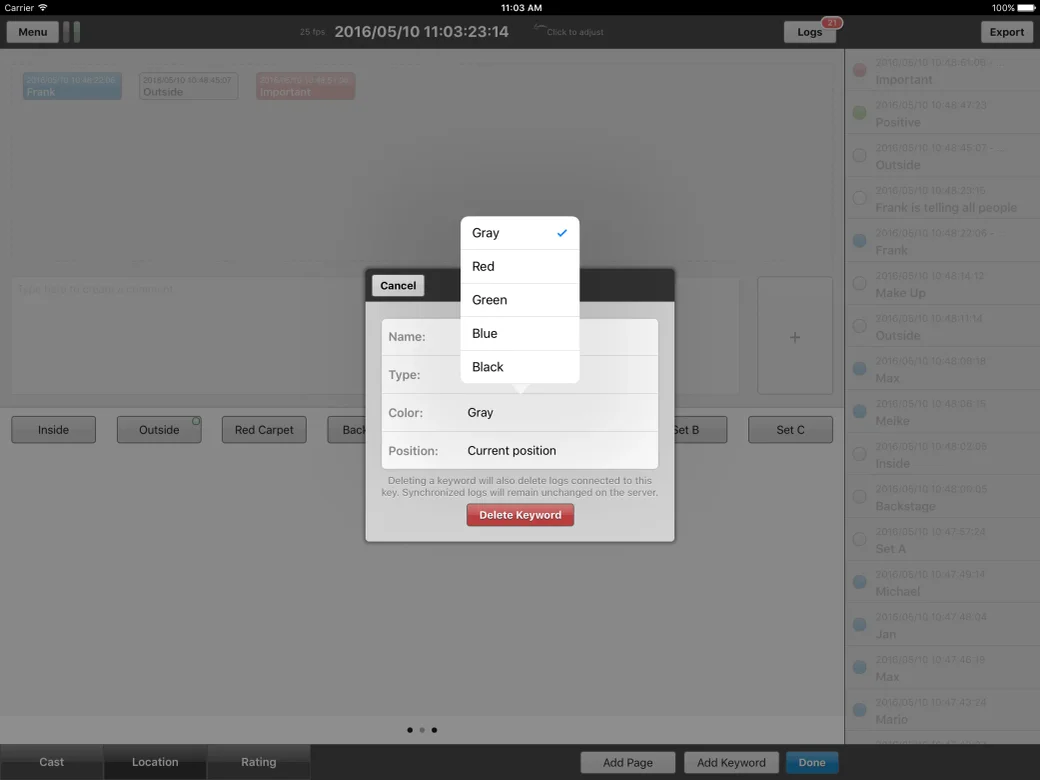
+++ Customize productions
To perfectly fit your needs Logster is highly customizable and lets you create multiple setups for different productions. Each setup may have multiple pages with multiple buttons or input fields. Each keyword can be customized for color and type.
+++ Export and email reports
Logster works without a permanent internet connection. All logs are saved locally on your iPad and can be sent by email once a mail account is available. You can choose between a CSV file format which may be used in common spreadsheet software or a XML file format while exporting your logs.
+++ Collaboration & Workflow integration
Logster is designed for single use and also for collaboration. Some productions may require all logged information to be consistent and further be connected to a central database or a content management system. With Logster logs created on different iPads can easily be synced manually or automatically to a central place. If you're wondering how Logster can be integrated into your workflow, we will be pleased to further advise you.
Novedades
Versión 3.0.0 · 28/10/2026
- Improved compatibility with iOS 27.1
- Updated for the Xcode 27.1 SDK
Privacidad de la aplicación
Lo que Studio Berlin GmbH declara en App Store sobre cómo esta aplicación gestiona los datos.
-
Datos vinculados a ti
Pueden recopilarse y vincularse a tu identidad.
- Identificadores
Las prácticas de privacidad pueden variar, por ejemplo, según las funciones que uses o tu edad.
Información
- Vendedor
- Studio Berlin GmbH
- Categoría
- Productividad
- Versión
- 3.0.0
- Actualizado
- 28/10/2026
- Publicado
- 1/1/2013
- Tamaño
- 1,6 MB
- Requiere
- iOS 17.6 o posterior
- Clasificación por edad
- 4+
- Precio
- Gratis
- Idiomas
- Inglés, Alemán
- Copyright
- © Studio Berlin GmbH
Quizá también te guste
-
 Timecode LogsProductividad
-
 Open Audio AnalyzerProductividad
-
 Timestamp MarkerProductividad
-
 Timecode QuickNotesProductividad
-
 GMA RehearsalBuddyProductividad
-
 Live Timecode NotesTake notes with real timecode
-
 TextMate Productividad
-
 Mio - Ask MathStudio with AIProductividad
-
 RaccorderApp para scripts
-
 Sticky Notes: Notas y TareasOrganizador, agenda y widgets