- Clasificación por edad4+
- CategoríaProductividad
- DesarrolladorJiseok Lee
- IdiomasInglés+ 5 más
- Tamaño54,4 MB
Enlaza a la página oficial de App Store
Download.org no aloja ningún archivo de Meta Task. El botón abre la página de la aplicación en App Store, donde la publica Jiseok Lee. Ficha comprobada por última vez el 19/11/2026.
Capturas de pantalla


Acerca de
El desarrollador no ha proporcionado este texto en tu idioma.
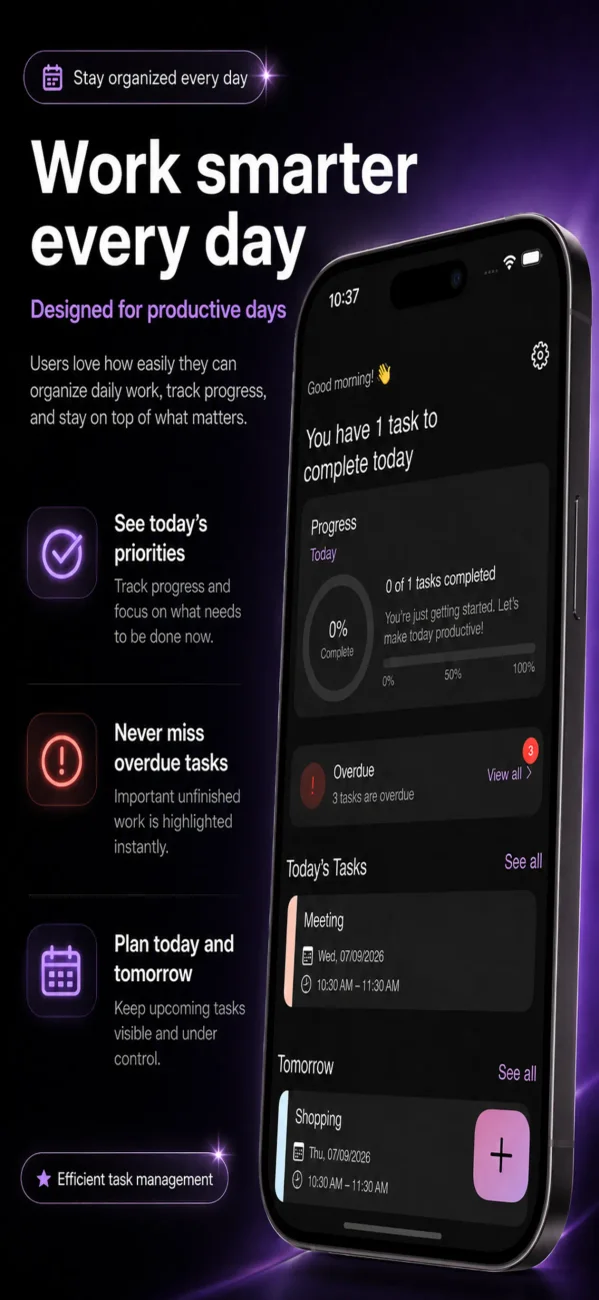
MetaTask is a native SwiftUI to-do app that stays laser-focused on the essentials. Instead of heavy templates or distracting badges, it helps you capture what matters—title, notes, start/finish time, and priority—then see it in a clean timeline that protects your daily flow. With a minimalist UI, one-tap checkmarks, and clear date views, MetaTask keeps you moving from “write” to “done” without friction. It supports English, German, Japanese, and Korean so your workflow travels with you.
■ Perfect for
- Anyone who needs clear start/end times to anchor the day
- People who prefer date-based views and a priority-first plan
- Users who want a simple, ultra-responsive app even with many tasks
■ Core features
• Add tasks fast: set start date, title, description, start time, end time, and priority—just the fields you need, when you need them. Edit anytime later.
• All tasks view: scan everything on one screen without losing context for priority/time.
• Date views: Today/Tomorrow/This Week group automatically so you can plan in a timeline that mirrors your day.
• Done/Undone: flip state with a single tap; completed items are visually separated to maximize momentum and motivation.
• Language switching: instantly switch the UI between English, German, Japanese, and Korean.
• Native feel: the SwiftUI foundation keeps interactions light and quick, aligned with iOS patterns.
■ Built for today’s productivity trends
- Minimal & focused: Short input, clear views. We trimmed repeat gestures so you only open the app when it adds value.
- Time-blocking: Start/finish times place tasks directly on your day, reducing calendar/app hopping and boosting deep work.
- Priority first: Clear distinctions between urgent and important tasks guide attention—and outcomes.
- Localization by design: Switch language while keeping structure, so your process survives context changes.
■ Use cases
Work—prepare meeting → review → draft → feedback with timed blocks.
Study—“20:00–21:30” sessions with visible progress.
Life—errands and workouts by date; act on the top priority first.
■ Interactions
Long-press to edit, swipe to check, tap to toggle—simple gestures your hands remember.
■ Fast to start
- First launch goes straight to task creation—minimal onboarding.
- Reused fields keep previous values to cut typing.
■ iOS-friendly by default
- System fonts and Dynamic Type keep information legible on any screen.
■ Why MetaTask?
While others add features, MetaTask refines the core loop: capture → sort → complete. Swift entry, clear date/time structure, and a distraction-free check flow create more of the only metric that matters: finished work. Simplicity is not a compromise—it’s a feature.
■ Getting started
1) Tap + and name your task.
2) Add notes, start date, start/end times, and priority if needed.
3) Use date view to line up what’s due today.
4) Check it off and feel the momentum.
■ FAQ
Q. Does it look like a calendar?
A. MetaTask is task-first, but start/end times let you build a day-timeline that pairs naturally with your schedule.
Q. Can I switch languages anytime?
A. Yes—toggle English, German, Japanese, or Korean in Settings.
Q. Ads? Complex sign-up?
A. We minimize friction so your attention stays on the work.
■ Product principles
- Write fast. Organize simply. Finish for real.
- Tools that protect focus must be light.
- Changing languages shouldn’t change your process.
A simpler day brings better results. Set today’s priorities, define a start and a finish, and let MetaTask connect your plan to action. Lighter planning, clearer finishing—start now.
Novedades
Versión 1.1.0 · 14/7/2026
[ Ver 1.1.0 ]
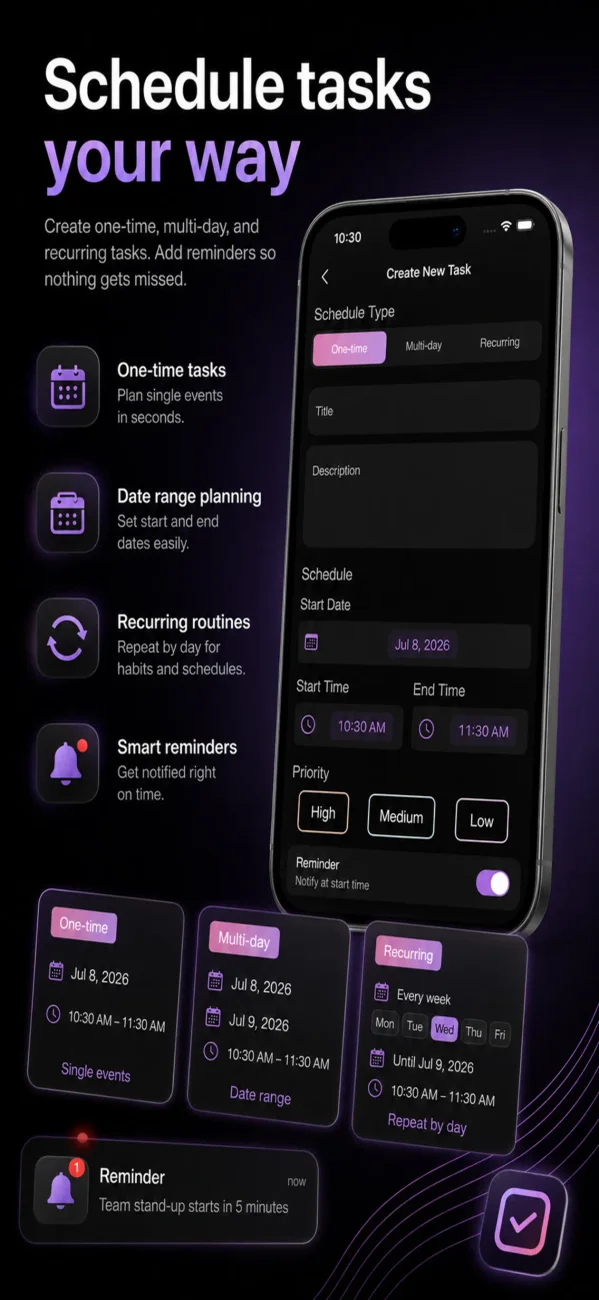
1. Added notification support
2. Added three schedule types — One-time, Multi-day, and Recurring (selectable weekdays)
3. Redesigned the overall main UI and app icon
Privacidad de la aplicación
Lo que Jiseok Lee declara en App Store sobre cómo esta aplicación gestiona los datos.
-
No se recopilan datos
El desarrollador no recopila ningún dato de esta aplicación.
Las prácticas de privacidad pueden variar, por ejemplo, según las funciones que uses o tu edad.
Información
- Vendedor
- Jiseok Lee
- Categoría
- Productividad
- Versión
- 1.1.0
- Actualizado
- 14/7/2026
- Publicado
- 29/10/2025
- Tamaño
- 54,4 MB
- Requiere
- iOS 17.0 o posterior
- Clasificación por edad
- 4+
- Precio
- Gratis
- Idiomas
- Inglés, Alemán, Japonés, Coreano, Chino simplificado, Chino tradicional
- Copyright
- © 2025 js
Quizá también te guste
-
 My Life Manager - PlannerProductividad
-
 Aline: agenda para TDAHRutinas, foco y recordatorios
-
 EchoDoProductividad
-
 Mneme: Your Second BrainProductividad
-
 TimePilot 24hProductividad
-
 Tempo - Plan your dayProductividad
-
 LumiBudProductividad
-
 LifeOS: Know Your TimeProductividad
-
 LifeOS - Self ObservatoryProductividad
-
 TaskLoco: Sticky Note To-DoProductividad