- Yaş sınırı4+
- KategoriÜretkenlik
- GeliştiriciJiseok Lee
- Dillerİngilizce+ 5 dil daha
- Boyut54,4 MB
Resmi App Store sayfasına bağlanır
Download.org, Meta Task için hiçbir dosya barındırmaz. Düğme, uygulamanın App Store üzerindeki sayfasını açar; uygulamayı orada Jiseok Lee yayınlar. Sayfanın son kontrolü: 19.11.2026.
Ekran görüntüleri


Hakkında
Geliştirici bu metni dilinizde sunmamış.
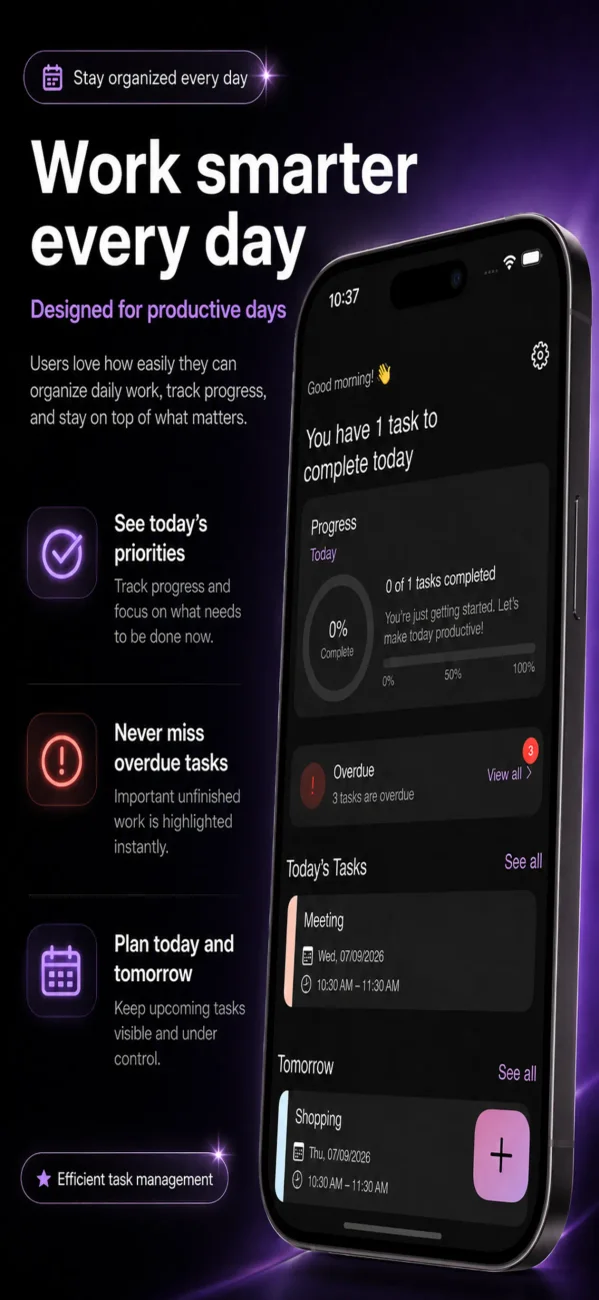
MetaTask is a native SwiftUI to-do app that stays laser-focused on the essentials. Instead of heavy templates or distracting badges, it helps you capture what matters—title, notes, start/finish time, and priority—then see it in a clean timeline that protects your daily flow. With a minimalist UI, one-tap checkmarks, and clear date views, MetaTask keeps you moving from “write” to “done” without friction. It supports English, German, Japanese, and Korean so your workflow travels with you.
■ Perfect for
- Anyone who needs clear start/end times to anchor the day
- People who prefer date-based views and a priority-first plan
- Users who want a simple, ultra-responsive app even with many tasks
■ Core features
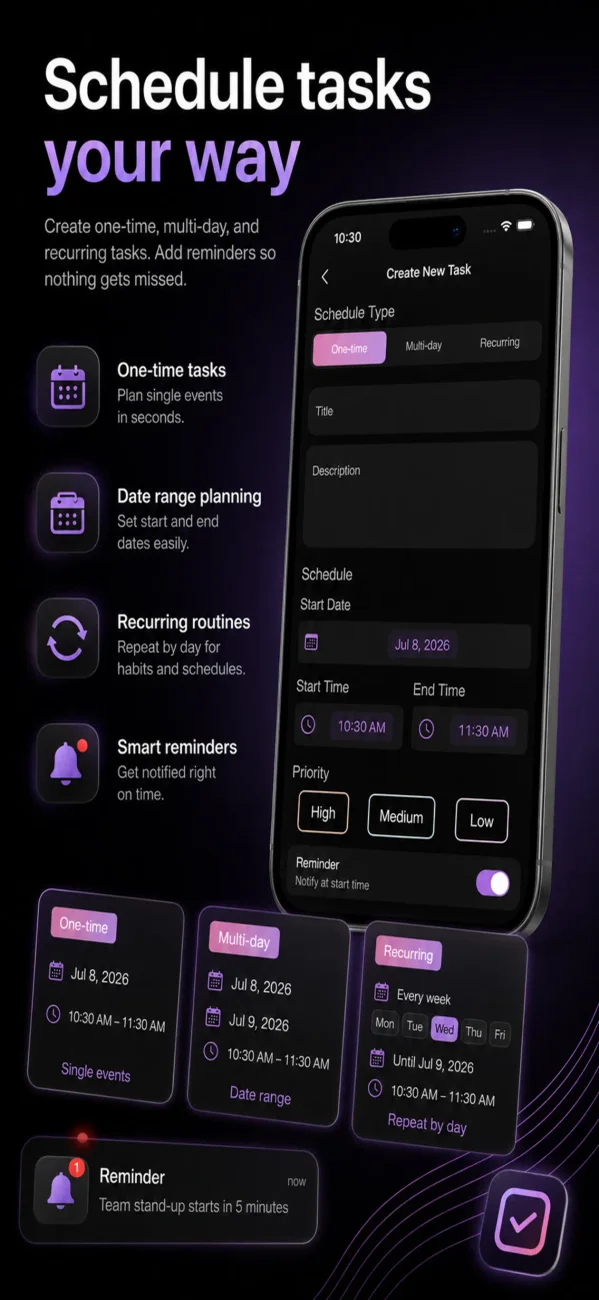
• Add tasks fast: set start date, title, description, start time, end time, and priority—just the fields you need, when you need them. Edit anytime later.
• All tasks view: scan everything on one screen without losing context for priority/time.
• Date views: Today/Tomorrow/This Week group automatically so you can plan in a timeline that mirrors your day.
• Done/Undone: flip state with a single tap; completed items are visually separated to maximize momentum and motivation.
• Language switching: instantly switch the UI between English, German, Japanese, and Korean.
• Native feel: the SwiftUI foundation keeps interactions light and quick, aligned with iOS patterns.
■ Built for today’s productivity trends
- Minimal & focused: Short input, clear views. We trimmed repeat gestures so you only open the app when it adds value.
- Time-blocking: Start/finish times place tasks directly on your day, reducing calendar/app hopping and boosting deep work.
- Priority first: Clear distinctions between urgent and important tasks guide attention—and outcomes.
- Localization by design: Switch language while keeping structure, so your process survives context changes.
■ Use cases
Work—prepare meeting → review → draft → feedback with timed blocks.
Study—“20:00–21:30” sessions with visible progress.
Life—errands and workouts by date; act on the top priority first.
■ Interactions
Long-press to edit, swipe to check, tap to toggle—simple gestures your hands remember.
■ Fast to start
- First launch goes straight to task creation—minimal onboarding.
- Reused fields keep previous values to cut typing.
■ iOS-friendly by default
- System fonts and Dynamic Type keep information legible on any screen.
■ Why MetaTask?
While others add features, MetaTask refines the core loop: capture → sort → complete. Swift entry, clear date/time structure, and a distraction-free check flow create more of the only metric that matters: finished work. Simplicity is not a compromise—it’s a feature.
■ Getting started
1) Tap + and name your task.
2) Add notes, start date, start/end times, and priority if needed.
3) Use date view to line up what’s due today.
4) Check it off and feel the momentum.
■ FAQ
Q. Does it look like a calendar?
A. MetaTask is task-first, but start/end times let you build a day-timeline that pairs naturally with your schedule.
Q. Can I switch languages anytime?
A. Yes—toggle English, German, Japanese, or Korean in Settings.
Q. Ads? Complex sign-up?
A. We minimize friction so your attention stays on the work.
■ Product principles
- Write fast. Organize simply. Finish for real.
- Tools that protect focus must be light.
- Changing languages shouldn’t change your process.
A simpler day brings better results. Set today’s priorities, define a start and a finish, and let MetaTask connect your plan to action. Lighter planning, clearer finishing—start now.
Yenilikler
Sürüm 1.1.0 · 14.07.2026
[ Ver 1.1.0 ]
1. Added notification support
2. Added three schedule types — One-time, Multi-day, and Recurring (selectable weekdays)
3. Redesigned the overall main UI and app icon
Uygulama gizliliği
Bu uygulamanın verileri nasıl işlediği hakkında Jiseok Lee tarafından App Store üzerinde yapılan beyan.
-
Veri toplanmıyor
Geliştirici bu uygulamadan hiçbir veri toplamıyor.
Gizlilik uygulamaları, örneğin kullandığınız özelliklere veya yaşınıza göre değişiklik gösterebilir.
Bilgiler
- Satıcı
- Jiseok Lee
- Kategori
- Üretkenlik
- Sürüm
- 1.1.0
- Güncellendi
- 14.07.2026
- Yayın tarihi
- 29.10.2025
- Boyut
- 54,4 MB
- Gereksinim
- iOS 17.0 veya sonrası
- Yaş sınırı
- 4+
- Fiyat
- Ücretsiz
- Diller
- İngilizce, Almanca, Japonca, Korece, Basitleştirilmiş Çince, Geleneksel Çince
- Telif hakkı
- © 2025 js
Bunları da beğenebilirsiniz
-
 My Life Manager - PlannerÜretkenlik
-
 Aline: ADHD Günlük PlanlayıcıOdaklan, hatırla, harekete geç
-
 EchoDoÜretkenlik
-
 Mneme: Your Second BrainÜretkenlik
-
 TimePilot 24hÜretkenlik
-
 Tempo - Plan your dayÜretkenlik
-
 LumiBudÜretkenlik
-
 LifeOS: Know Your TimeÜretkenlik
-
 LifeOS - Self ObservatoryÜretkenlik
-
 TaskLoco: Sticky Note To-DoÜretkenlik