
- Clasificación por edad4+
- CategoríaEstilo de vida
- DesarrolladorClara Ling
- IdiomasInglés
- Tamaño3,1 MB
Es posible que OnPlot no esté disponible en App Store en este momento
No se pudo acceder a la ficha de la tienda en nuestra última comprobación. El enlace sigue llevando a la página oficial de App Store.
Capturas de pantalla




Acerca de
El desarrollador no ha proporcionado este texto en tu idioma.
OnPlot is an AI-assisted daily planner and scheduler designed to make organizing your day feel effortless.
Speak or type what you need to do, and OnPlot helps turn it into organized tasks, scheduled activities, reminders, timers, and routines—all in one clear daily view.
PLAN NATURALLY
Tap “Tell me what you need to do” and speak naturally, or type instead.
You can say something like:
“Piano lesson at 5, finish my homework, and remind me to take out the trash in 20 minutes.”
OnPlot can separate what you said into multiple activities, clean up titles, identify timing, and organize each item before you add it.
YOUR DAY, AT A GLANCE
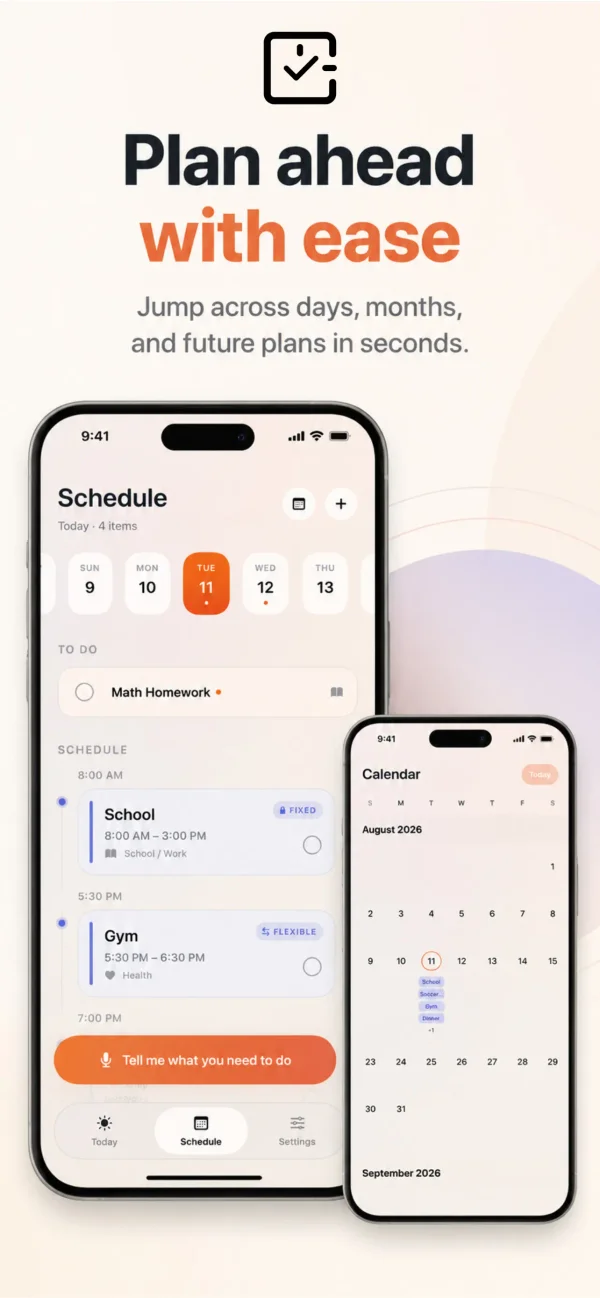
See tasks and scheduled activities together in a simple timeline so you always know what’s coming next.
Create and manage:
• Tasks
• Fixed and flexible scheduled activities
• Timers and reminders
• Important dates
• Recurring routines
CALENDAR
Move between days or open the full calendar to see your plans across weeks and months.
APPLE CALENDAR
Connect Apple Calendar to bring scheduled activities into OnPlot and keep your plans together in one place.
Tasks and reminders remain separate, helping keep your calendar clean.
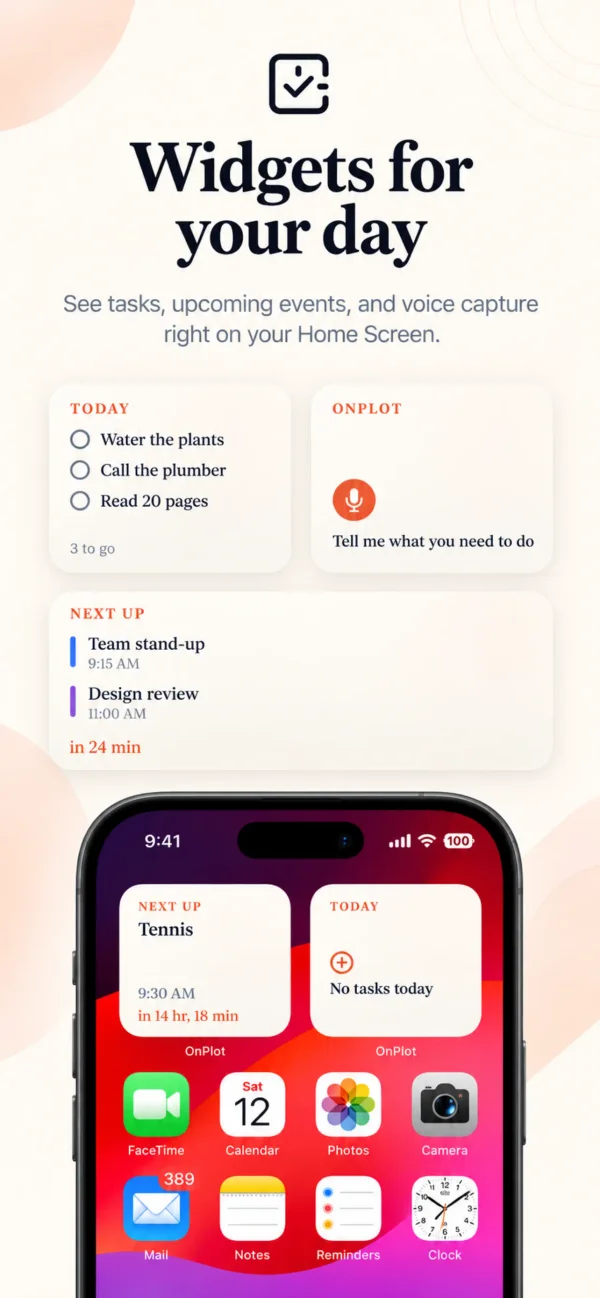
HOME SCREEN WIDGETS
Stay organized without opening the app.
OnPlot widgets can help you:
• Check off today’s tasks
• See what’s coming next
• Jump quickly into voice entry
REMINDERS & TIMERS
Get notified about scheduled activities, tasks, timers, reminders, and important dates so nothing important slips through the cracks.
RECURRING ROUTINES
Set activities to repeat daily, weekly, monthly, yearly, or on selected days—great for classes, workouts, lessons, chores, and everyday routines.
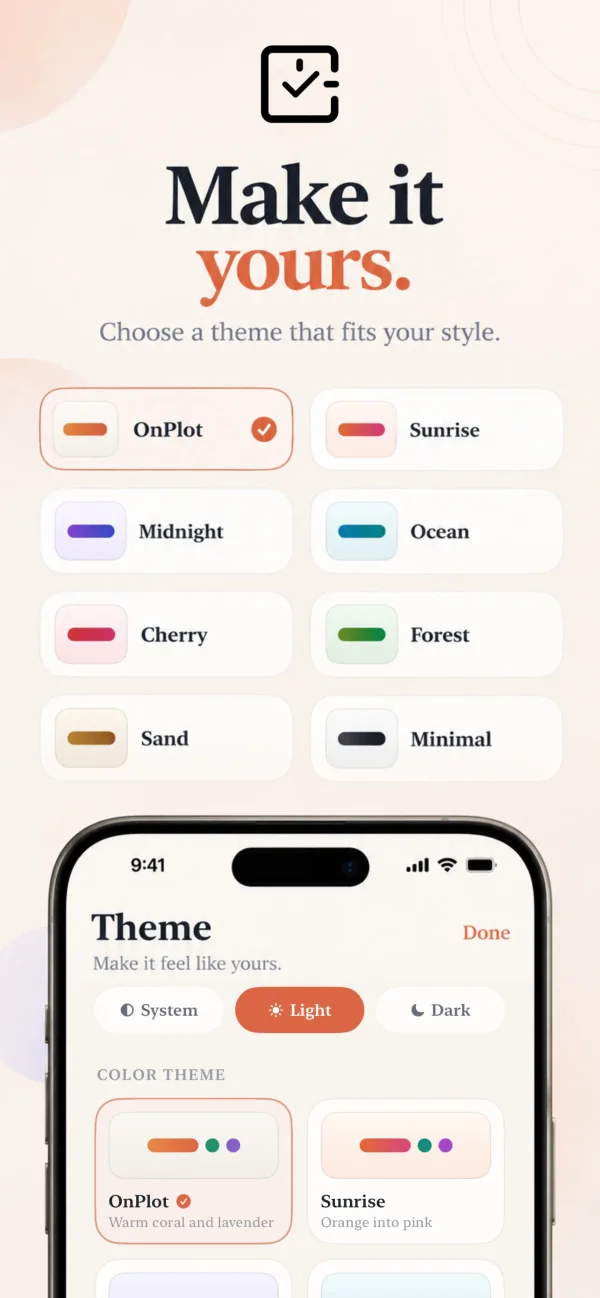
MAKE ONPLOT YOURS
Choose between Light, Dark, and System appearance modes, then personalize the app with color themes including OnPlot, Sunrise, Midnight, Ocean, Cherry, Forest, and more.
BUILT TO STAY SIMPLE
OnPlot is designed to help you spend less time maintaining a productivity system and more time actually getting things done.
Novedades
Versión 1.2.0 · 14/9/2026
OnPlot just got a major upgrade.
• Smarter AI-assisted voice and text planning
• Create multiple tasks, events, and reminders from one prompt
• Apple Calendar integration for scheduled activities
• New interactive Home Screen widgets
• Personalized color themes and appearance options
• A completely redesigned onboarding experience
• Improved calendar navigation and event handling
• Smarter duplicate detection for synced calendar events
• Bug fixes and performance improvements
Plan your day with less effort—and make OnPlot feel more like yours.
Privacidad de la aplicación
Lo que Clara Ling declara en App Store sobre cómo esta aplicación gestiona los datos.
-
Datos no vinculados a ti
Pueden recopilarse, pero no se vinculan a tu identidad.
- Contenido del usuario
Las prácticas de privacidad pueden variar, por ejemplo, según las funciones que uses o tu edad.
Información
- Vendedor
- Clara Ling
- Categoría
- Estilo de vida
- Versión
- 1.2.0
- Actualizado
- 14/9/2026
- Publicado
- 6/9/2026
- Tamaño
- 3,1 MB
- Requiere
- iOS 17.0 o posterior
- Clasificación por edad
- 4+
- Idiomas
- Inglés
- Copyright
- © 2026 [Clara Ling]
Quizá también te guste
-
 TimeLog - Time TrackerEstilo de vida
-
 YardFlip: AI Landscape DesignEstilo de vida
-
 Glance SetupEstilo de vida
-
 Max Belleza AI: Mejora AhoraMejora tu look con IA
-
 Hair Loss AI: Are You Balding?Alopecia Tracker & Growth Plan
-
 Gather: All-in-One MobilityEstilo de vida
-
 Wallive: Wallpaper, LockscreenCool Live Wallpaper & Widget
-
 SimpliSafe Home Security AppEstilo de vida
-
 Glam Up - Perfect Your LookEstilo de vida
-
 Sport Clips Haircuts Check-InEstilo de vida