
- 対象年齢4+
- カテゴリライフスタイル
- 開発元Clara Ling
- 言語英語
- サイズ3.1 MB
App Storeの公式ページにリンクしています
Download.orgはOnPlotのファイルを一切ホストしていません。ボタンを押すと、Clara Lingが公開しているApp Storeのアプリページが開きます。ページの最終確認:2026/11/20。
スクリーンショット




概要
開発元はこのテキストをお使いの言語で提供していません。
OnPlot is an AI-assisted daily planner and scheduler designed to make organizing your day feel effortless.
Speak or type what you need to do, and OnPlot helps turn it into organized tasks, scheduled activities, reminders, timers, and routines—all in one clear daily view.
PLAN NATURALLY
Tap “Tell me what you need to do” and speak naturally, or type instead.
You can say something like:
“Piano lesson at 5, finish my homework, and remind me to take out the trash in 20 minutes.”
OnPlot can separate what you said into multiple activities, clean up titles, identify timing, and organize each item before you add it.
YOUR DAY, AT A GLANCE
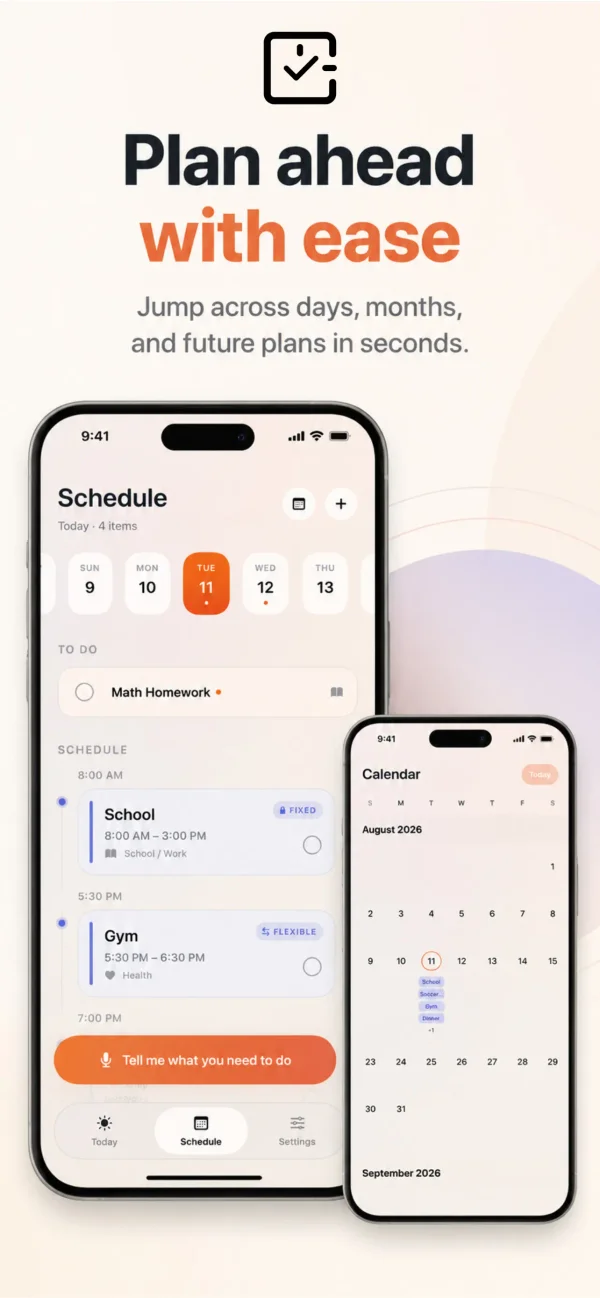
See tasks and scheduled activities together in a simple timeline so you always know what’s coming next.
Create and manage:
• Tasks
• Fixed and flexible scheduled activities
• Timers and reminders
• Important dates
• Recurring routines
CALENDAR
Move between days or open the full calendar to see your plans across weeks and months.
APPLE CALENDAR
Connect Apple Calendar to bring scheduled activities into OnPlot and keep your plans together in one place.
Tasks and reminders remain separate, helping keep your calendar clean.
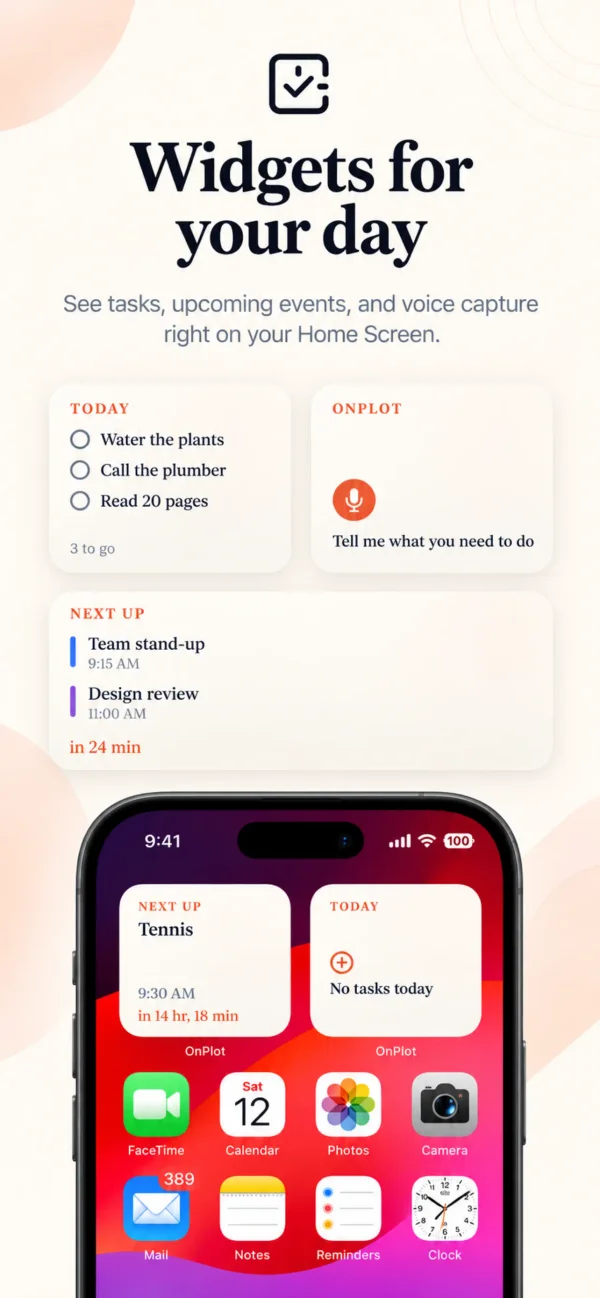
HOME SCREEN WIDGETS
Stay organized without opening the app.
OnPlot widgets can help you:
• Check off today’s tasks
• See what’s coming next
• Jump quickly into voice entry
REMINDERS & TIMERS
Get notified about scheduled activities, tasks, timers, reminders, and important dates so nothing important slips through the cracks.
RECURRING ROUTINES
Set activities to repeat daily, weekly, monthly, yearly, or on selected days—great for classes, workouts, lessons, chores, and everyday routines.
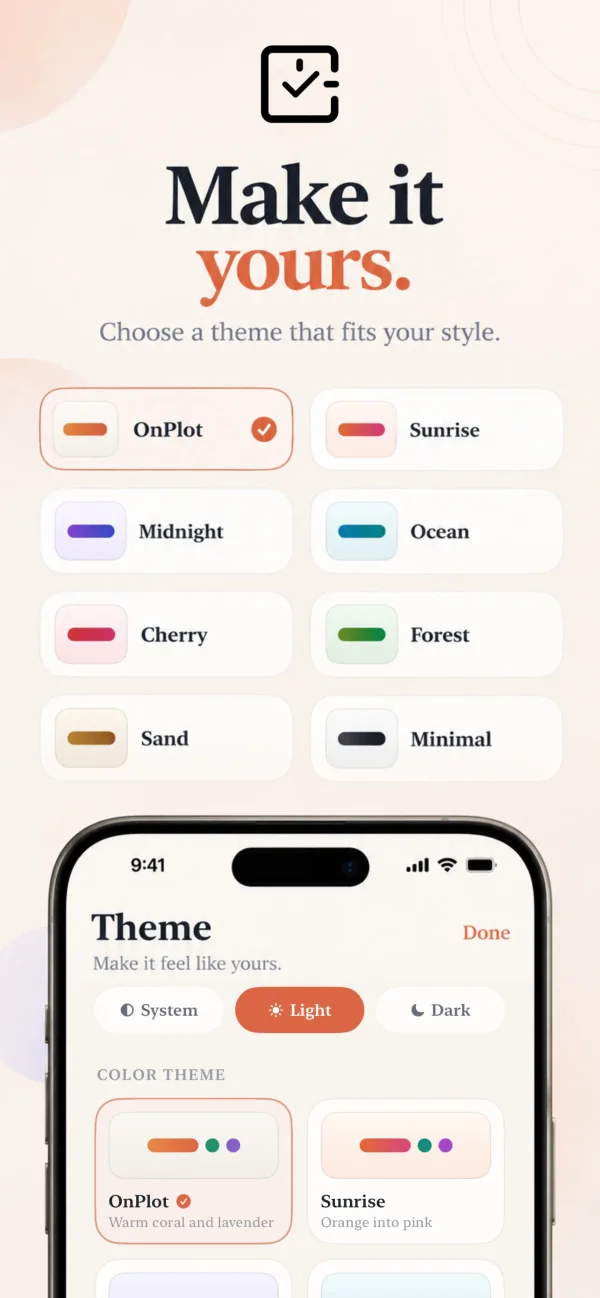
MAKE ONPLOT YOURS
Choose between Light, Dark, and System appearance modes, then personalize the app with color themes including OnPlot, Sunrise, Midnight, Ocean, Cherry, Forest, and more.
BUILT TO STAY SIMPLE
OnPlot is designed to help you spend less time maintaining a productivity system and more time actually getting things done.
新機能
バージョン 1.2.0 · 2026/9/14
OnPlot just got a major upgrade.
• Smarter AI-assisted voice and text planning
• Create multiple tasks, events, and reminders from one prompt
• Apple Calendar integration for scheduled activities
• New interactive Home Screen widgets
• Personalized color themes and appearance options
• A completely redesigned onboarding experience
• Improved calendar navigation and event handling
• Smarter duplicate detection for synced calendar events
• Bug fixes and performance improvements
Plan your day with less effort—and make OnPlot feel more like yours.
アプリのプライバシー
このアプリのデータの取り扱いについて、Clara LingがApp Storeで申告している内容です。
-
ユーザーに関連付けられないデータ
収集される場合がありますが、ユーザーの識別情報には関連付けられません。
- ユーザーコンテンツ
プライバシーの取り扱いは、ご利用の機能やお客様の年齢などに応じて異なる場合があります。
情報
- 販売元
- Clara Ling
- カテゴリ
- ライフスタイル
- バージョン
- 1.2.0
- 更新日
- 2026/9/14
- リリース
- 2026/9/6
- サイズ
- 3.1 MB
- 必要条件
- iOS 17.0以降
- 対象年齢
- 4+
- 価格
- 無料
- 言語
- 英語
- 著作権
- © 2026 [Clara Ling]
こちらもおすすめ
-
 TimeLog - 時間の見える化仕事も家事も勉強も、時間の使い方を記録
-
 YardFlip: AI Landscape Designライフスタイル
-
 Glance Setupライフスタイル
-
 ルックスマックスAI: 美しさ向上AIで美しさを引き出す
-
 HairLoss AI: Beat Baldingライフスタイル
-
 Gather: All-in-One Mobilityライフスタイル
-
 ライブ壁紙, スマホ 壁紙 - Wallive3D 待受画面, 可愛い 壁紙,ホーム 画面 カスタマイズ
-
 SimpliSafe Home Security Appライフスタイル
-
 Glam Up - Perfect Your Lookライフスタイル
-
 Sport Clips Haircuts Check-Inライフスタイル