
PicturePresenter
Native photos on any screen
Diseñada para iPhone, iPad
Gratis · Compras en la aplicación
- Clasificación por edad4+
- CategoríaFoto y vídeo
- DesarrolladorMichael Schmid
- IdiomasInglés+ 1 más
- Tamaño6,9 MB
Enlaza a la página oficial de App Store
Download.org no aloja ningún archivo de PicturePresenter. El botón abre la página de la aplicación en App Store, donde la publica Michael Schmid. Ficha comprobada por última vez el 13/11/2026.
Capturas de pantalla



Acerca de
El desarrollador no ha proporcionado este texto en tu idioma.
Picture Presenter shows your photos on a projector, TV or monitor connected via HDMI or AirPlay – filling the screen at native resolution, without the black bars of screen mirroring.
THE PROBLEM
When you plug an iPhone into a projector, iOS normally mirrors the screen: the entire 19.5:9 iPhone display is fitted onto the canvas, leaving black bars left and right and making your photo small.
THE SOLUTION
Picture Presenter takes over the external display with its own window. A 16:9 projector becomes a true 16:9 canvas, a 16:10 monitor a 16:10 canvas – always at the highest mode the display offers. Your iPhone stays the remote control: the big screen only ever shows the picture, never the controls.
FEATURES
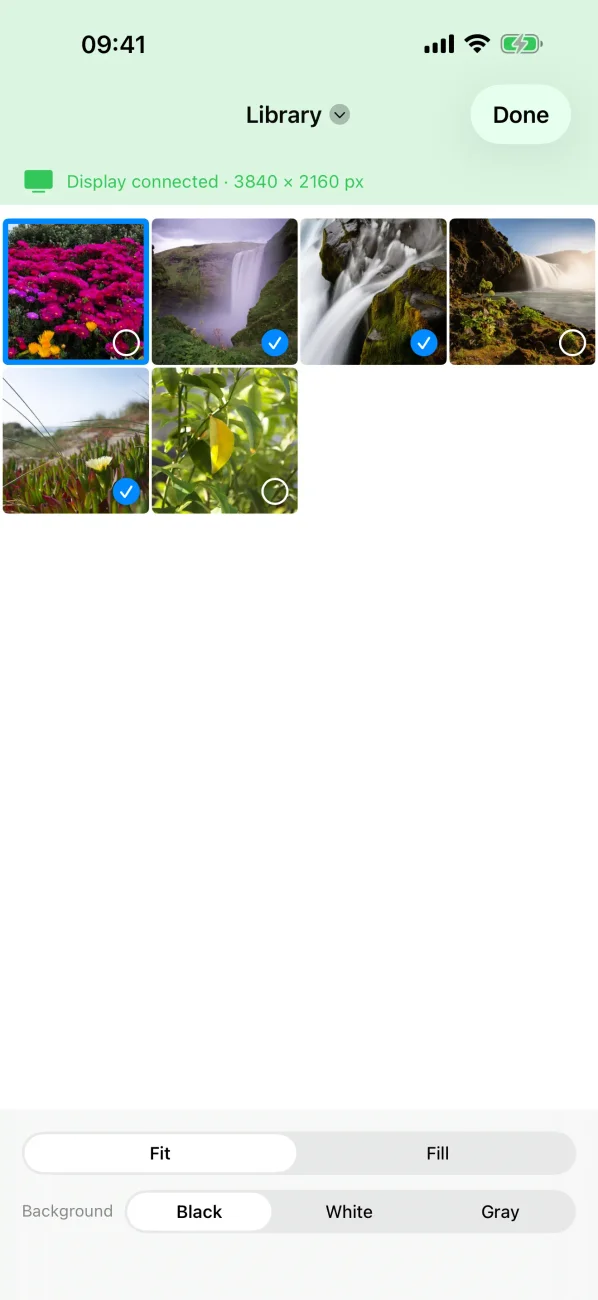
• Browse your library, your own albums and favorites
• Fullscreen viewer just like the Photos app: swipe to flip through, every picture appears instantly on the big display
• Fit (whole picture visible) or fill (edge to edge, cropped)
• Choose the matte color for bars: black, white or gray
• Slideshow with configurable duration per picture and transition – true crossfade or push
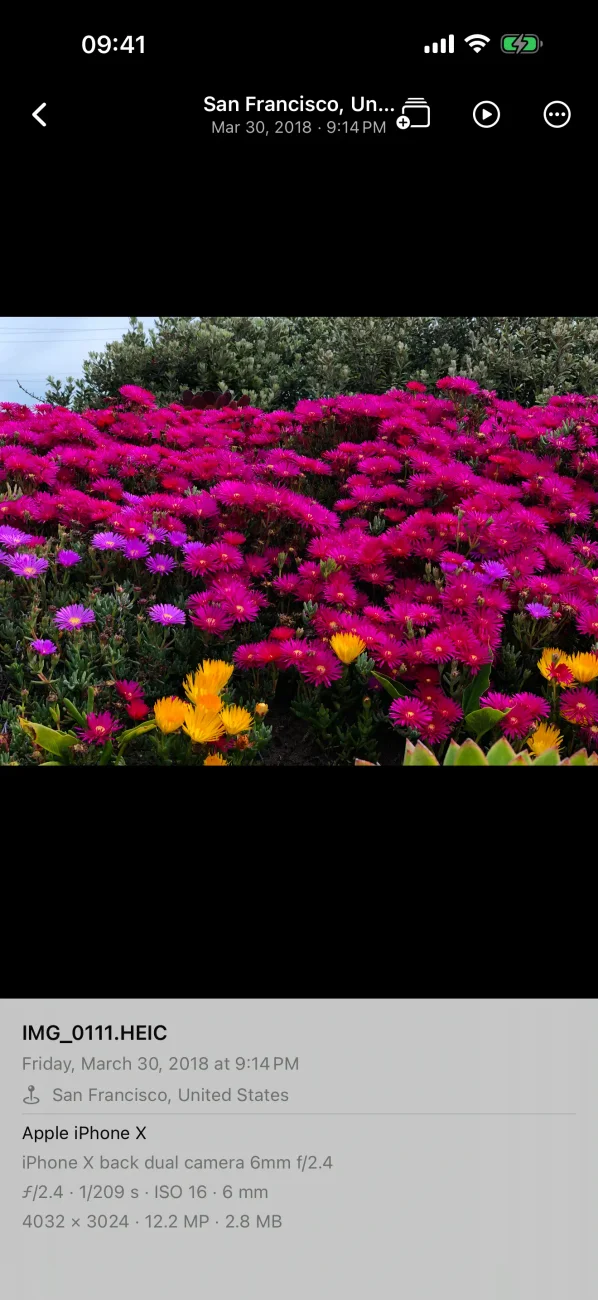
• Info view with capture details (date, location, camera, exposure, resolution) – optionally as an overlay on the big picture
• Quick collection: tap pictures in selection mode to assemble your own presentation set – stored across launches
• iCloud photos are downloaded automatically at full resolution when needed, with a progress bar
CONNECTION & REQUIREMENTS
• iOS 17 or later
• USB-C (DisplayPort Alt Mode): iPhone 15 and later – native signal, up to 4K depending on device
• Lightning: Apple Digital AV Adapter – up to 1080p
• AirPlay: streaming to an Apple TV is supported as well
The app owns the display while it is open; on the home screen iOS mirrors again.
PRIVACY
Your photos stay on your device. No account, no ads, no tracking, no data collection.
NEW: APPLE WATCH REMOTE
Browse from your wrist, start or pause your slideshow, and see a small preview of the next photo. The Digital Crown moves through photos in discrete steps. The companion requires watchOS 10 or later and the iPhone app to remain open; your iPhone continues to output the presentation.
Novedades
Versión 1.1 · 1/10/2026
Picture Presenter comes to Apple Watch:
• Move to the previous or next photo and start or pause your slideshow right from your wrist.
• See the current photo count and a small preview of the next photo.
• Browse with the Digital Crown in discrete steps with haptic feedback.
Your iPhone continues to run the presentation. Open a photo there and keep the app open. The screen now stays awake while the photo viewer is open.
Privacidad de la aplicación
Lo que Michael Schmid declara en App Store sobre cómo esta aplicación gestiona los datos.
-
No se recopilan datos
El desarrollador no recopila ningún dato de esta aplicación.
Las prácticas de privacidad pueden variar, por ejemplo, según las funciones que uses o tu edad.
Información
- Vendedor
- Michael Schmid
- Categoría
- Foto y vídeo
- Versión
- 1.1
- Actualizado
- 1/10/2026
- Publicado
- 30/7/2026
- Tamaño
- 6,9 MB
- Requiere
- iOS 17.0 o posterior
- Clasificación por edad
- 4+
- Precio
- Gratis
- Compras en la aplicación
- Sí
- Idiomas
- Inglés, Alemán
- Copyright
- © Michael Schmid
Quizá también te guste
-
 GalleryShow: Diapos y MarcoTransmite a TV y Marco Digital
-
 Scenio: Fotos y VídeosPresenta recuerdos mejor
-
 LoopSlideFoto y vídeo
-
 Simple SlideShow - KNAKFoto y vídeo
-
 FluxCapacitor TimecodeFoto y vídeo
-
 RetroAlignFoto y vídeo
-
 Lume PhotosFoto y vídeo
-
 Rando - Random Photo SlideshowFoto y vídeo
-
 Shuffle Album – Your MemoriesRandom feed for photos&videos
-
 Flashback Photo ShuffleFoto y vídeo