- Clasificación por edad4+
- CategoríaFoto y vídeo
- DesarrolladorAvical
- IdiomasInglés
- Tamaño6,6 MB
Enlaza a la página oficial de App Store
Download.org no aloja ningún archivo de PQ Calc. El botón abre la página de la aplicación en App Store, donde la publica Avical. Ficha comprobada por última vez el 29/11/2026.
Capturas de pantalla




Acerca de
El desarrollador no ha proporcionado este texto en tu idioma.
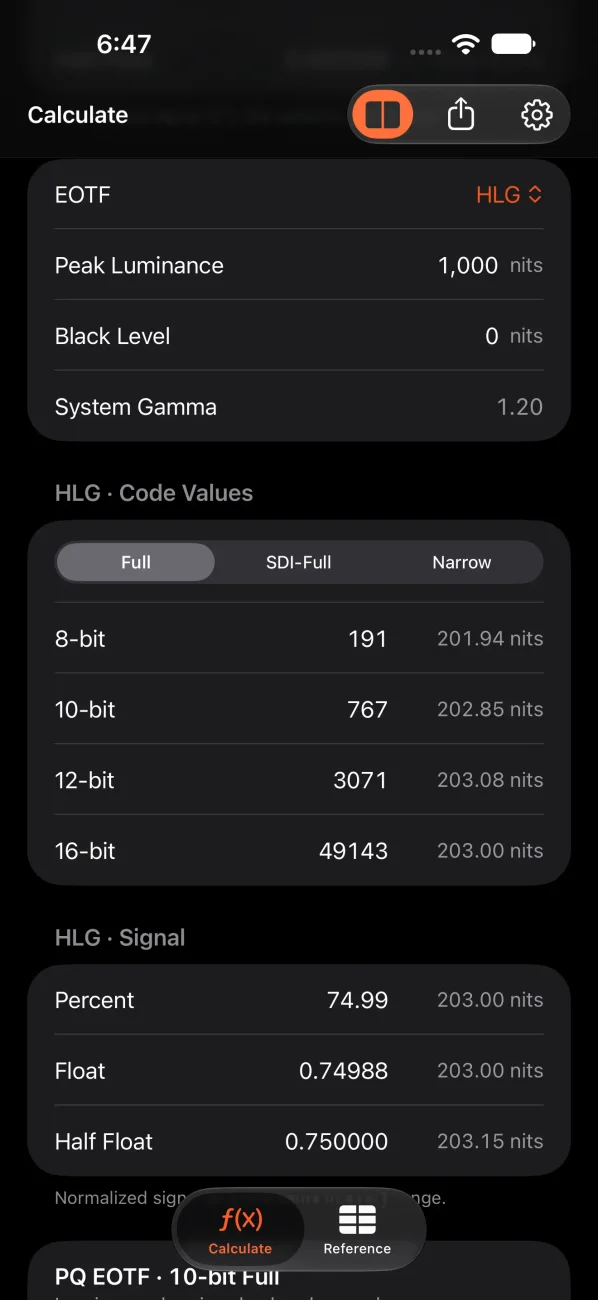
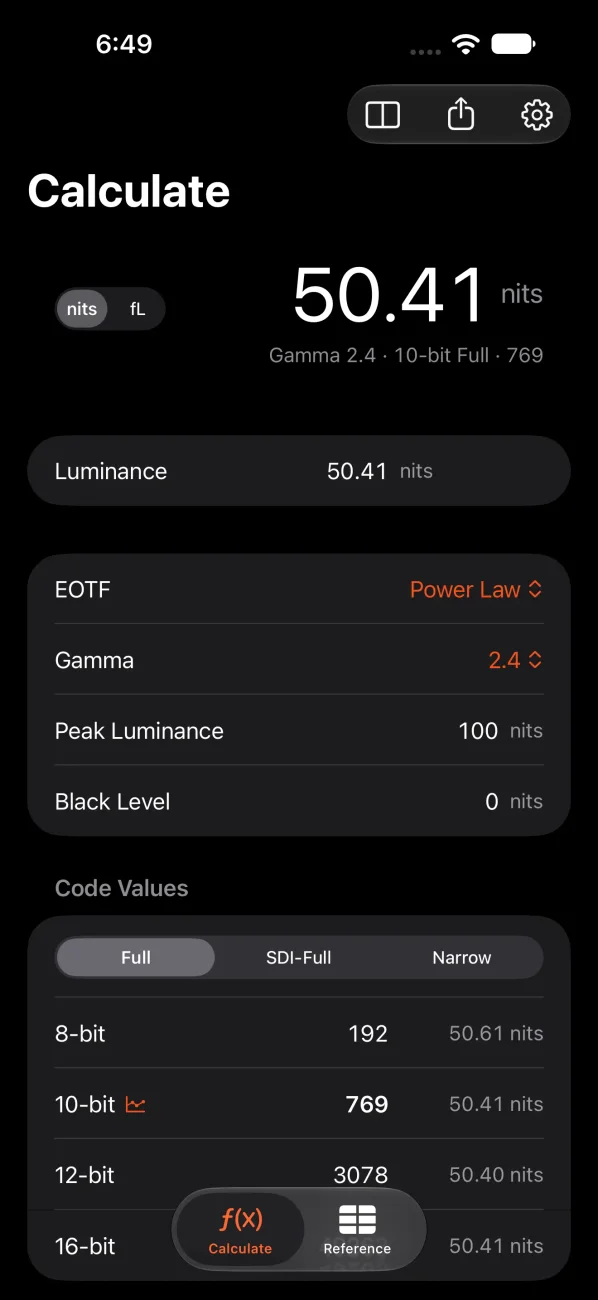
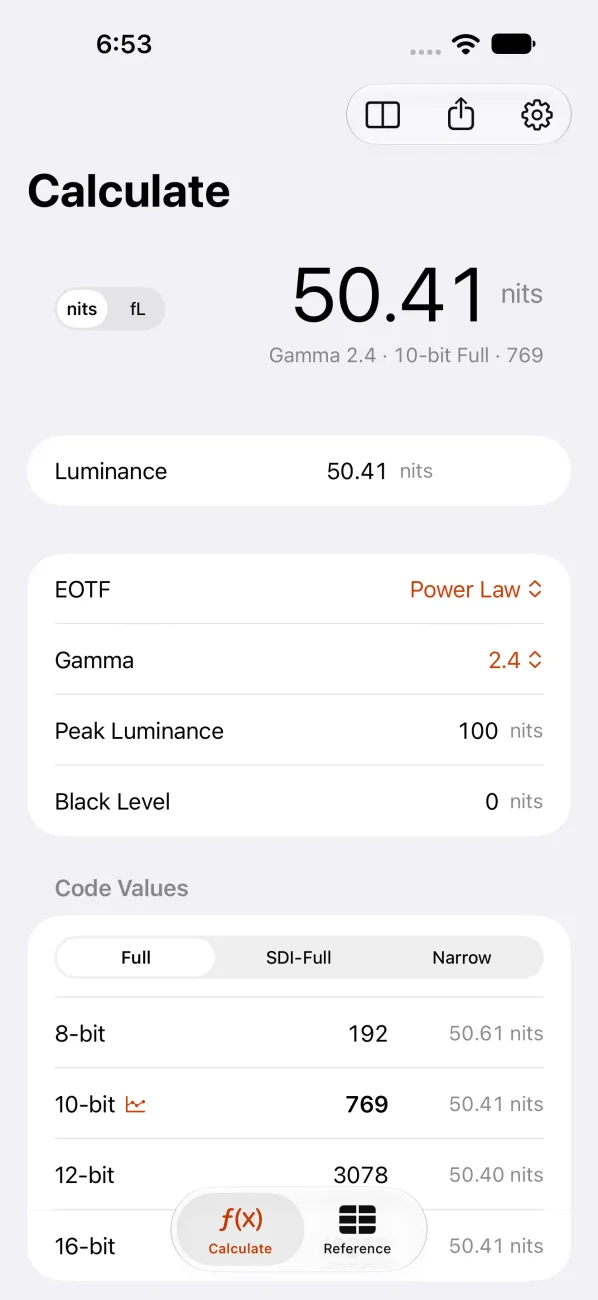
PQ Calc converts between light levels and video code values on five EOTFs: PQ (SMPTE ST 2084), HLG (ITU-R BT.2100), BT.1886 (ITU-R BT.1886), Power Law, and sRGB (IEC 61966-2-1). Every format is on one screen: type in any row and every other row updates as you type.
PQ is absolute, so every code value means one exact luminance. PQ Calc answers the questions that come up all day in HDR work. What luminance is 10-bit code 520? Which 12-bit code is 203 nits in Narrow range? How dark is code 1, really? And which code does the same light level take on an HLG or a Gamma 2.4 display? It’s made for color scientists, colorists, display engineers, and calibrators, and for anyone who needs to know exactly what a signal means.
ONE SCREEN, EVERY FORMAT
• Luminance in nits or foot-lamberts
• Code values at 8, 10, 12, and 16 bits, in Full, SDI-Full, or Narrow range
• Percent, Float, and Half Float (FP16): the normalized signal, the same in every range
• Type into any row, including Luminance, and the rest follow
• Each code row shows the exact luminance of that code, and Half Float shows the luminance of the rounded FP16 value
FIVE EOTFS
• PQ, HLG, BT.1886, Power Law, and sRGB
• For every EOTF but PQ, the display’s peak luminance and black level
• Power Law at a gamma of 2.2, 2.4, or 2.6, or your own; HLG’s system gamma follows the peak
• SDI-Full clipped, as SMPTE RP 2077 specifies, or scaled, as SMPTE ST 2084 Annex A describes
• When a display can’t show a light level, PQ Calc says so
COMPARE
• Add a second EOTF, with its own range and display
• See one light level as code values on both, side by side where there’s room
THE CURVE, LIVE
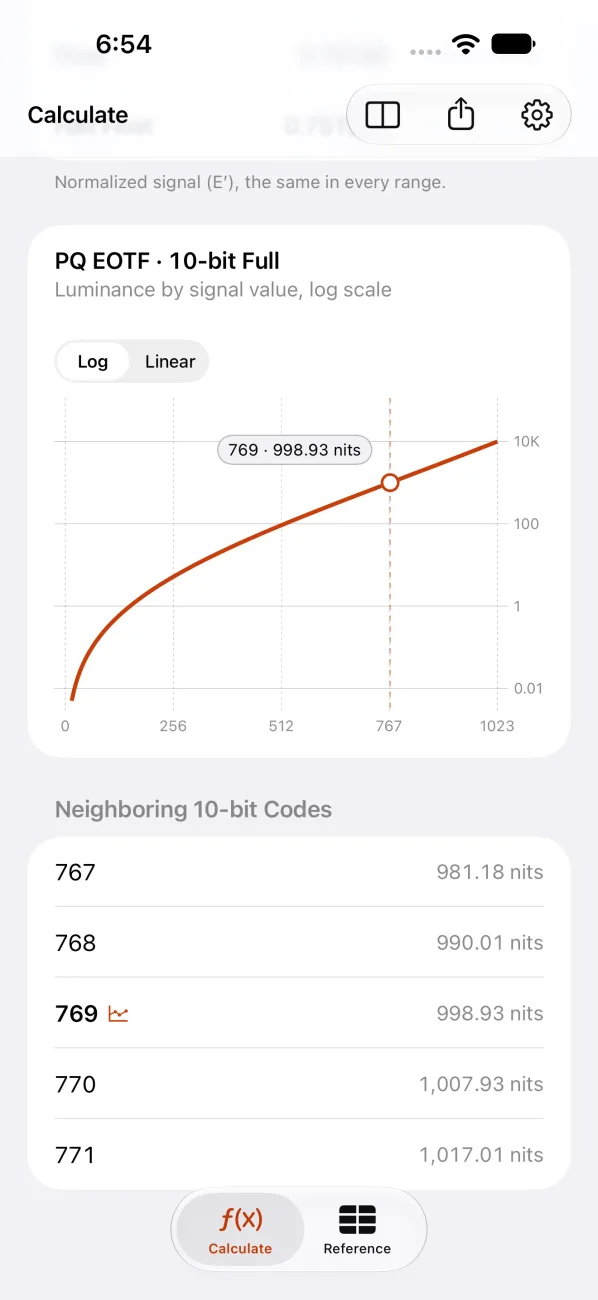
• A chart of the selected EOTF that follows the selected row, with the current value marked on the curve
• Log or linear luminance scale
• Drag across the plot to set a value; code rows snap to whole codes
• Neighboring codes: the codes nearest the current one, each with its luminance
REFERENCE
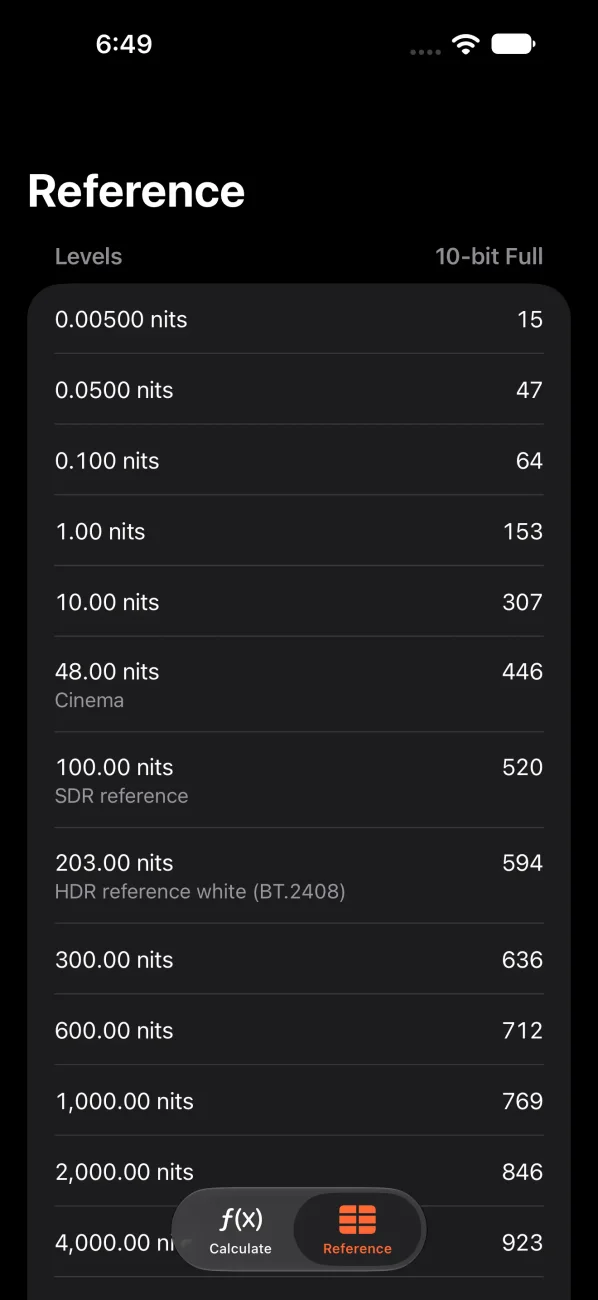
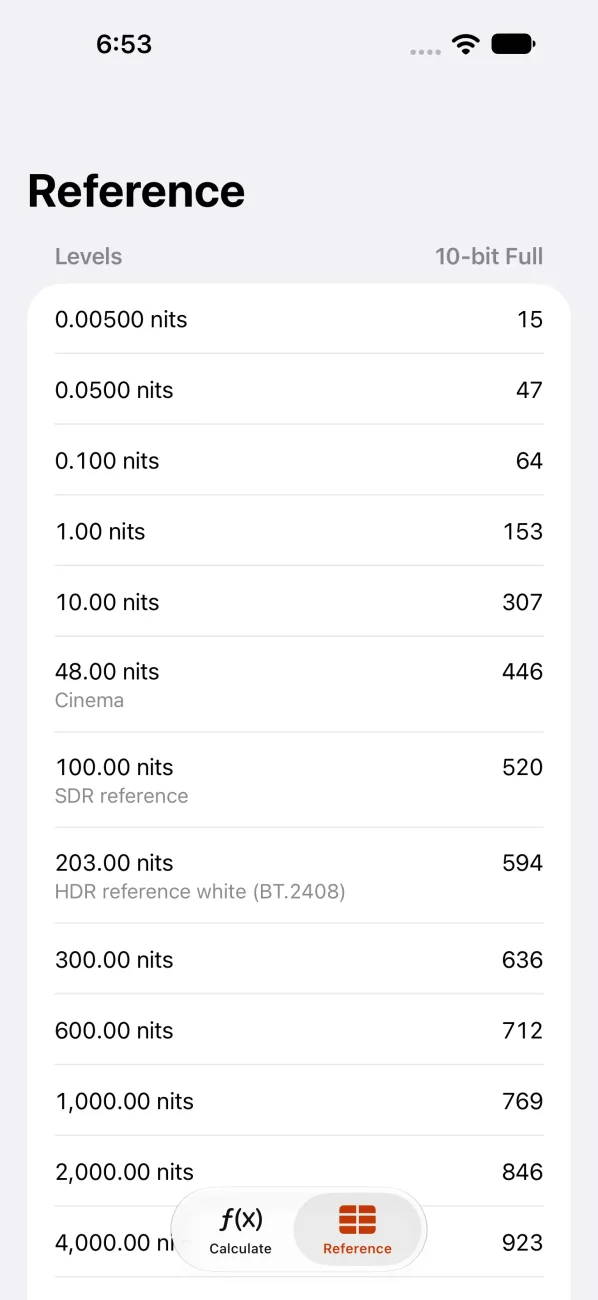
• Fourteen common levels from 0.005 to 10,000 nits, including 48 nits (cinema), 100 nits (SDR reference), and 203 nits (BT.2408 HDR reference white)
• With PQ alone, each level shows its code value in the current range, or its signal value when Percent, Float, or Half Float is selected
• Guides to the EOTFs, and to Full, SDI-Full, and Narrow range
• Tap a level to load it into the calculator, on any EOTF
MADE FOR IPHONE, IPAD, MAC, AND IPHONE DUO
• One app for all of them
• iPhone Duo: the chart beside the values when open in landscape, and a chart-first layout when the device stands half open
• iPad and Mac: two panes when there’s room, keyboard shortcuts, and the value under the pointer when you hover over the chart
• Mac: a full menu bar, multiple windows, Undo, Copy As (tab-separated or CSV), and a standard Settings window
• Handoff: continue a calculation on another of your devices
PRECISE BY DESIGN
• Exact SMPTE ST 2084 constants; quantization follows ITU-R BT.2100 Table 9, rounding half away from zero
• HLG and its system gamma as ITU-R BT.2100 defines them, BT.1886 as ITU-R BT.1886 defines it, and sRGB as IEC 61966-2-1 defines it
• Luminance shown to the digits that tell neighboring codes apart, so 10-bit PQ code 1 reads 0.0000404 nits, never 0
• Decimal places: Auto, 2, 4, or 6
MAKE IT YOURS
• Show only the rows you use, in the order you want
• Share the visible rows as text, or copy any value with its units
• Dark Mode, Dynamic Type up to the accessibility sizes, and VoiceOver with an audio graph for the chart
PRIVATE
PQ Calc has no account, no analytics, and no tracking. Nothing you enter leaves your device unless you share it or hand it off to another of your own devices.
Requires iOS 27, iPadOS 27, or macOS 27 or later. The Mac version runs on Apple silicon.
Novedades
Versión 2.1 · 28/11/2026
PQ Calc 2.1 works with five EOTFs, and compares two.
Five EOTFs. Choose PQ, HLG, BT.1886, Power Law, or sRGB in the new EOTF row. For every EOTF but PQ, set the display’s peak luminance and black level. Power Law takes a gamma of 2.2, 2.4, 2.6, or your own, and HLG’s system gamma follows the peak, as ITU-R BT.2100 sets it.
Compare. Add a second EOTF, with its own range and display, and see one light level as code values on both. It sits beside the first where there’s room, as on a Mac or a wide iPad, and under it otherwise.
SDI-Full, two ways. Choose Clipped, as in 2.0 (SMPTE RP 2077), or Scaled, which scales the whole signal into the codes SDI allows (SMPTE ST 2084, Annex A).
A chart for every EOTF. The curve follows the selected EOTF, and its axis ends at 10,000 nits for PQ and at the display’s peak for the others.
A display’s limits, in words. When a display can’t show a light level, PQ Calc says so, in the rows, on the chart, and in VoiceOver.
Share and Copy, for every EOTF. With PQ alone, the text is the same as in 2.0. With any other EOTF, the list names each EOTF with its display, and Copy As on Mac adds the EOTF, the display, and the mapping as columns.
Reference. New guides to the EOTFs, and to SDI-Full’s two mappings.
The Calculate menu, on Mac and in the iPad’s menu bar, adds EOTF, SDI-Full Mapping, and Add Comparison.
Privacidad de la aplicación
Lo que Avical declara en App Store sobre cómo esta aplicación gestiona los datos.
-
No se recopilan datos
El desarrollador no recopila ningún dato de esta aplicación.
Las prácticas de privacidad pueden variar, por ejemplo, según las funciones que uses o tu edad.
Información
- Vendedor
- Avical
- Categoría
- Foto y vídeo
- Versión
- 2.1
- Actualizado
- 28/11/2026
- Publicado
- 4/12/2020
- Tamaño
- 6,6 MB
- Requiere
- iOS 27.0 o posterior
- Clasificación por edad
- 4+
- Precio
- Gratis
- Idiomas
- Inglés
- Copyright
- © 2026 Avical
Quizá también te guste
-
 HDR CastFoto y vídeo
-
 Patterns MobileFoto y vídeo
-
 LDX ScannerFoto y vídeo
-
 LookPocketFoto y vídeo
-
 Strada MediaFoto y vídeo
-
 Tech Scout CameraFoto y vídeo
-
 tcCalc - timecode & frame calcFoto y vídeo
-
 Film Logbook - Analog TrackerFoto y vídeo
-
 Light Meter - TsinglandFoto y vídeo
-
 Streaming PlayerFoto y vídeo